News
Azure's 'Dev Box' Cloud Workstation Service in Public Preview
Microsoft's managed Dev Box service for developer-oriented, Azure-based cloud workstations is now available in a public preview.
Introduced in a private preview in May during the company's big Build developer conference, the service lets developers create on-demand, secure, high-performance, ready-to-code, project-specific workstations in the cloud, freeing coders to concentrate on coding rather than setup and configuration, according to Microsoft. Users can choose from different SKUs that offer various amounts of compute, storage and other resources.
It can also help to address rapidly changing hardware requirements for developer workstations while keeping resources up to date for evolving projects, which can be even more difficult in hybrid development environments where work might be done by distributed teams in offices or homes.
It's part of a growing trend in the Microsoft-centric dev space to offer development environments online, such as GitHub Codespaces and browser-based Visual Studio Code (see https://vscode.dev). Developers can even simply press the period (.) key in any GitHub repo or pull request to bring up a browser-based VS Code environment with the source code file ready for editing.
With Dev Box, however, developers aren't limited to VS Code. Initially, they can use any tools -- including IDEs and SDKs -- that work on Windows for desktop, mobile, web apps and game development, so users can set up Dev Boxes with project-specific tools, source code and pre-built binaries.
In addition to front-line coders, testers and QA specialists, the service also targets dev infra administrators and project admins.
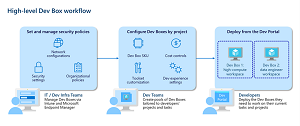 [Click on image for larger view.] Dev Box Workflow (source: Microsoft).
"Dev infra admins are responsible for providing developer infrastructure and tools to the dev teams," Microsoft said in Aug. 15 documentation. "Dev infra admins create and manage dev centers, which represent the units of organization within an enterprise. Any user with sufficient permissions on the subscription or resource group can create a dev center. Dev infra admins create projects and define the images that are used to create Dev Boxes.
"Project admins are experienced developers with in depth knowledge of their projects who can assist with day-to-day administrative tasks. Project admins create and manage Dev Box pools, enabling developers in different regions to self-serve Dev Boxes."
Those admins can manage things with familiar Microsoft products like Active Directory, Windows 365, Microsoft Intune, Microsoft Endpoint Manager and so on.
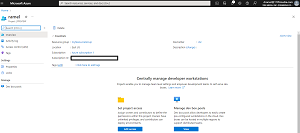 [Click on image for larger view.] Setting Up a Dev Box (source: Microsoft).
"IT admins can set conditional access policies to ensure users only access Dev Boxes from compliant devices while keeping Dev Boxes up to date using expedited quality updates to deploy zero-day patches across the organization and quickly isolate compromised devices," Microsoft said in an Aug. 15 announcement. "Endpoint Manager's deep device analytics make it easy to audit application health, device utilization, and other critical metrics, giving developers the confidence to focus on their code knowing they're not exposing the organization to any unnecessary risk."
With a consumption-based compute and storage pricing model, organizations only pay for what they use on a per-hour basis.
During the preview, organizations get the first 15 hours of the Dev Box 8vCPU and 32 GB Memory SKU for free every month, in addition to the first 365 hours of the Dev Box Storage SSD 512 GB SKU. After that, the consumption-based pricing model kicks in.
About the Author
David Ramel is an editor and writer at Converge 360.