News
.NET MAUI Community Toolkit v1.3 Supports Gravatar ('Globally Recognized Avatar')
Nodding to today's social media-centered tech world and the under-construction metaverse, Microsoft announced the new .NET MAUI Community Toolkit v1.3 adds support for Gravatar, standing for "globally recognized avatar."
The Gravatar web site says it provides one avatar to power public profiles for everything, everywhere. Associated with email addresses, Gravatars are visible wherever users post, comment and interact online. As such, Gravatars, which have been around for more than a decade, have been associated with the emerging metaverse.
Microsoft this week announced Gravatar support in .NET MAUI Community Toolkit v1.3, a community-created library that offers extensions, advanced UI/UX Controls and behaviors to help code projects built with .NET MAUI, which evolves Xamarin.Forms by adding desktop app support in addition to traditional iOS and Android mobile targets.
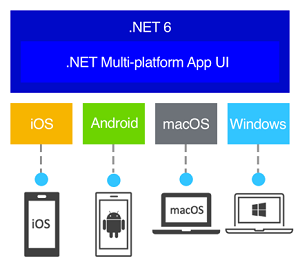 [Click on image for larger view.] .NET MAUI (source: Microsoft).
That support comes with the new GravatarImageSource, which can be used anywhere that ImageSource can be used to display Gravatar images next to people's names or email addresses.
"A Gravatar (globally recognized avatar) is an image that can be used as your avatar -- that is, an image that represents you or your users, such as in a forum post or a blog comment," Microsoft's Kym Phillpotts said in an Oct. 4 blog post. "You can learn more about Gravatar or register your own at the Gravatar website."
Another new construct, StatusBarBehavior, helps developers customize -- via code or in XAML -- the color and style of the status bar on iOS and Android. Implemented as a behavior, developers can change it per page or even dynamically in response to user actions or the status of an app.
 [Click on image for larger view.] .NET MAUI Community Toolkit v1.3 (source: Microsoft).
Animations also received some attention with the new FadeAnimation, which improves on the existing AnimationBehavior by introducing prebuilt fade animations that help devs animate the opacity of a VisualElement from its original opacity to a specified new opacity setting and then back to the original.
The final main highlight of the release sees improvements to Source Link, providing what Microsoft calls a first-class source debugging experiences for binaries.
"With this release we have configured our builds to use Source Link, which means if you have Source Link enabled in Visual Studio you can expect an even better debugging experience whilst using the .NET MAUI Community Toolkit," Phillpotts said. "You can find more information about Source Link and how to enable it in this blog post."
The toolkit's development is conducted on GitHub, and the tool, delivered via NuGet, has been downloaded more than 70,000 times.
About the Author
David Ramel is an editor and writer at Converge 360.