News
VS Code v1.74 (November 2022): 'Remote Development Even Better'
Microsoft's dev team for Visual Studio Code is previewing new remote development functionality for the super-popular, open source-based code editor.
Specifically, the v1.74 update (November 2022) introduces Remote Tunnels as a preview feature in the latest stable release. The feature lets developers create a connection to any machine -- for example, to securely access a dev machine from any device, anywhere -- without needing to use the Secure Shell Protocol (SSH).
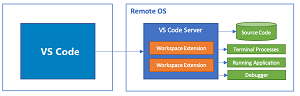 [Click on image for larger view.] VS Code Remote Development (source: Microsoft).
In announcing the update, the team explained the preview functionality can be turned on in three different ways:
- Choose Turn on Remote Tunnel Access from the Account menu or Command Palette.
- Run
code tunnel from a machine with VS Code installed and on the PATH.
- Download the new VS Code CLI [the CLI is automatically included in your existing VS Code installation -- no additional setup required] and run ./code tunnel.
"Once tunnel access is turned on, you can connect to the machine from any device using vscode.dev, or using the Remote - Tunnels extension from within VS Code Desktop.
The new VS Code CLI was detailed two weeks ago in a separate blog post, "Developing with Remote Tunnels," which explains how the command-line interface was updated to allow developers to use it to start a remote instance.
Remote Tunneling in Animated Action (source: Microsoft)
"Today, we're thrilled to share our enhanced code CLI that lets you both launch VS Code and connect to a machine remotely from VS Code Desktop or vscode.dev," Microsoft said. "The updated CLI is built into the latest VS Code release and is also available for standalone install, so you can create a secure connection to any computer and connect to it remotely, even if you can't install VS Code Desktop on it."
What's more, other updates to improve remote development include:
- You can enable tunneling directly from the VS Code UI.
- Tunneling is no longer in private preview -- anyone can create and use tunnels, no sign up required.
-
We renamed two remote extensions to be clearer about how they work and where they can help development:
ers
- The "Remote - WSL" extension is now simply WSL.
- The "Remote - Containers" extension is renamed Dev Containers to reflect its use for creating development environments.
The "Remote - Tunnels" extension in the Visual Studio Code Marketplace, meanwhile, "lets you connect to a remote machine, like a desktop PC or virtual machine (VM), via a secure tunnel. You can then securely connect to that machine from anywhere, without the requirement of SSH." Released in March and updated last week, the tool has been installed more than 46,000 times.
The dev team's other work was summarized in a bullet-point list, with links to go directly to each specfic feature:
About the Author
David Ramel is an editor and writer at Converge 360.