News
AI-Powered 'Data Wrangler' VS Code Tool Eases Prep Work for Data Scientists
A new tool being previewed in the Visual Studio Code Insiders channel can generate code to ease the tedious data preparation process that data scientists need to go through to get good data for successful analysis projects.
The Data Wrangler extension works with the favorite programming language of data scientists, Python, and the associated open source Pandas library to enhance the data preparation process: exploring, manipulating/cleansing and visualizing data. Microsoft describes the VS Code Insiders preview as "the first step towards our vision of simplifying and expediting the data preparation process on Microsoft platforms."
The idea is to get the time-consuming, tedious stuff out of the way so data scientists can more quickly get about their business, like gleaning actionable business insights from corporate data.
How time consuming? Microsoft pointed to the Anaconda State of Data Science Report 2022 in which survey respondents (Python data scientists using the Pandas dataframe library) indicated they spend about 37.75 percent of their time on data preparation and cleansing, with data visualization -- critical to interpreting results -- also taking up a big chunk of time.
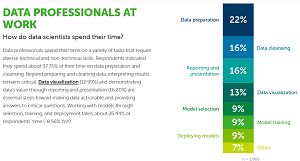 [Click on image for larger view.] Time-Consuming Data Prep/Cleansing/Visualization (source: Anaconda).
Microsoft's offering aims to fill the void of available tooling to make the process quicker and easier, a process which they say now involves a fair bit of just finding relevant code snippets on Stack Overflow and copy/pasting them into their own project files.
"This activity is critical to the success of their projects, as poor data quality directly impacts the quality of the predictions made by their models," Microsoft said. "Furthermore, this activity is not predictable: the industry even calls it exploratory data analysis to capture the fact that it is often highly creative, requiring experimentation, visualization, comparison and iteration. However, despite the activity being creative and iterative, the individual operations are not -- they involve writing small code snippets that drop columns, remove missing values, etc."
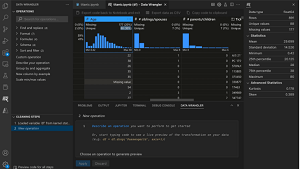 [Click on image for larger, animated GIF view.] Data Wrangler in Action (source: Microsoft).
Data Wrangler uses code-generating techniques that are becoming popularized with the advent of advanced AI coding assistants. In this case, it's PROSE, an AI-powered program synthesis technology. To delete a column, for example, a right-click on a column heading will generate the necessary Python code to do that. Also, directly from the UI, users can remove rows containing missing values or substitute them with a computed default value. On the flip side, devs can use the tool to create new data columns simply by providing examples of what the data should look like.
"If you find an error in the results, you can correct it with a new example, and PROSE will rewrite the Python code to produce a better result," Microsoft said. "You can even modify the generated code yourself."
The project's GitHub repo provides instructions on how to:
- Install and setup Data Wrangler
- Launch Data Wrangler from a notebook
- Use Data Wrangler to explore your data
- Perform operations on your data
- Edit and export code for data wrangling to a notebook
- Troubleshooting and providing feedback
As a new (published March 16) niche tool available only on the VS Code Insiders program (a rapidly changing beta stream with access to early features), the extension in the VS Code Marketplace has been installed only 211 times at the time of this writing, garnering a perfect 5.0 rating from five users who reviewed it. However, the marketplace description says it should be installed by searching for "Data Wrangler" in the VS Code Extensions Marketplace tab of VS Code Insiders.
Microsoft is urging early adopters to provide feedback on the extension to iteratively improve it.
About the Author
David Ramel is an editor and writer at Converge 360.