News
Visual Studio 2022 v17.6 Released
Microsoft announced the general availability of Visual Studio 2022 v17.6, bringing a host of new features, improvements and bug fixes to the flagship IDE.
Released shortly before the company's big Build developer conference, the update is in the long-term service channel, with Microsoft providing support through Jan. 9, 2025, according to the release notes.
"With Visual Studio 2022, our goal is to help you get more done in less time throughout all your development tasks inside the IDE, and in this release, we have improved the performance in several core experiences based on your feedback," said Microsoft's Marian Luparu, a group program manager for the C++ team, in a May 16 announcement.
Following are summaries of new features, functionality and improvements.
- Performance Improvements: These include improved performance for Git File History, faster opening and closing times for big solutions like Chromium, and faster stop collection operations in the Performance Profiler.
-
Editor Enhancements: Updates to the All-In-One Search UI allow developers to search code and Visual Studio features in one spot. Brace Pair Colorization and Sticky Scroll are now available in the editor to increase code readability (see the Visual Studio Magazine article, "Visual Studio Devs Love New Brace Pair Colorization in v17.6 Preview 1"). The recently enhanced Spell Checker now supports C#, C++, and Markdown files.
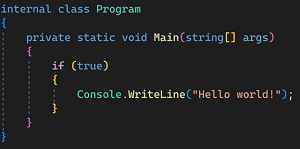 [Click on image for larger view.] Brace Pair Colorization (source: Microsoft).
- Debugging & Diagnostics Capabilities: The update introduces new capabilities including Visualizer Support for .NET Unix remote debugging, Live Graph in the WSL Profiler, breakpoint groups (which help devs manage numerous breakpoints in organized groups), and the newly enhanced Call Stack Window.
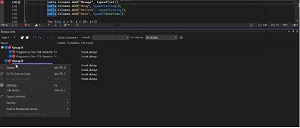 [Click on image for larger view.] Breakpoint Groups in Animated Action (source: Microsoft).
The .NET Object Allocation tool can now import allocations from a .NET data provider using ETL file formats. The Memory Analysis tool can now identify and display sparse arrays, and the Instrumentation tool now supports C++ code, providing improved performance analysis.
- Git Collaboration Tools: The release improves git integration, allowing developers to stage changes and commits while building, unstage at line level, and providing more control over merges.
- Enterprise Management: Visual Studio 2022 v17.6 also introduces features that make it easier to scale an enterprise development environment and simplify the deployment and management of Visual Studio for IT admins and developers. Specifically, IT administrators will now be able to host and deploy layouts on an intranet web site in addition to a file share, which can simplify layout maintenance and improve installation performance.
- F# and C++ Improvements: The update introduces native "Go To Definition" functionality for navigating from C# to F#. For C++, the "Sync with Active Document" feature now works in the CMake Targets View, and the Solution - Close scenario has been improved, making closing a solution containing C++ projects faster.
-
SQL Support for Ledger: The database ledger incrementally captures the state of a database as it evolves over time, while updates occur on ledger tables, (see the Visual Studio Magazine article, "New for Devs in SQL Server 2022: Ledger for Blockchain-Backed Security"). This feature, similar to Azure Data Studio, is an added feature in SQL 2022, being added to Sql Server Data Tools.
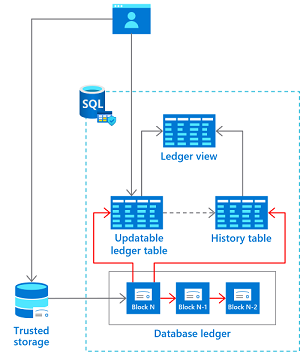 [Click on image for larger view.] Ledger Table Architecture (source: Microsoft).
- Arm64 Support: The dev team continued to build native support for Arm64 on Windows 11 for the most popular developer scenarios. Now, the .NET Multi-platform App UI (MAUI) workload is supported on Arm64 Visual Studio.
- Microsoft Teams Development Tools (Teams Toolkit): In preview is a feature flag, "Teams App Configuration Improvements," in the Teams Toolkit that helps developers bring their existing internal and Software-as-a-Service (SaaS) applications into Teams with Teams-native integration.
All of the above represent just a small part of all the changes made in the new release. The announcement post also addresses new features and functionality related to building modern .NET and cloud-native apps and game development, along with many more C++ enhancements and enterprise management functionality.
The release notes are even more voluminous, for example listing 26 separate Developer Community highlights. In total, the team completed some 371 community feedback items, ranging from "Arm64 support for .NET MAUI" TO "XAML designer IntelliSense is slow."
As is its custom, Microsoft also published release notes for VS 2022 v17.7 Preview 1, for which it has already completed 118 Developer Community feedback items.
"As you use Visual Studio, continue to let us know what you love, what you live, and where you'd like us to improve the product next," said Luparu in closing. "You can share your feedback with us via Developer Community by reporting any problems or sharing your suggestions for new features or improvements to existing ones. Your feedback is critical to help us make Visual Studio the best tool it can be!"
About the Author
David Ramel is an editor and writer at Converge 360.