News
AI at Build 2023: Microsoft Q&A Gets Assist, AI Training Announced
Among the many AI-related announcements at this week's Microsoft Build 2023 developer conference is a new AI-powered "Q&A Assist" tool for the Microsoft Q&A site, along with new updated AI training and documentation.
These two features added to the Microsoft Learn site join a host of AI announcements at the big three-day developer conference, which started today, May 23.
Microsoft Q&A Assist provides AI functionality for the company's Microsoft Q&A site, which currently sports 254,376 questions, kind of like a mini, Microsoft-centric Stack Overflow.
"Available now in limited preview, the AI powered features in Microsoft Q&A Assist make it easier and faster for you to find the technical answers you need," Microsoft said in a May 23 blog post. "We are excited to offer you a glimpse into these features today as we plan for wider general availability in the coming months."
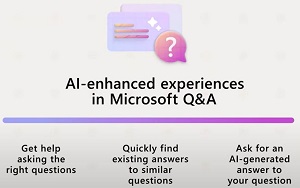 [Click on image for larger view.] AI Help (source: Microsoft).
The company said it can help developers:
- Get help asking the right question: In many cases, getting the question right is half the challenge. New AI features assist you in writing a complete and clear question so you can quickly get the specific information you are looking for. Type your question, request help, and you'll get AI-powered suggestions for how to improve your question, such as clarifying wording and including the details needed for a quick and accurate answer.
- Quickly find existing answers to similar questions: We know many of you share the same technical questions, and it's very likely that Microsoft Q&A already has the answers. Once a question is written, new AI features will help search for similar previously asked questions on Microsoft Q&A so you can quickly get answers. Type in your question and view previously asked questions that match your query. Select any of the suggested options to see if the answer is what you're looking for. Once you have found what you are looking for, you're done. It is as simple as that.
- Ask for an AI-generated answer to your question: If you have not yet found the answer you are looking for, we can now leverage AI to pull from multiple Microsoft Learn sources. While complex questions may require answers from people with subject matter expertise, many questions can be answered quickly using AI. You can request an AI-powered response to uncover the information you are looking for. Citations and sources are provided when AI has assisted with a question.
More details will be available in the coming months, but in the meantime there's a video for more information.
Microsoft Learn Training
Along with AI-powered Q&A assistance, Microsoft Learn's training component is getting an AI boost.
"We're continuing to update Microsoft Learn so you always find the resources you need to build expertise and gain new skills in the latest AI innovations," the company said. That's being done via recent releases you will find learning paths and documentation to learn how to use Azure OpenAI, add intelligence to apps using Power Apps AI Builder, use Power Virtual Agents to build adaptable chatbots, and get code suggestions on GitHub Copilot."
 [Click on image for larger view.] Learn AI via AI (source: Microsoft).
The link above takes you to the Learn Microsoft AI collection of resources that cover:
- Azure OpenAI
- Azure Machine Learning
- Azure Cognitive Services
- Machine learning with Azure Databricks
- GitHub Copilot
- AI Builder from Power Apps
- Power Virtual Agents
- Microsoft Certifications
- Instructor-led training
Developers can find multiple educational resources under each of those headings.
The new content for Microsoft Learn joins an already established portfolio including:
About the Author
David Ramel is an editor and writer at Converge 360.