News
What's Coming in VS 2022 v17.7 for Productivity, .NET/Cloud, C++ and More
With Visual Studio v17.6 becoming generally available recently, Microsoft provided a peek at what's coming up in the next iteration, VS 2022 v17.
That peek came in an announcement of v17.7 Preview 1 and the accompanying release notes.
Those sources reveal the following highlights across productivity, .NET and cloud development; and C++ and game development:
Productivity
- Multi-branch Graph & Git repository improvements: A multi-branch graph visualization lets devs see and compare multiple branches in the Git Repo window and perform cross-branch operations. "The power of Git really comes alive when you can see multiple branches at the same time to understand how the branches are related and inform operations," Microsoft said.
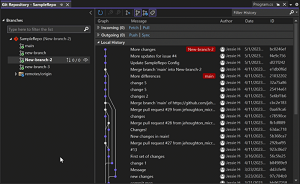 [Click on image for larger, animated GIF view.] Visualize multiple branches and execute cross-branch operations in animated action. (source: Microsoft).
- Comparing files: In response to significant developer feedback, developers can now compare files in Solution Explorer.
- Copy and trim indentation: Visual Studio now automatically fixes indentation for developers who copy code from Visual Studio and paste it in another program.
- All-in-One search enhancements: The team addressed known accuracy and performance issues so:
- Exact matches are now prioritized higher in the results list.
- The results list now accurately updates as you type.
.NET and Cloud development
IntelliTest support for .NET 6+ and NetStandard: This is now in preview, providing:
- Create Project will create a compatible test framework project in which generated tests can be saved and then run using Test Explorer or through the command-line interface (CLI).
- Generate Tests can be run for a single method or an entire class, building and probing the target assembly. The Z3 Solver helps by leveraging symbolic execution to recommend testing parameters.
Publish Blazor WebAssembly to Azure Static Web Apps: Devs can now publish ASP.NET Core Blazor WebAssembly (WASM) projects to Azure Static Web Apps. "When you publish a Blazor WASM project after you select Azure as the target, you will now see an option to select Azure Static Web Apps."
C++ and Game Development
- Unreal Engine macros formatting for C++: Devs now have the option to use special indentation rules for Unreal Engine macros. In this preview feature, Visual Studio will detect and use indentation and formatting rules for Unreal Engine reflection macros.
- Unreal Engine naming convention checker for C++: Devs are now informed by Visual Studio hints when their symbols are not conformant to the Unreal Engine coding style. "After adding an
.editorconfig file to your Unreal Engine project, Visual Studio will display naming convention warnings in the Error List and provide a Quick Fix option upon right-clicking."
About the Author
David Ramel is an editor and writer at Converge 360.