News
VS Code June Update: Copilot AI Chat Creates Workspaces, Notebooks
Generative AI again takes center stage in the latest edition of Microsoft's open source-based Visual Studio Code editor, which advanced to version 1.8.0 in the June 2023 update. A highlight of the release is the ability to use the AI-powered GitHub Copilot coding assistant to quickly scaffold projects and notebooks.
Microsoft this week unveiled cutting-edge AI tech in preview for Copilot, specifically the Chat mode that's available only via a waitlist.
As recently detailed in the article, "Accepted for GitHub Copilot Chat? How to Get Started and What You Can Do," developers can use Chat to issue various slash commands, like:
- /vscode - Questions about VS Code
- /tests - Generate unit tests for the selected code.
- /simplify - Simplify the selected code.
- /fix - Propose a fix for the problems in the selected code.
- /explain - Explain step-by-step how the selected code works.
- /ext - Ask about the VS Code extension development.
- /help - General help about GitHub Copilot
In this week's announcement, the dev team introduced preview-only slash commands in the Chat view to create projects and notebooks and search for text in a workspace:
- Create workspaces: Devs can ask Copilot to create workspaces for popular project types with the /createWorkspace slash command. Copilot will first generate a directory structure for your request. Devs can then use the Create Workspace button to create and open the project directory as a new workspace.
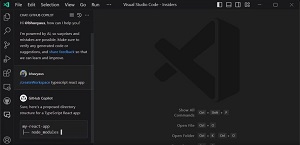 [Click on image for larger view.] 'Sure, here's a proposed directory structure for a TypeScript React app' (source: Microsoft).
- Create notebooks: Devs can ask Copilot to create Jupyter notebooks based on your requirements with the /createNotebook slash command. Copilot will generate an outline of the notebook based on your requirements. Devs can then use the Create Notebook command to create the notebook and fill in the code cells based on the suggested outline.
- Generate search parameters: Devs can ask Copilot to autofill the search parameters in workspace search. To do this, use the /search command followed by a description of what you want to find in text.
Note that devs need to use an Insiders build and configure some setting to access the preview functionality, along with installing the Pre-Release version of the GitHub Copilot extension -- all after getting accepted from the waitlist.
Chat also received some accessibility improvements, getting new audio cues that can be enabled by developers. Furthermore on the Chat front: "Chat responses are provided to screen readers as soon as they come in and the inline and chat panel accessibility help menus contain more detailed information about what to expect and how to interact with each feature."
The June update also features many more fixes, tweaks and improvements, summarized by Microsoft (with links for more information) like this:
About the Author
David Ramel is an editor and writer at Converge 360.