News
'Dev Drive' Storage Now Available for Developers in Windows 11
A recent Windows 11 update includes Dev Drive, a new form of storage volume designed to improve performance for key developer workloads.
Dev Drive was announced at Microsoft's Build conference in June along with a bunch of associated goodies for developers working on Windows 11, including Dev Home, described by the company as a new control center for Windows that helps devs monitor projects in a dashboard using customizable widgets, set up a dev environment by downloading apps, packages or repositories, connect to developer accounts and tools (such as GitHub), and create a Dev Drive for storage.
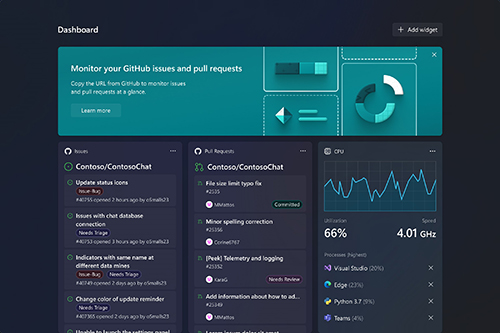 [Click on image for larger view.]
Dev Home
[Click on image for larger view.]
Dev Home
That storage is based on the Resilient File System (ReFS), as opposed to the Windows default NT File System (NTFS), employing targeted file system optimizations while providing more control over storage volumes and security. The ReFS file system was evolved and retuned for typical developer workloads such as:
- Hosting Project Source Code: Dev Drive is designed to meet a developer's needs to host project source code, Microsoft said. This can be particularly useful for large projects where efficient access and manipulation of code files are critical.
- Working Folders: Developers typically have working folders where they perform operations such as building, testing and debugging. Dev Drive can host these folders, providing faster file I/O performance.
- Package Caches: Package caches are often used in software development, especially when using package managers like npm (Node.js), pip (Python), or NuGet (.NET). By hosting package caches on a Dev Drive, developers can benefit from faster package installation and updates.
- Disk-Bound Operations: Dev Drive improves performance for disk-bound operations such as cloning, building, copying files, and package restore. This can significantly reduce the time developers spend waiting for these operations to complete.
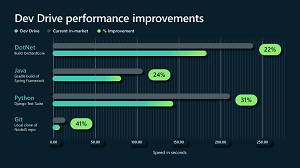 [Click on image for larger view.] Dev Drive Performance Boost (source: Microsoft).
- Security Profile Management: Dev Drive allows developers to better manage their performance and security profile. It includes file system optimizations and features that enable developers to have more control over their storage volume settings and security.
Dev Drive is available in this week's Windows Update for Windows 11 22H2. Devs can check to see if it's available by running the command format /? and seeing if the /DevDrv parameter is listed in the help text.
If it doesn't appear, instructions to try to enable it via a Windows patch are provided in Microsoft's Oct. 13 announcement.
About the Author
David Ramel is an editor and writer at Converge 360.