News
'All-in-One Search' Leads New Visual Studio Productivity Features
Microsoft's' string of productivity improvements in Visual Studio 2022 over the past year have continued in v17.9 Preview 3, shipped last week.
That preview enhances search functionality, specifically All-in-One Search, or Code Search.
The company previewed All-in-One Search in April, and Preview 3 enhanced the functionality by adding plain-text support.
"Now, you can search for any word or string of characters across your solution, supplementing file and symbol results from your codebase," said the dev team's Leah Tran in a Jan. 17 post. "You can now search for local variable names, words in comments, parameter names, or any other string of characters across your codebase."
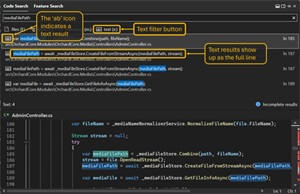 [Click on image for larger view.] Plain-Text Search (source: Microsoft).
The plain-text support was also featured in a new post today (Jan. 22) that summarizes Visual Studio productivity features in 2023.
"The Code Search experience in All-In-One Search will actually look through all your code with the addition of plain text support, including comments and local variables," Tran said.
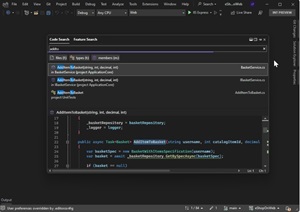 [Click on image for larger, animated GIF view.] Code Search in Action (source: Microsoft).
Other productivity boosts dating back to v17.5 include Spell Checker, Markdown, Brace Pair Colorization, Sticky Scroll, Compare Files, Copy and Trim Indentation, Case-Preserving Find and Replace, Summary Diff and Rename Suggestions.
Regarding Code Search, Tran noted the default experience (enacted via Ctrl+T or Ctrl+) will include exact text matches when applicable, adding items like comments and local variables that were previously unavailable.
Developers can retrieve just text results by doing one of these:
- Click the "text (x:)" button below the search bow [box?]
- Prefix your search query with "x:"
- Use the keyboard shortcut 'Shift+Alt+F'
- Go to the menu option "Edit > Go To > Go To Text"
The UI also pops up these text-only search options:
- Match case
- Match whole word
- Use regular expressions
The new full text support is supposed to be available by default in v17.9 previews starting with Preview 2, but if it hasn't rolled out completely yet developers can switch it on with menu commands: Tools > Options > Environment > Preview Features > Plain text search in All-In-One Search.
"It will also be available in the main release in version 17.9 as a preview feature, where you can turn it on by going to Tools > Options > Environment > Preview Features > Plain text search in All-In-One Search," Tran said.
About the Author
David Ramel is an editor and writer at Converge 360.