News
Copilot Chat Highlights Visual Studio 2022 17.10 Preview 1
Advanced AI, specifically in the form of the GitHub Copilot Chat tool, leads the list of new goodies in Visual Studio 2022 17.10 Preview 1, the latest iteration of the flagship IDE from Microsoft.
"Copilot Chat isn't just a chatbot; it's a coding companion that understands your code," the Visual Studio dev team said in announcing Preview 1 last week. "Integrated with Visual Studio, it gathers useful information from your project to provide answers that make sense in your current development context."
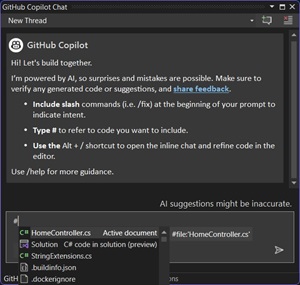 [Click on image for larger view.] GitHub Copilot Chat (source: Microsoft).
The Chat tool is a companion offering with GitHub Copilot, the original "AI pair programmer" that kicked off Microsoft's widespread Copilot craze that sees it infusing AI throughout its offerings. The Chat tool is designed to help developers write code faster and with fewer errors, providing assistance with code completion, code suggestions, code snippets and more. It does this by leveraging advanced natural language processing (NLP) to allow devs to converse with Copilot in ordinary human speech.
In fact, after the Chat tool's debut, GitHub said it heralded a new era that will see human speech as the "new universal programming language."
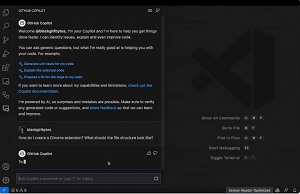 [Click on image for larger, animated GIF view.] GitHub Copilot Chat in Animated Action (source: GitHub).
"Whether you need help with syntax, programming concepts, context-specific code help, test cases, or debugging, Copilot Chat is here to assist you," the team said in last week's announcement.
Note that the
latest version of the Copilot Chat extension is required to use its new features in Visual Studio 2022 17.10 Preview 1.
Speaking of new features, the team also highlighted new Chat functionality that was recently added, including slash ("/") commands, which provide quick access to common tasks, and the ability to ask for help with specific programming concepts.
The slash commands can quickly modify code via different actions, including:
- /doc to add a documentation comment
- /explain to explain the code
- /fix to propose a fix for the problems in the selected code
- /generate to generate code to answer your question
- /help to get help on Copilot Chat
- /optimize to analyze and improve running time of the selected code
- /tests to create unit tests for the selected code
They can be used in conjunction with new # context variables, which can help developers specify a file for Copilot to focus its answers on in response to submitted queries. Basically, they let developers add references to their code files into a query so the tool can access the file's content to answer more specific questions.
Microsoft also highlighted inline chat, which it said provides seamless coding by providing he ability to directly interact with Copilot within a file. That means devs can receive coding solutions or view a diff comparison all while staying within the IDE flow.
Also in the productivity department, Microsoft noted the new preview offering contains other preview tech that allows for the customization of settings via Unified Settings.
"We've been working on reimagining the experience of customizing settings in Visual Studio," the team said. "Starting with today's preview, you'll be able to try out an early preview of a new settings experience that aims to make it easier than ever before for you to configure, share, and store your customized settings."
Other productivity features and functionality in the new preview -- with links for more information -- include:
Other highlights in different areas include:
-
Debugging & Diagnostics:
- Attach to Process Dialog Revamp
- Enhancing Debugging with Conditional Breakpoints and Tracepoints
- Targeted Instrumentation for EXE
- Simplifying memory usage investigations with the Memory Tool
-
C++ and Game Dev:
- Pinning CMake Targets
- Build Insights Template View
- Additional Unreal Engine Macros for Indentation
- Keep Integration Tool Plugin Running in the Background
-
Teams and Microsoft 365 Dev:
- Build Teams Bot powered with AI
- Run and debug Teams Bot offline
- Extend Copilot for Microsoft 365
More information on all of the above and much more is available in the release notes.
About the Author
David Ramel is an editor and writer at Converge 360.