News
VS Code Insiders Get Copilot Chat AI-Enhanced Extensions in Latest Update
Developers using the "Insiders" build of the May 2024 Visual Studio Code update, bringing the open-source-based, cross-platform code editor to version 1.90, can now enjoy enhanced chat AI functionality in extensions.
Microsoft this week introduced new Chat and Language Model APIs that enable extensions to incorporate AI chat capabilities by interacting with large language models (LLMs) like GPT-3.5 and GPT-4, facilitating the development of intelligent, conversational assistants within the editor. Extensions can now leverage these models to provide enhanced features such as contextual chat, code suggestions and real-time collaboration. This functionality aims to streamline coding workflows by integrating advanced AI-driven support directly into the development environment.
However, even though they're finalized, the new APIs are currently available only in the Insiders build of VS Code, an early-access version of the software that includes the latest/greatest features and updates before they are released in the stable version.
The APIs are expected to be rolled out to the stable release in the near future, providing a powerful toolset for creating intelligent, interactive extensions that can assist developers in various tasks.
"Visual Studio Code's Copilot Chat architecture enables extension authors to integrate with the Copilot Chat experience," says Microsoft's Chat extensions guidance. "A chat extension is a VS Code extension that uses the Chat extension API by contributing a Chat participant."
That refers to the process of creating and integrating a chat extension within VS Code's Copilot Chat architecture. A chat participant is essentially a domain expert that can answer user queries within a specific domain.
The upshot is that extension authors can enhance the Copilot Chat experience by adding specialized knowledge and interactive capabilities to their tools.
A GitHub Chat Example shows how to:
- Contribute a chat participant
- Use the chatRequestAccess API to request access to the chat
- Respond with follow-ups
"The Chat Participants API enables extensions to extend GitHub Copilot Chat with a chat participant that can be invoked in the chat input field with @," the dev team explained. "The participant can reply to user requests with markdown, a file tree, buttons to run VS Code commands, or other types of content." That results in this:
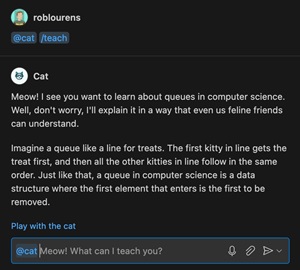 [Click on image for larger view.] Chat Example (source: Microsoft).
The companion Language Model API, meanwhile, provides access to Copilot's chat models such as GPT-3.5 and GPT-4, enhancing not only chat participants but also enriching other features.
A presentation at the recent Microsoft Build conference, "Enhancing VS Code extensions with GitHub Copilot," explained more about the new APIs, saying "VS Code enables extension authors to integrate with GitHub Copilot via chat extensions, which can provide specialized answers to user queries within a domain."
The ability to create more intelligent, interactive and context-aware tools that can assist developers in various tasks could be a game-changer for extension authors.
More AI
The new APIs are just part of the AI-driven enhancements in v1.90, which also introduces:
- IntelliSense in chat code blocks: Copilot-generated code blocks now include basic IntelliSense support. This allows devs to utilize familiar IntelliSense tools, similar to those in the editor, enhancing their understanding of the generated code.
- Attach context to chat: To provide more specific chat prompts, devs can add context to their messages. Devs can attach various types of context, including workspace symbols. Previously, they would use the "#" symbol to reference a file or the current selection. Now they can attach context by clicking the 📎 icon in the Chat view input field or by typing
Ctrl+/.
- Ask questions using Bing search and enterprise knowledge bases: GitHub Copilot Enterprise users in VS Code can now inquire using Bing search and their organization's knowledge bases. This feature enriches queries with context from web results, allowing developers to access relevant information. To explore this functionality, devs must install the latest pre-release of Copilot Chat."
- Improved links in chat responses: The team improved chat responses by adding links for file names and symbols, which when selected navigate to the corresponding file or symbol in the editor.
Other highlights of the v1.90 release, with links for more information, include:
About the Author
David Ramel is an editor and writer at Converge 360.