News
Windows Community Toolkit Update Improves Controls
The Windows Community Toolkit advanced to version 8.1, adding new features, improving existing controls and making dependency changes.
The toolkit is a community-driven project hosted by the .NET Foundation and helmed by Microsoft with help from Uno Platform, an open-source project for building single-source C# and WinUI apps that run natively on Windows, iOS, Android, macOS, Linux and Web via WebAssembly.
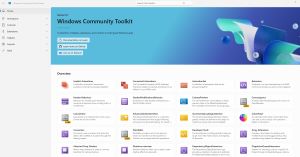 [Click on image for larger view.] Windows Community Toolkit (source: Microsoft).
The kit features controls for WinUI 2 (older UI framework catering to UWP), WinUI 3 (native UI framework) and Uno Platform that are designed to simplify and demonstrate common tasks for app development on Windows 10 and Windows 11 with .NET.
Speaking of controls, two were featured in the v8.1 update announced last week:
- Color Picker:
ColorPicker and ColorPickerButton return with 8.1, and have been upgraded with a new look and feel and optimized UX.
- TabbedCommandBar: The
TabbedCommandBar has been ported to 8.1 and has adopted a modern look and feel, so it fits right in with other WinUI controls.
Other items of note include:
- .NET 8 Support: The Windows Community Toolkit now supports .NET 8 with Windows App SDK 1.5.
- Camera Helpers: The Camera helpers have been updated and fixed to now work with the WindowsAppSDK.
- ImageCropper Overlay: You can now provide a brush to use as the overlay for the
ImageCropper control. This can allow you to show the crop shape or other ornaments that will be added in your post-processing during the live preview.
- DockPanel Spacing:
DockPanel now supports both HorizontalSpacing and VerticalSpacing between elements to provide it options inline with other modern panels.
Initial AOT Annotations: With this PR, the dev team started looking at annotations for Native AOT support and will continue to test support for the upcoming WindowsAppSDK 1.6 release, stay tuned for more information and updates.
- Dependencies/TFM: The Toolkit's dependencies have been updated to the latest WindowsAppSDK 1.5 and Uno Platform 5.2 versions to take in fixes and updates that devs needed to support .NET 8 and address other issues within the Toolkit.
- Older Package NuGet Redirects: Many older 7.x and below NuGet packages of the Windows Community Toolkit have been updated to redirect to their closest matching 8.1 counterparts.
Other changes are associated with Windows Community Toolkit Labs, set up by Microsoft as a place to incubate and iterate over new ideas, try things out worry-free, see what gets used by the community and then decide whether to bring them into the main repository when they're ready and well-tested.
Items of discussion there include the MarkdownTextBlock component that was rebuilt on top of the Markdig parser, along with an initial version of the common Ribbon pattern.
About the Author
David Ramel is an editor and writer at Converge 360.