News
Dev Asks, and 7 Years Later Python in VS Code Delivers Django Unit Test Support
Microsoft's dev teams for coding tooling like Visual Studio Code are strictly adamant about continually seeking feedback from developers and using it to improve their respective products, though it sometimes seems to a take a long time from ask to answer.
That's the case for the main feature of the September 2024 update to Python in Visual Studio Code: Django unit test support, which comes in wildly popular extensions for Python and Jupyter, with the team also being responsible for the Pylance extension, providing a language server that delivers Python-specific "smarts." They are by far the most-used extensions for VS Code, itself a wildly popular editor topping lists in many dev tool surveys.
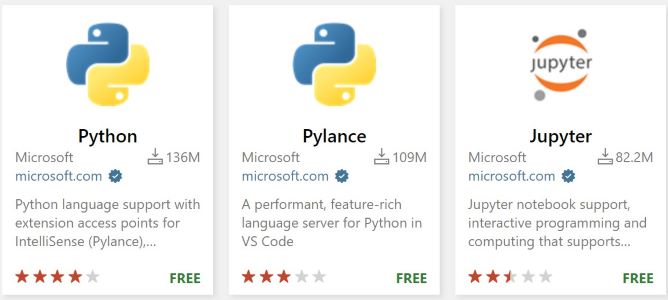 [Click on image for larger view.] VS Code Python Tools in Marketplace (source: Microsoft).
Way back in early 2017 a developer posted a GitHub issue saying: "Django unittest extends from unittests, but you can't run as the former on this extension. For this, you need to 'manage.py test,' but it would be awesome if there were those same shortcuts."
Just last week, in announcing the September 2024 update to Python in VS Code, Microsoft said: "We are excited to announce support for one of our most requested features: you can now discover and run Django unit tests through the Test Explorer!"
More details are provided in Django testing docs.
Another major feature highlighted by Microsoft is the enablement of inlay hints with Pylance, so devs can now more conveniently navigate to a type's definition through Ctrl+Click or Cmd+Click commands when hovering over a type.
Other changes and enhancements mostly affect the VS Code Native REPL for Python introduced in with the June release of the tools. REPL stands for Read-Eval-Print Loop, an interactive programming environment that takes user inputs (Read), evaluates them (Eval), prints the result (Print), and then loops back to wait for the next input (Loop). This cycle allows developers to write and test code snippets in real-time, making it easier to experiment and debug. The related changes include:
Devs can now launch the directly from the Command Palette using the Python: Start Native REPL command.
When using the VS Code Native REPL for Python, it will now automatically start in the project's folder.
Strings are now automatically normalized when commands are sent to the VS Code Native REPL.
It's now possible to restart the debugger while debugging tests via the debug control widget.
To help prioritize future work, the team is also asking for feedback on another issue: "Design proposal for test coverage" in (@vscode-python#22827). It starts out: "With the creation of the coverage API in vscode core, it is now possible to enable coverage for the python extension specifically. Below is the proposed design for how test coverage will work and includes some outstanding questions. Comments welcome as we are still in the design stage."
The Python, Jupyter and Pylance tools for VS Code are the most downloaded in the marketplace, with the Python extension alone having been installed more than 136 million times. Pylance isn't far behind at 109 million installs, with the related Jupyter extension in third place with more than 82 million installs.
About the Author
David Ramel is an editor and writer at Converge 360.