News
Low-Coding in the Age of AI: Dataverse Embraces Copilot, Claude and Cursor
Microsoft's original low-code/no-code proposition for its Power Platform centered on helping "citizen developers" and ordinary business users create applications without conventional software-development expertise. That proposition can appear less distinctive in the age of agentic AI, when natural-language coding tools let a much broader group of users "vibe code" applications. Microsoft, however, has been evolving Power Platform and its data layer -- Dataverse -- for the generative AI era, positioning it not only as the data layer for low-code business applications but also as an enterprise data and tool platform for AI agents. Now it's an agent data platform.
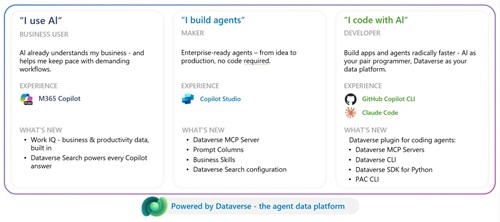 [Click on image for larger view.] The Agent Data Platform (source: Microsoft).
Microsoft's July 2026 Dataverse announcement puts developer tooling at the front of that transition. The company has expanded its Dataverse plugin for coding agents into the marketplaces used by Claude, Cursor and GitHub Copilot. It also detailed a broader Model Context Protocol ecosystem that includes more than 60 ready MCP servers, an updated Dataverse MCP tool surface, certification for partner-built servers and governance for organizations bringing their own internal MCP servers.
Microsoft describes AI as a coding partner for makers and professional developers working against the same business-data platform. Rather than requiring developers to move among documentation, browser-based administration tools and separate command-line utilities, Microsoft said the Dataverse plugin accepts natural-language instructions and routes each task to the appropriate underlying tool.
In effect, the plugin lets a developer treat GitHub Copilot, Claude or Cursor as a natural-language Dataverse operator. The developer states the intended data, schema or deployment outcome, while the plugin guides the coding agent in selecting and invoking the appropriate MCP tool, SDK, API or command-line utility. The resulting operations remain subject to the developer's Dataverse identity, security roles and environment governance.
Dataverse itself is Microsoft's cloud-based system for securely storing and managing data used by business applications. It organizes information in standard or custom tables composed of rows and columns. It also supplies server-side business rules, validation, workflows and a security model that can combine business-unit, role-based, row-level and column-level access controls. Dynamics 365 applications use Dataverse, while Power Apps, Power Automate and Power BI can work with data brought together in the platform.
Dataverse also exposes developer capabilities for programmatically accessing data and metadata, creating tables, applying business logic and integrating external systems. Microsoft's newer agent work places MCP and coding-agent skills alongside those established APIs, SDKs and command-line interfaces.
Dataverse Arrives in Coding-Agent Marketplaces
The Dataverse plugin is now listed for GitHub Copilot, Claude and Cursor. Microsoft said the plugin provides the same Dataverse expertise across those coding-agent surfaces, including natural-language interaction, intelligent tool routing and enterprise security guardrails.
"We are excited to announce the expansion of the Dataverse plugin into additional coding agent marketplaces, meeting developers where they already work," Microsoft said. "The plugin is now available for Claude, Cursor and GitHub Copilot. This means that whether a developer's primary coding agent is GitHub Copilot, Claude or Cursor, they get the same Dataverse expertise: intelligent skill routing, enterprise-grade guardrails, and a consistent natural-language experience across every surface. This cross-platform availability reflects our commitment to making Dataverse accessible wherever agents are being built, and we will have support for more coding agents coming soon."
The plugin is built from an open-source collection of Dataverse skills under the MIT license. The project wraps the Dataverse MCP server, Dataverse CLI, Python SDK and Power Platform CLI, or PAC CLI, behind specialized skills. Its repository lists skills for connection and setup, querying, record operations, metadata design, solution lifecycle management, environment administration, security management and cross-cutting tool routing.
For GitHub Copilot, installation uses the Awesome Copilot plugin marketplace with the command /plugin install dataverse@awesome-copilot. Developers can then use /plugin list and /skills list to verify that the plugin and its skills loaded. Cursor users can enter /add-plugin dataverse from agent chat or locate Microsoft Dataverse under Settings and Plugins in the Cursor marketplace. Claude Code users can install it with /plugin install dataverse@claude-plugins-official.
The plugin's dv-connect skill handles the initial setup process. According to the repository, it installs or verifies the Dataverse CLI, Python SDK and PAC CLI, authenticates against a Dataverse environment and registers the Dataverse MCP server with the coding agent. After installation, a developer can ask the agent to "Connect to Dataverse," and the skill walks through tool checks, authentication and MCP registration.
Microsoft's Claude marketplace walkthrough provides additional detail about the orchestration. The plugin checks prerequisites including Python, PAC CLI, the .NET SDK, Azure CLI, Node.js, Dataverse CLI and Git. It checks existing PAC CLI authentication profiles, discovers accessible environments and initializes a workspace. It can also create the project-level MCP configuration needed by the agent.
Dataverse MCP Gets a More Explicit Tool Surface
The second major part of Microsoft's announcement concerns MCP, the protocol used to expose tools and data sources to compatible AI agents. Microsoft said its catalog now includes more than 60 ready MCP servers that can connect agents to productivity products, developer tools, business applications and partner platforms.
The company said the same connection model can be used across Microsoft 365 Copilot, Copilot Studio, Azure AI Foundry, GitHub Copilot and other MCP-compatible clients. The Dataverse MCP server is supported in Copilot Studio, Azure AI Foundry and compatible third-party or developer clients.
A separate Dataverse MCP tool update explains that the server now exposes a more concrete set of named capabilities. Supported tools cover searching structured and unstructured data, finding table schemas and business skills, creating and updating records, deleting records with explicit approval, creating or changing tables, executing supported Dataverse SQL SELECT queries, inspecting search results and transferring files.
The tool set also includes operations for adding, updating or deleting Dataverse skills and playbooks. Microsoft said the explicit tool boundaries make individual capabilities easier to allow, block, audit and improve. Agent clients named in the update include Copilot Studio, GitHub Copilot in Visual Studio Code, GitHub Copilot CLI, Claude Desktop and Claude Code.
Administrators retain control over which clients can connect to an environment's MCP server. Microsoft also recommends treating write-capable tools differently from read-only tools and validating that users can access only the data already allowed by their Dataverse security context. Preview tools can be enabled at the environment level through the Power Platform admin center. Non-Microsoft MCP clients can connect to the preview endpoint at the environment's /api/mcp_preview path.
Certification and Bring Your Own MCP
Microsoft is also establishing a certification path for MCP servers supplied by independent software vendors and partners. The MCP certification process is in preview and requires a verified publisher to submit a package through Partner Center using the Apps and Agents for M365 and Copilot offer type.
The package must include a manifest, tool-definition file, introductory documentation, metadata, icons, public support and policy links, and Azure Key Vault-backed authentication configuration. Microsoft performs automated package validation followed by functional and safety review covering endpoint behavior, authentication, security, compliance, telemetry readiness and responsible AI considerations. Approved servers are published to supported discovery and runtime surfaces, including Copilot Studio and Azure Foundry.
For internally developed servers, Microsoft's Bring Your Own MCP capability provides a developer-to-administrator workflow. A developer registers a remote MCP server with the Agent 365 CLI, declaring its endpoint, authentication type and exposed tools. An IT administrator reviews and approves or rejects the request in the Microsoft 365 admin center. Approved servers are routed through the Agent 365 Tooling Gateway, and security teams can monitor MCP activity and tool invocations through Microsoft Defender advanced hunting.
Microsoft's BYO MCP documentation identifies Copilot Studio, Visual Studio Code, Claude Code and GitHub Copilot CLI as supported client surfaces during the preview. Azure AI Foundry and Microsoft 365 Declarative Agents are not supported by that preview, and republishing new versions of a registered remote MCP server is not currently supported.
Together, the marketplace listings and MCP updates extend Dataverse beyond its established role in low-code applications. Microsoft is presenting it as a governed business-data platform that coding agents can query and modify through explicit tools while continuing to enforce the user's existing identity, role and environment controls.
About the Author
David Ramel is an editor and writer at Converge 360.