News
Microsoft Highlights Third-Party Open-Source '.NET Smart Components'
Microsoft has long acknowledged third-party vendor contributions to dev tooling ecosystems like Blazor and is now doing the same for its newly open-sourced .NET Smart Components.
The GitHub-parked .NET Smart Components basically abstract away all the complex behind-the-scenes AI work normally needed to infuse apps with AI functionality, such as natural language processing (NLP), machine learning (ML) and so on, with tools like Microsoft's Semantic Kernel. The components are designed to be easily added to existing apps, with the AI capabilities mostly provided by API calls, along with locally hosted, customized models tailored for specific functionality.
So they essentially serve as AI-infused ready-made components that devs can just drop into their projects to instantly supercharge UI with AI.
Microsoft said they demonstrate how prepackaging AI-based functionality into reusable components makes it easier to integrate these features into existing apps, while also helping library authors who can use the sample components for inspiration and as reference implementations for how to package AI-powered features for easy consumption.
Last month, shortly after being open sourced, they were demoed at a company event after a March debut.
Now, Daniel Roth, principal product manager for ASP.NET, has published a shout-out to third-party vendors who have contributed to the project, while inviting others to "Join the .NET Smart Components ecosystem."
"Several popular component vendors have already started investing in building their own smart components, building on the ideas in the .NET Smart Components as well as adding their own unique innovations and features," he said.
Roth specifically highlighted offerings from Progress Telerik, DevExpress and Syncfusion, which all happen to be active contributors to Blazor and other Microsoft-centric projects and, coincidentally, are consistently named as winners in Visual Studio Magazine's annual Reader's Choice Awards, which were just announced this week.
The third-party offerings join the initial set of .NET Smart Components that Microsoft open sourced, which included Smart Paste, Smart TextArea and Smart ComboBox.
Here's a brief summary of the vendors' respective contributions:
Progress Telerik
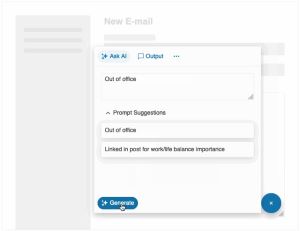 [Click on image for larger, animated GIF view.] Progress Telerik AI Prompt Component in Animated Action (source: Progress Telerik).
This company's contributions include a prebuilt AI Prompt component to streamline integrating AI services in ASP.NET Core, Blazor and .NET MAUI apps, being fully customizable through templates and events while supporting globalization, localization and right-to-left rendering. Telerik is also working on its own Smart (AI) Components for ASP.NET Core, Blazor, WPF and Windows Forms. The company includes semantic search integration in its grid and combo box controls as well as AI assistant integration with its PDF viewer.
DevExpress
 [Click on image for larger view.] The DevExpress AI Assistant Integrated with Company's Blazor Report Viewer (source: DevExpress).
Among many AI-powered enhancements coming in the company's December release are:
- AI-assisted text processing in text editing components for Blazor, Windows Forms, and WPF, with integrated support for large input text via a chunking strategy.
- A prebuilt AI-powered Blazor chat component for creating intelligent chat assistants, with Blazor Hybrid support, allowing reuse in Windows Forms, WPF, and .NET MAUI apps.
- AI-powered Smart Paste and Smart Search for Data Grid, Layout, and Ribbon.
- Support for offline model execution using Ollama.
"DevExpress Early Access Previews are now available for both the AI-powered text editor extensions and Blazor chat component, so be sure to give them a try!" Roth said.
Syncfusion
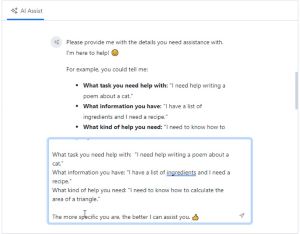 [Click on image for larger, animated GIF view.] Syncfusion AI AssistView in Animated Action (source: Syncfusion).
New AI features recently shipped in the company's Essential Studio 2024 Volume 3 release include a new AI AssistView component for Blazor, MVC & Razor Pages, .NET MAUI and WinUI as well as its own Smart Paste Button and Smart TextArea components for Blazor.
"The AI AssistView component integrates seamlessly with AI services," Roth said. "It can send & suggest prompts, execute commands using toolbar options, and display responses in an easy-to-use interface. It provides Toolbar options for copy, edit, link/unlike, and you can add custom options and views."
Roth invited new contributions and feedback on existing ones, while also discussing another capability of the project: local embeddings using Semantic Kernel. They are sample convenience APIs for calculating embeddings (LocalEmbeddings) locally on a server.
About the Author
David Ramel is an editor and writer at Converge 360.