News
Uno Platform Unveils 'Hot Design' Tool for Cross-Platform .NET Apps
Uno Platform provided a new take on visual designers for .NET app development, claiming a breakthrough that changes code at runtime rather than the design stage.
That new take is called Hot Design, and it comes with a new Uno Platform Studio that bundles a suite of productivity tools, all announced this week at Microsoft's .NET Conf 2024 virtual event.
It basically eliminates the traditional separation between design-time and runtime, allowing developers to modify visual designs directly in the running application, with those changes reflected immediately in the source code.
Uno Platform is a specialist in cross-platform .NET development, with its core code being open source. Thus a key point of its new Hot Design initiative is a runtime visual designer that enables devs to work in real time, without breaking workflow, running on any OS from multiple IDEs.
"In Hot Design, any adjustment made in the Designer updates the XAML code in real time," the company said in a Nov. 14 announcement. "Also, any code changes are reflected in UI allowing for a consistent design-to-code experience. This feature is especially valuable when working on complex UIs, as it shortens the development cycle and streamlines the dev process."
In other words, the Hot Design site says, when using the tool, "a single click turns a live, running app into a visual Designer. Another click, and you're back in your app!"
It works with the company's extensions for Visual Studio 2022, Visual Studio Code or Rider from JetBrains.
Uno Platform Studio still supports Hot Reload -- "Reliably update any code in your app and get instant confirmation your changes were applied with its new App Indicator" -- along with design-to-code functionality: "Completely eliminate the manual design handoff process by generating ready-to-use well-structured/clean XAML or C# Markup code from a single click."
The company compared its approach to alternatives in terms of productivity.
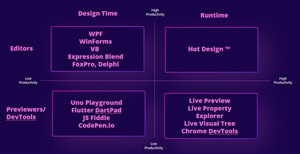 [Click on image for larger view.] Productivity Matrix (source: Uno Platform).
When asked on social media about support for F#, the company replied: "Not for UI code. Hot Design supports XAML for now. You can use C# Markup if you want coded UIs with Hot Reload but without the Hot Design support."
The announcement generated a lot of buzz in the industry, with a company representative saying its announcement tweet seemed to be the most popular emanating from the .NET Conf 2024 event. It was nearing 50,000 views at the time of this writing.
It also drew praise from industry figurehead Miguel de Icaza, who knows something about cross-platform development in the .NET ecosystem, having co-founded Xamarin, which was acquired by Microsoft and morphed into the Xamarin.Forms cross-platform UI toolkit, which is now being replaced by .NET MAUI. He called it "amazing."
"This is very different take on UI designers," de Icaza said. "Rather than using a designer to generate your app, the designer is built into the app, and you tune it visually over the real data during development. And you don't need a designer integrated into the IDE to design your app." His social media post has at this time been viewed some 15,000 times.
Uno Platform Studio might also help tangentially address the "huge technical challenge" that faced Microsoft developers seeking to modernize WinForms and other functionality in the move to .NET Core, as outlined in the article, "Some 5 Years In, 'New' WinForms Designer Still Not There" from February.
Microsoft's dev team faced issues like:
- Transition to 64-bit: Challenges in moving from 32-bit to 64-bit architecture, affecting compatibility with legacy components.
- Out-of-Process Designer: The need to develop an out-of-process designer to handle tasks that Visual Studio cannot execute as a .NET Framework process.
- Legacy Component Support: Difficulties in maintaining support for existing 32-bit components and custom control libraries.
For example, in 2019 a Microsoft dev team member said:
"For developers the .NET Core Windows Forms Designer (when we will release the GA version) will look and feel the same as the .NET Framework Windows Forms Designer. But for us it is a huge technical challenge to bring the designer to .NET Core because it requires the design surface that hosts the live .NET Core form to run outside the Visual Studio process. That means we need to re-architect the way the designer surface 'communicates' with Visual Studio."
Some four years later, another Microsoft dev team engineer working on Windows Forms noted the 64-bit transition was still problematic:
"The journey from 32-bit to 64-bit has been a complex one and not without its challenges. We're committed to making this transition as smooth as possible for all our users, but we understand that there will be bumps along the way."
When asked about whether Hot Design might help address such issues, Sasha Krsmanovic, CMO at Uno Platform, said: "The beauty of Hot Design approach is that it is not a Visual Designer experience embedded in the IDE, but it is rather a Visual Designer overlay over the application in runtime itself, while it is being developed of course. So, to Hot Design, it really doesn't matter if the system is 32-bit or 64-bit. Or to that point, which IDE you are using, or operating system you are using. The only thing that matters is the App itself. The current app screen you are in becomes a design surface, as our tooling enables you to enter design mode. It is a novel and patent-pending approach that no other ecosystem has."
So, while Uno Platform Studio and Hot Design might not directly address the issues faced by Microsoft's dev team, they might provide a new way to approach cross-platform .NET development that could help in the future.
The new tech will not be open sourced, rather being an optional, paid tool similar to the company's existing Figma plugin. Pricing has yet to be decided.
The company is rolling out its new offering via a waitlist.
About the Author
David Ramel is an editor and writer at Converge 360.