News
C# Dev Kit Previews .NET Aspire Orchestration
Microsoft's dev team has been busy updating the C# Dev Kit, a Visual Studio Code extension that enhances the C# development experience by providing tools for managing, debugging, and editing C# projects.
The kit's tooling includes:
- C# project and solution management via an integrated solution explorer
- Native testing environment to run and debug tests using the Test Explorer
- Roslyn-powered language service for best in-class C# language features such as code navigation, refactoring, semantic awareness, and more
It builds on OmniSharp and .NET CLI to offer a more seamless, feature-rich environment for developers working with C# applications, including ASP.NET Core, Blazor, .NET MAUI, and .NET Aspire.
The latter is a cloud-ready stack for building resilient, observable, and configurable cloud-native applications with .NET.
Microsoft this month announced several updates to the kit, including a preview of .NET Aspire Orchestration.
It enables developers to convert any existing solution into a .NET Aspire solution by adding the .NET Aspire App Host and Service Defaults projects. This integration allows .NET Aspire to streamline the run, debug, and deployment process for an application. To get started, developers need to open the command palette, select “.NET: Add .NET Aspire Orchestration”, specify the projects to orchestrate and name the AppHost and ServiceDefaults projects.
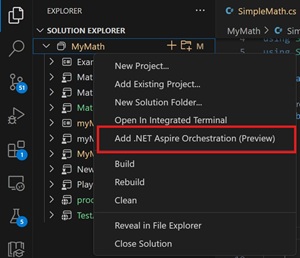 [Click on image for larger view.] Add .NET Aspire Orchestration (source: Microsoft).
Other updates to the C# Dev Kit include:
- Solution Explorer Updates
- Solution-Free Workspace Mode: Developers can now work on C# projects without requiring a
.sln file, simplifying project management. This feature is currently in preview and can be enabled by setting dotnet.previewSolution-freeWorkspaceMode to true.
- Razor/Blazor Enhancements
- Hot Reload Improvements: Enhancements have been made to the Hot Reload feature, currently in experimental mode, to improve reliability. Developers can enable it by setting
csharp.experimental.debug.hotReload to true.
- IntelliSense and Error Management: Improvements address issues with go-to definition reliability and erroneous errors in the problems pane, enhancing the Razor editing experience.
- Debugging Enhancements
- Blazor Web Page Debugging: Enhanced support for debugging Blazor web pages.
- Azure Functions Debugging: Developers can now locally debug Azure Functions apps, including those within .NET Aspire applications, facilitating cloud-native development.
The extension has been installed more than 8.2 million times.
About the Author
David Ramel is an editor and writer at Converge 360.