News
Vibe Coding Advances in Visual Studio 2022 Previews
Vibe coding, all the recent rage with AI increasingly taking over the typing drudgery and generating code according to typed or verbal human instruction, is accelerating in recent Visual Studio 2022 previews.
As is often the case, Microsoft's flagship IDE is getting advanced AI tech well behind its little open-source-based cousin, Visual Studio Code, and Copilot Next Edit Suggestions (Copilot NES) is no exception.
After first appearing in VS Code in February, it has now made its way into Visual Studio 2022 17.14 Preview 3. That fits the pattern, as features typically appear in VS Code 3 to 4 months before they are introduced in Visual Studio 2022.
Upon its debut we tried NES in VS Code and dubbed it "tab, tab, tab coding" at about the same time the term "vibe coding" was coined to describe the AI-centric approach to software development in much pithier language.
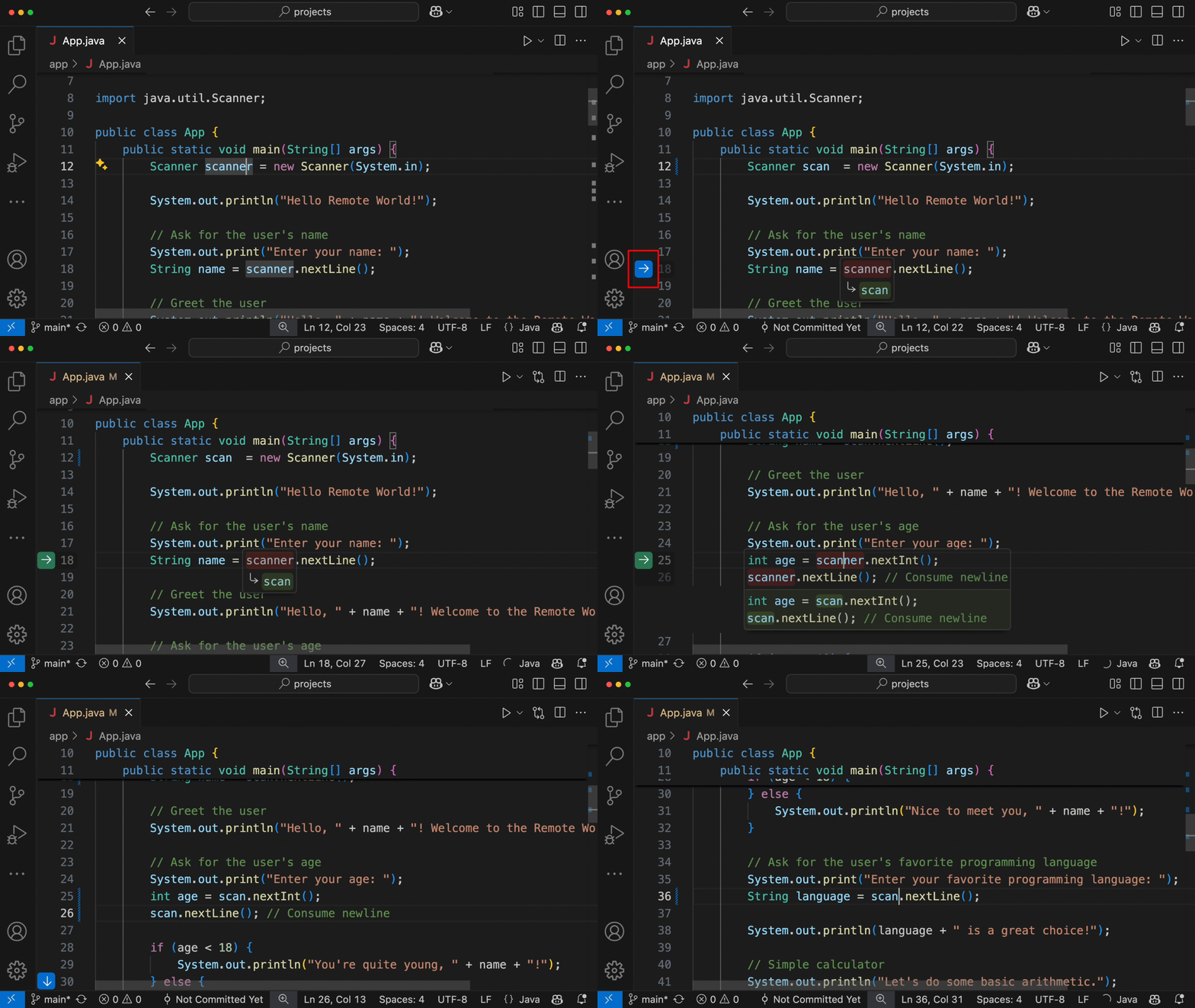 NES in Animated Action (source: Microsoft).
Last week, NES was the star of the VS 2022 17.14 Preview 3 show.
"Next Edit Suggestions is now available in Visual Studio public preview to support your code editing activities!" says the release notes. "We are excited to announce Next Edit Suggestions, or NES for short, is now available in Visual Studio to further improve your coding experience. NES leverages the previous edits made and predicts the next edit to come, whether it's an insertion, deletion, or mix of both. Unlike Cocompletions which is limited to generate suggestions at your caret location, NES can support you anywhere in your file, where the next edit is most likely to occur. NES augments the existing Copilot Completions experience by supporting developers' code editing activities."
Example scenarios for NES as demoed in the post include:
- Refactoring a 2D Point class to 3D Point
- Updating code syntax to modern C++ using STL
- Making logical changes in response to a newly added variable
GitHub itself inked ted NES to vibe coding earlier this month in a post about new AI functionality in VS Code, "Vibe coding with GitHub Copilot: Agent mode and MCP support rolling out to all VS Code users": "We are also announcing the general availability of the Copilot code review agent. Plus, the general availability of next edit suggestions so you can tab tab tab your way to coding glory. 🏆"
Preview 3 also introduced adaptive paste, an AI-powered feature that intelligently adjusts pasted code to match the syntax, structure, and formatting of the surrounding code context. When you paste code -- especially from different locations or projects -- Visual Studio analyzes the target context and adapts the indentation, variable names, and even formatting to fit in seamlessly.
 Adaptive Paste in Animated Action (source: Microsoft).
Adaptive paste enhances vibe coding by reducing friction during development. Instead of breaking your creative flow to manually refactor pasted snippets, the IDE handles it for you, allowing you to stay in the zone and focus on higher-level logic and problem-solving. It's about preserving momentum -- keeping your "vibe" uninterrupted.
"Adaptive paste is here to save you time and reduce effort by automatically adjusting the pasted code to fit the context of your existing code, minimizing the need for manual modifications," Microsoft said. "This feature also supports scenarios such as minor error fixes, code styling, formatting, human and code language translation, and fill-in-the-blank or continue-the-pattern tasks."
Vibe coding was also advanced in previous v17.14 previews:
-
GPT-4o Code Completions
Introduced in: Visual Studio 2022 v17.14 Preview 2
Release Date: March 11, 2025
Description: Uses the GPT-4o model for highly accurate, context-aware code completions.
Source:
GPT-4o Copilot Code Completion Blog
Relation to Vibe Coding: Enhances coding flow by generating smarter inline suggestions that match the developer's intent more closely.
-
AI-Generated Documentation Comments
Introduced in: Visual Studio 2022 v17.14 Preview 2
Release Date: March 2025
Description: Automatically generates XML doc comments based on function signatures and intent.
Source:
Documentation Comment Generation Blog
Relation to Vibe Coding: Frees developers from tedious comment writing, preserving creative energy for design and logic.
-
Copilot Chat Enhancements
Introduced in: Visual Studio 2022 v17.14 Preview 1+
Release Date: February 2025
Description: Added support for image inputs, scoped chat context, and more nuanced conversation threading.
Source:
Copilot Chat Context Tips
Relation to Vibe Coding: Reduces the need to search external docs or switch apps by making the assistant more aware of code context and media.
Stay tuned for more vibing in Visual Studio 2022.
About the Author
David Ramel is an editor and writer at Converge 360.