News
Microsoft Boosts MCP and AI Chat in Delayed VS Code Release
Microsoft took an extra week to ship the new Visual Studio Code 1.101 (May 2025) release, which is today available with a host of improvements around advanced AI and the Model Context Protocol (MCP).
The MCP is a key enabler of AI extensibility in VS Code, providing a standardized way for the editor and its AI agents to interact with external servers and tools. It lets developers expose structured resources, prompts, and functions to AI models through an open protocol, enhancing what chat-based agents can understand and accomplish. MCP bridges the gap between local development workflows and cloud-based or service-backed intelligence, making AI interactions in VS Code both more powerful and customizable.
In today's release, the MCP support now spans prompts, resources, sampling, and authentication, enabling more sophisticated agent interactions and secure integration with external services. The AI chat experience, meanwhile, also evolved with customizable tool sets, new implicit and explicit context handling, refined UX elements, and a preview of custom chat modes -- allowing users to tailor how the Copilot agent behaves and what tools it uses. Here's a summary of what's new.
MCP Functionality Expands Across AI Workflows
MCP servers can now define reusable prompts exposed as slash commands in chat, return structured resources that can be saved or used as context, and initiate model sampling requests (with user confirmation). "VS Code's Model Context Protocol support now includes sampling, which allows MCP servers to make requests back to the model," Microsoft said. Authentication support has also been added, enabling secure interaction with services tied to a user account, with integration for GitHub and Microsoft Entra identities.
 [Click on image for larger view.] MCP Support for Prompts (source: Microsoft).
Developers can now enable MCP development mode for testing and debugging servers, and extensions can publish collections of MCP servers for easier discovery and installation. According to the May 2025 iteration plan, the MCP work was a top priority for the team, which focused on improving tool discovery, authentication, and first-class resource support.
AI Chat Gains Tool Sets, Custom Modes & Smarter Context
The AI chat experience in VS Code also sees major improvements in version 1.101. Developers can now group tools into reusable tool sets, referenced by name in chat or agent mode. "A tool set is a collection of different tools that can be used just like individual tools," Microsoft explained.
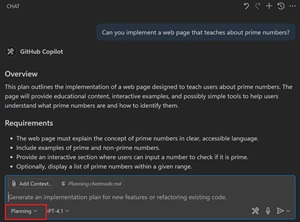 [Click on image for larger view.] A Custom 'Planning' Chat Mode (source: Microsoft).
Custom chat modes are now supported in preview, allowing developers to tailor the behavior and available tools of the chat agent for specific workflows. The agent also handles context more intelligently, with streamlined ways to add the current file as context and new awareness of editor state and terminal working directory.
Chat UX improvements include clearer visual separation of user and AI messages, better undo controls, and keyboard-friendly attachment handling. The chat agent now recognizes task diagnostics and can respond more intelligently to errors and warnings.
Per the May 2025 iteration plan, the team prioritized improvements such as tool set support, a new /list command for registered tools, auto-recovery from response errors, and enhanced support for diagram rendering in chat.
Other New Features/Functionality
Here's a summary of some other new features and functionality introduced today:
- Copilot coding agent integration with GitHub pull requests and issues, enabling background task automation
- Improved editing workflow with more efficient file edits and new keybindings for keeping and undoing changes
- Source Control Graph enhancements, including the ability to add history items as chat context
- Language server-based completions in terminal Python REPL sessions (initial support via Pylance)
- Enhanced Python extension tools for chat and environment management, with improved new project templates and Pyenv/Poetry support
- Settings search powered by AI-based semantic search (preview)
- Experimental "send elements to chat" feature for selecting and adding web elements from Live Preview to chat
- Accessibility improvements, including new action sounds and richer screen reader support in agent mode
As far as that one-week shipping delay announced in the iteration plan, it apparently had nothing to do with Microsoft's work to take GitHub Copilot Chat open source, as we considered on Monday.
About the Author
David Ramel is an editor and writer at Converge 360.