News
New Default Model for Visual Studio Copilot, So How Do You Choose?
Along with a new default model, a new Consumptions panel in the IDE helps developers monitor their usage of the various models, paired with UI to help easily switch among models.
GitHub Copilot in Visual Studio 2022 has a new default foundational AI model that grows an expanding arsenal, so how do you choose the best model for the project at hand?
"Copilot in Visual Studio now uses GPT-4.1 as the default model (previously GPT-4o)," the company said in a June 25 blog post. "In our testing, it delivers significantly better performance -- faster responses, higher quality suggestions, and greater efficiency overall."
The company also announced a new Consumptions panel in the IDE to help developers monitor their usage of the various models, and also detailed how easy it is to switch models. More information on those two things is below.
As far as that growing arsenal, the company said it now includes:
- Claude Sonnet 4
- Claude Opus 4
- Claude Sonnet 3.5
- Claude Sonnet 3.7
- OpenAI o3 mini
- Gemini 2.0 Flash
- Gemini 2.5 Pro
However, those aren't all the models available to Visual Studio developers. What models you can use depends not on your Visual Studio subscription level -- Community and so forth -- but rather on your GitHub Copilot subscription. Choices include Free, Pro and Pro+ at the consumer level, and Business and Enterprise levels that are handled differently.
| Plan Name |
Who It's For |
Key Features |
| Copilot Free |
Verified students and open source maintainers |
Limited usage
GPT-4o access only
No model picker, chat, or agent mode
|
| Copilot Pro |
Individual developers |
GPT-4.1, Claude Sonnet 3.7, o3/o4-mini, Gemini 2.0 Flash
300 premium requests/month
Copilot Chat and model picker included
|
| Copilot Pro+ |
Power users and advanced individual devs |
Includes all Pro features
1,500 premium requests/month
Access to advanced models like Claude Opus 4, GPT-4.5, Gemini 2.5 Pro
Agent mode available
|
| Copilot Business |
Organizations and developer teams |
Everything in Pro+
300 premium requests per user/month
Admin controls, policy management, usage reporting
Access to all 13 models including agent support
|
| Copilot Enterprise |
Large companies and regulated environments |
All Business features
1,000 premium requests per user/month
Single sign-on (SSO), enterprise-grade compliance and indemnity
Premium support and deployment controls
|
They all come with different capabilities, and to confuse things even more, plans and pricing have changed, with the most recent change just being made last week (see "Update to GitHub Copilot consumptive billing experience"). Also note that some availability can change according to different contexts or circumstances, such as the specific Copilot feature being used (chat, inline, or agent mode), administrative restrictions in a GitHub organization, remaining premium request quota, rollout timing for new models, whether the latest Visual Studio extension is installed, and other factors.
Visual Studio Options
In the Visual Studio IDE, developers have several options, dependent on Copilot subscriptions. Here's an unofficial summary derived from available resources:
| AI Model |
Copilot Free |
Copilot Pro |
Copilot Pro+ |
Copilot Business |
Copilot Enterprise |
| GPT-4o |
✅ |
✅ |
✅ |
✅ |
✅ |
| GPT-4.1 |
❌ |
✅ |
✅ |
✅ |
✅ |
| GPT-4.5 |
❌ |
❌ |
✅ |
✅ |
✅ |
| o1 |
❌ |
❌ |
✅ |
✅ |
✅ |
| o3 |
❌ |
✅ |
✅ |
✅ |
✅ |
| o3-mini |
❌ |
✅ |
✅ |
✅ |
✅ |
| o4-mini |
❌ |
✅ |
✅ |
✅ |
✅ |
| Claude Sonnet 3.5 |
❌ |
✅ |
✅ |
✅ |
✅ |
| Claude Sonnet 3.7 |
❌ |
✅ |
✅ |
✅ |
✅ |
| Claude Sonnet 4 |
❌ |
❌ |
✅ |
✅ |
✅ |
| Claude Opus 4 |
❌ |
❌ |
✅ |
✅ |
✅ |
| Gemini 2.0 Flash |
❌ |
✅ |
✅ |
✅ |
✅ |
| Gemini 2.5 Pro |
❌ |
❌ |
✅ |
✅ |
✅ |
For example, I have some kind of organizational Copilot plan, so when I open up the model picker in the latest Visual Studio 2022 edition, I see the following options, two standard and nine premium:
 [Click on image for larger view.] AI Model Picker in VS 2022 (source: Ramel).
The numbers shown next to each model in your Visual Studio model picker -- like 0.33x, 1x and 10x -- represent the premium request multiplier cost for that model under GitHub Copilot's consumptive billing system.
So 1x equals the baseline cost for a single premium request, 0.33x means this model only costs one-third of a standard premium request (more efficient) and 10x means this model costs 10 times more than a standard request (very expensive).
So that's all fine and good, and your mileage may vary, but how do you choose the best model for your project?
Which Model for What?
With the growing number of foundation models now available in GitHub Copilot, especially for Visual Studio users on higher-tier plans, developers are increasingly faced with a decision: which AI model is best for a given development task? Choosing well can mean the difference between blazing-fast iteration or sluggish, confusing results. Different models are optimized for different capabilities -- some excel at speed and responsiveness, while others are built for deep reasoning, large-context understanding, or even visual input.
GitHub offers some guidance here in
Choosing the right AI model for your task.
GitHub and its model partners (OpenAI, Anthropic, Google) provide guidance based on the strengths and trade-offs of each model. Factors to consider include response quality, latency, cost (measured in premium request multipliers), and support for features like vision or agent mode. In general, no single model is best for every job -- developers should select a model based on the nature and complexity of the task at hand.
This subject has also been tackled elsewhere, so GitHub's documentation -- a long read in itself -- can be enhanced and summarized like this:
Model Recommendations by Task Type
For everyday development tasks such as writing functions, adding comments, or generating documentation, general-purpose models like GPT-4.1 or Claude Sonnet 3.7 are strong defaults. When speed is paramount -- like during lightweight prototyping or rapid editing -- lower-latency models such as o3-mini or Gemini 2.0 Flash perform well. For more demanding use cases like debugging large systems, refactoring complex codebases, or architectural planning, advanced models like Claude Opus 4 or GPT-4.5 offer superior reasoning and long-context understanding. Visual input tasks, such as interpreting screenshots or UI diagrams, require models with multimodal support like GPT-4o or Gemini 2.0 Flash.
| Task Type |
Recommended Models |
Why These Models |
| General-purpose coding and writing |
GPT-4.1, Claude Sonnet 3.7, GPT-4o |
Balanced quality and speed, reliable for common dev tasks |
| Fast help with simple or repetitive tasks |
o3-mini, o4-mini, Claude Sonnet 3.5, Gemini 2.0 Flash |
Low latency, ideal for quick answers and small edits |
| Deep reasoning and debugging |
Claude Opus 4, Claude Sonnet 4, GPT-4.5, o3, o1, Gemini 2.5 Pro |
Supports structured logic, complex code understanding, long context |
| Working with visual input (e.g. screenshots, diagrams) |
GPT-4o, Gemini 2.0 Flash |
Multimodal support for UI feedback and image-based tasks |
Summary List of Model Use Cases
- Use GPT-4.1 or Claude Sonnet 3.7 for high-quality completions and broad language/framework support.
- Use o3-mini, o4-mini, or Gemini 2.0 Flash when you need low-latency suggestions or quick syntax help.
- Use Claude Opus 4, Claude Sonnet 4, or GPT-4.5 for deep reasoning, planning, or debugging across multiple files.
- Use GPT-4o or Gemini 2.0 Flash if your task involves visual content like screenshots or UI diagrams.
 [Click on image for larger view.] Copilot Consumptions (source: Microsoft).
Tracking Usage
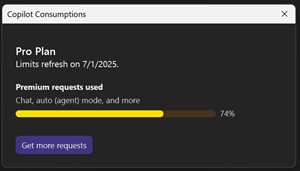
It can be hard to keep track of which model you are using, especially if you have a Copilot subscription that allows you to use multiple models. In this week's post, Microsoft addressed this with a new Copilot Consumptions panel in the IDE to help developers monitor their usage. "Just click the Copilot badge in the top-right corner of Visual Studio, then select Copilot Consumptions to see how many premium requests you've used across chat, inline suggestions, and more," the company said (see image above).
 [Click on image for larger view.] Change Model (source: Microsoft).
Changing Models
To change the model used by Copilot in Visual Studio, click on the Copilot badge in the top-right corner, then select "Change Model." This will open a dialog where you can choose from the available models based on your current task requirements. "If a model is available under your plan but not yet enabled, you'll now see a prompt right in the model picker -- no need to navigate to GitHub settings," Microsoft said (see image above).
About the Author
David Ramel is an editor and writer at Converge 360.