News
VS Code v1.102 Doubles Down on GitHub Copilot and AI-Enhanced Development
In the June 2025 update (v1.102), Microsoft Visual Studio Code puts GitHub Copilot front and center, with improvements spanning Copilot Chat, inline code completions, and editing workflows. These upgrades further the company's continued shift toward deep integration of GenAI across the entire developer experience -- from writing code to navigating and editing it.
With its focus on advanced AI, the company is even turning VS Code into a completely open-source AI editor. Last week's update post "announced" the GitHub Copilot Chat extension is now open source as the first milestone in this project, though we covered it last month (see "VS Code Goes Transparent as Open-Source AI Editor").
Meanwhile GitHub Copilot has become a familiar, integral part of the VS Code toolset, with the new update tightening that relationship by making AI more responsive, more context-aware, and more seamlessly embedded in the core editor itself, the update post indicated. The AI emphasis was clear in the three main highlights presented by Microsoft, concerning Chat, the Model Context Protocol (MCP) and the "editor experience," which is enhanced by agentic AI functionality. Here's how all that plays out in those three key areas:
Chat Gets Smarter: Faster, More Reliable Copilot Conversations
Developers can now explore, extend, and contribute to the underlying infrastructure powering VS Code's AI-powered chat system -- including chat modes, agent functionality, and integration points for custom instructions and language models.
The open-sourcing milestone comes alongside a wave of new features designed to make AI-driven conversations more useful, transparent, and project-aware. At the center of these changes is a reworked architecture for customizing chat behavior. Developers can now define their own modes, assign specific tools, generate tailored instructions from their codebase, and even specify the language model used in each mode. This marks a shift from Copilot Chat as a standalone feature to a programmable platform for building intelligent development agents.
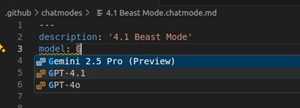 [Click on image for larger view.] Configuring Language Models (source: Microsoft).
Microsoft also introduced experimental editing capabilities, more control over terminal command execution, and new command-line tooling -- all supporting a vision of AI as a customizable partner in development rather than a black-box assistant.
More details and other highlights in Chat-related features include:
- Configurable Language Models: Each chat mode can now specify a preferred language model (via IntelliSense-supported metadata) using the
model property in its definition.
- Custom Chat Modes: Users can define their own chat modes (beyond Ask, Edit, and Agent) using metadata-rich markdown files that control tools, prompts, and behavior.
- Enhanced Editor Support: Better completions, hover info, validation, and diagnostics for chat configuration files improve the UX when building and debugging chat modes.
- New Configuration UI: A "Configure Chat" gear menu in the Chat view helps manage custom modes, prompts, and tool sets visually.
- Import via URL: Chat modes and instruction files can now be imported from external sources like GitHub gists using a special VS Code link syntax.
- Generate Custom Instructions: A new command,
Chat: Generate Instructions, analyzes your workspace and produces AI prompt instructions tailored to your project structure and conventions.
- On-Demand Instruction Loading: Instruction files can be conditionally added based on file patterns. The LLM now automatically loads relevant instructions as needed per request context.
- Edit Previous Requests (Experimental): You can now edit past chat requests -- modifying their text, mode, or context -- and replay them with updated input. Options include inline editing or input-box-driven modes.
- Agent Terminal Auto-Approval (Experimental): Fine-grained control over which commands the agent can run automatically via customizable allow/deny lists.
- Task and Terminal Awareness: Agent mode tracks background tasks and terminal sessions, avoiding duplicate runs and enabling context-aware suggestions based on task output.
- New Command-Line Interface: A new
code chat subcommand allows developers to launch chat sessions directly from the terminal with specific modes and context files.
- Maximized Chat View: Chat panels can now span the full editor and are persistently remembered between sessions, enabling distraction-free interaction with the AI.
- Chat Debugging View: A new debug tree lets developers inspect the exact prompts, tool calls, and responses sent in chat sessions -- invaluable for debugging or refining instructions.
- Edit Tool Improvements: GPT-4 and Sonnet-based editing tools see improvements in stability and reliability when used for code transformation requests.
MCP Enters General Availability, Becomes a First-Class Platform for AI Context
VS Code now officially supports the full MCP specification, marking a major milestone in its evolution as an open AI development platform. With general availability in the June 2025 update, MCP is no longer experimental -- it's a foundational component that enables language models to request rich context from the IDE, powering smarter completions, better chat responses, and more accurate agent actions.
Microsoft has elevated MCP to first-class status inside VS Code, with a dedicated configuration system, curated server discovery experience, and profile-specific storage for robust, portable setup management. Developers can now install prebuilt MCP servers, manage them through an integrated UI, or even build their own. The new architecture also supports Dev Containers and syncs via Settings Sync, making MCP usage seamless across teams and environments.
Specifically, new and improved MCP functionality in v1.102 includes:
- Policy-Based Control: Enterprises can now control MCP server access via GitHub Copilot policies.
- Support for Elicitations: VS Code adopts the latest spec to support input requests from MCP servers to clients.
- Curated Server Discovery: New MCP Servers section in the Extensions view links directly to a curated list of installable MCP servers.
- MCP Server Management View: A new UI pane lets users start, stop, configure, view logs, manage model access, and uninstall MCP servers.
- First-Class Resource Architecture: MCP servers are now stored in a dedicated
mcp.json file per profile, not in global settings.json.
- Settings Sync Integration: MCP configurations can now sync across devices and environments, with profile-level control.
- Migration Support: Existing MCP server setups are automatically migrated to the new architecture, with support for local, remote, WSL, and Codespaces environments.
- Dev Container Support: Developers can predefine MCP servers in
devcontainer.json to configure containers with custom MCP support.
- New MCP Commands: Access
mcp.json files directly with MCP: Open User Configuration and MCP: Open Remote User Configuration commands.
- Simplified Account Management: Sign out or disconnect MCP-linked accounts via new gear menu actions and quick pick entries.
Editor Experience Gains AI-Aware Polish
Visual enhancements to the editor help align the AI experience with traditional workflows. For instance, Copilot-suggested edits and comments now follow better UI patterns for readability and selection. AI responses integrate more cleanly with the terminal, output, and problems panels, offering more seamless transitions between manual and AI-assisted tasks.
Editor responsiveness, especially when used alongside Copilot Chat, has also improved.
Other AI-Related Enhancements
Beyond the three focal points above, the June update also includes smaller AI-related improvements across the editor, debugging, and interaction surfaces. These don't shift core workflows but do contribute to a smoother, more capable Copilot ecosystem inside VS Code.
- Improved notebook support for Copilot Chat responses in Markdown cells
- Enhanced agent context handling in multi-message chat threads
- Experimental WASI debugging via WebAssembly-enabled runtimes (preview)
- Better handling of AI-generated text in the diff editor
- Ongoing refinement of code suggestions for TypeScript and JavaScript via AI-assisted completions
Non-AI Features and Quality-of-Life Updates
While AI dominated the spotlight, the June release also delivered foundational improvements for developers working in remote environments or using more traditional tooling. These updates enhance security, accessibility, and extension performance -- all important areas even as the focus shifts to AI.
- Remote tunnel connections now default to secure HTTPS instead of HTTP
- New timeout setting:
remote.tunnel.serverListenTimeout for connection flexibility
- Bracket pair highlighting improvements in Markdown editing
- Accessibility improvements to screen reader labels in command palette and search
- Better contrast handling and focus outlines in high-contrast themes
- Bundled TypeScript updated to v5.5 for latest language support
- UI improvements to the experimental notebook diff viewer
- Fixes to keyboard navigation and tab order in key UI panels
With Copilot Chat now open source and new customization tools rolling out, Microsoft seems to be continuing its transformation of VS Code into a fully programmable AI platform. Developers can expect even deeper integrations -- and more control -- in upcoming releases.
About the Author
David Ramel is an editor and writer at Converge 360.