News
Coming Soon in Visual Studio AI: Debugging/Profiling Modes and Agentic DevOps
Microsoft detailed its plans for advanced AI in its flagship IDE in September, with new modes for debugging and profiling, as well as enhancements for agentic DevOps, in the works.
The company last week published its September roadmap for AI in Visual Studio, describing ongoing work rather than delivery commitments and outlining near-term plans across several areas.
Debugging and Profiling: Agent Tools
Visual Studio is streamlining how developers find and switch between modes while ensuring both built-in and extension modes can handle more complex workflows. Two new agent-powered tools are in progress:
-
Profiler agent:
- Spot performance bottlenecks faster.
- Get contextual recommendations to optimize your code.
- Get a built-in support for BenchmarkDotNet to create meaningful benchmarks and track improvements.
-
Debugger agent:
Create an agentic debugging experience in Visual Studio designed to help solve complex issues more easily. Instead of just giving quick answers, the Debugger Copilot agent will soon be able to explore problems more deeply and work more independently.
Azure Agentic DevOps
Microsoft is bringing agentic workflows and Azure-native capabilities directly into Visual Studio. A public preview is available in Visual Studio 2022 with automatic installation of Azure Model Context Protocol (MCP) for a streamlined start.
 [Click on image for larger view.] GitHub Copilot for Azure in Visual Studio (source: Microsoft).
Next steps on the roadmap include first-party Azure MCP installation in Visual Studio 2026, publishing and CI/CD to Azure App Service for .NET applications using GitHub Actions and Azure DevOps, and custom modes tailored for Azure developers.
Also in September Work
Agent Mode and Copilot Chat updates under development include speed improvements, a progress indicator, an experiment to make Agent Mode the default chat experience, actions such as running tests via Test Explorer and package search, project memories, planning/to-dos, instruction file support, the ability to disable built-in tools, and redirecting Agent Mode mid response.
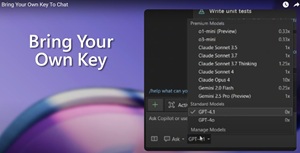 [Click on image for larger view.] Model Selection Is Growing (source: video).
The roadmap also notes model updates and customization options: Bring Your Own Key expands model choice, and GitHub Copilot native support lists Claude Opus 4.1 and GPT-5 Mini, with support for Azure Foundry and custom URLs. Editor work includes next-edit suggestions and a keyboard shortcut to accept Copilot suggestions.
About the Author
David Ramel is an editor and writer at Converge 360.