News
Copilot Does Azure-Focused .NET App Modernizations in Visual Studio
Microsoft and GitHub have made GitHub Copilot app modernization available for both .NET and Java applications, offering developers an AI-powered path to upgrade legacy codebases and migrate them to Azure cloud services. The toolset promises to reduce migration efforts by up to 70% while cutting upgrade time in half through automated code transformations and intelligent remediation.
For .NET developers working inside Visual Studio, Copilot app modernization is built directly into the IDE starting with version 17.14.16. Unlike the Java tooling, which relies on a VS Code extension, the .NET experience is tightly integrated into Visual Studio's workflow. Developers can launch the modernization agent from Copilot Chat, monitor progress in the Output window, and review all code changes within familiar source control and build pipelines. The agent also operates only on Windows, aligning with Visual Studio's environment. This integration allows .NET teams to modernize applications without leaving the IDE they already use for coding, debugging, and deployment.
Although GitHub announced "general availability," Microsoft documentation says that while the general capability to use the tool and perform upgrades is GA, the specific feature of end-to-end migration to Azure for .NET is in public preview.
AI-Driven Assessment and Planning
The modernization process begins with comprehensive analysis. GitHub Copilot app modernization "analyzes your projects and proposes an modernization plan," according to Microsoft documentation. The AI examines project dependencies, identifies outdated libraries, potential migration issues, and security vulnerabilities, then generates actionable remediation strategies.
For .NET developers, the tool supports upgrading projects from .NET Framework through modern .NET versions, handling everything from console applications and class libraries to web technologies including MVC, Blazor, Razor Pages, and Web API. Desktop applications using Windows Forms and Windows Presentation Foundation are also supported, along with test projects using MSTest and NUnit.
"The agent performs the following steps in a GitHub Copilot chat session: Analyzes your projects and proposes an modernization plan. According to the plan, runs a series of tasks to modernize your projects," Microsoft states in the documentation.
Automated Code Transformations With Built-In Fixes
The modernization agent operates through GitHub Copilot's agent mode, transforming it from a passive suggestion tool into what GitHub describes as being "like having a junior developer on your team who understands what you're trying to achieve and works through multiple steps to make it happen, automatically and iteratively, without you having to spell out every single instruction."
The system uses specialized tools like OpenRewrite for Java projects to handle API replacements and dependency updates. When build errors occur during transformation, the AI iteratively resolves compilation issues without manual intervention. The system is designed to automatically fix issues during the code transformation process.
"Automatically fixes issues during the code transformation," according to Microsoft documentation, while providing "reports progress and allow access to code changes & logs." The process continues until compilation succeeds.
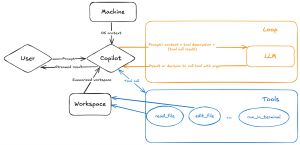 [Click on image for larger view.] Agent Mode Flow Chart (source: GitHub).
Security Vulnerability Management
Security scanning is integrated throughout the modernization process. The system automatically identifies Common Vulnerabilities and Exposures (CVEs) in dependencies and proposes secure replacements. "Built-in security checks catch CVEs (Common Vulnerabilities and Exposures) early, ensuring alignment with your standards and policies," GitHub states in their solution documentation.
When vulnerabilities are detected, "the agent intelligently proposes safe version replacements or recommends alternative libraries to maintain security compliance," according to GitHub's step-by-step guide. This automated CVE scanning addresses what the company describes as "a critical security feature consistently requested by development teams."
Azure Migration and Cloud Deployment
Beyond runtime upgrades, the toolset handles complete migration to Azure services. The AI can deploy applications to Azure App Service, Azure Container Apps, and Azure Kubernetes Service with compatibility guidance and security hardening.
A related video presentation helmed by Matt Soucoup, principal cloud advocate at Microsoft, shows the complete transformation process: "We went from .NET Framework 4.NET, moved it all the way to .NET 9, and then we said go out to the cloud. And not only that, we took a 4.8 app and we containerized it in the cloud."
The system generates Infrastructure as Code files for Azure deployment and automatically addresses deployment errors. "CI/CD pipelines are set up for continuous integration. This task completes the modernization workflow from analysis to production," according to Microsoft's documentation.
Real-World Performance Claims
GitHub reports significant time savings from early adopters. The company claims "70% less time spent on migration efforts" and "50% less effort to upgrade apps," with some organizations changing "500k+ lines of code within weeks."
However, the system has notable limitations. Microsoft acknowledges there's "no guarantee that the upgrade or migration suggestions are considered best practices" and "the LLM doesn't persist learning from the upgrade." The tool currently runs only on Windows and requires Git repositories for version control.
Integration With Visual Studio and VS Code
For .NET developers, the modernization agent integrates directly with Visual Studio 2022 version 17.14.16 or newer through GitHub Copilot subscriptions (Pro, Pro+, Business, or Enterprise). Java developers work through the GitHub Copilot app modernization VS Code extension.
The workflow operates within existing development environments, creating working branches in local Git repositories and providing detailed progress monitoring. "You can monitor the progress of the assessment through the Visual Studio interface. The agent provides real-time feedback and updates on the status of the migration process," Microsoft documentation explains.
Privacy and Data Handling
Microsoft addresses data privacy concerns by stating that "the agent never stores a user's codebase and never uses your code for training the model. Once an upgrade or migration is complete, session data is deleted."
The system collects only basic telemetry about "project types, intent to upgrade, and upgrade duration" through Visual Studio's standard telemetry mechanisms, with no user-identifiable information included.
Getting Started and Requirements
Developers need a GitHub Copilot subscription and Git-based projects built with standard tools (Maven or Gradle for Java, standard .NET project types). The modernization process requires human oversight, with the AI requesting confirmation before major changes.
Microsoft recommends using advanced language models like Claude Sonnet 4.0 or Claude Sonnet 3.7 for optimal results. The company also suggests thorough code reviews and standard QA processes before merging AI-generated changes into production branches.
The general availability announcement represents a significant expansion from the previous technical preview phase, where Microsoft "tested GitHub Copilot app modernization on hundreds of open-source repositories to ensure build, consistency, and unit tests pass after the modernization process."
More Information
Microsoft and GitHub published a wealth of information and documentation on the new initiative, including:
About the Author
David Ramel is an editor and writer at Converge 360.