Visual Studio Toolbox
Top Agentic AI Tools for VS Code, According to Installs
Agentic AI is the place to be these days as a Microsoft-centric developer, and as advanced GenAI works its way into the brand-new Visual Studio 2026, several agentic tools are already available for its lightweight, open-source little cousin, Visual Studio Code.
Here's a look at the top extensions in the AI section of the VS Code Marketplace with the words "agent" or "agentic" in their descriptions, ranked by the number of installs. Because we only looked for those words, front-running tools from GitHub like Copilot and Copilot Chat and Pull Requests lead the overall pack but don't make the cut here. They obviously have agentic capabilities, with functionality like agent mode, for one example, but they didn't include the magic words so they don't make the grade for this examination (Editor's note: level up your agentic AI marketing, GitHub, if you want to play along next time).
For context for this study, note that Copilot boasts 53.8 million installs.
That's some 51.4 million (rounded numbers) more installs than the top agent-specific offering, Cline. So here's a description of the top six "agent" tools from the marketplace, a number picked because it makes for a nice opening graphic scraped from the marketplace's list of top agentic tools:
 [Click on image for larger view.] Top 6 'Agent' Extensions by Popularity (source: VS Code Marketplace).
Cline
This is an "Autonomous coding agent right in your IDE, capable of creating/editing files, running commands, using the browser, and more with your permission every step of the way."
 [Click on image for larger view.] Cline (source: VS Code Marketplace).
The extension can reason through multi-step tasks, create and edit files (with diff previews), run terminal commands (with feedback monitoring), and even drive browser-based interfaces for debugging or UI fixes. It supports a plug-in model via the Model Context Protocol (MCP) so you can extend its capabilities (for example, "add a tool for Jira tickets"), and it always operates with human oversight--sorting changes into snapshots you can approve or roll back. Moreover, it handles context smartly (reading ASTs, file structure) and supports multiple model back ends (OpenAI, Anthropic, local models, etc.).
Cline's "human-in-the-loop" approach is central to its design. Every action--whether editing a file, executing a command, or launching a browser instance--requires the user's explicit approval, ensuring transparency and safety as the agent autonomously works through coding tasks. The tool's creators position it as a balance between automation and developer control, keeping the human as the final decision-maker.
It also includes performance tracking, context visualization, and compatibility with local model runners like Ollama, making it attractive for developers who want agentic capabilities without relying exclusively on cloud APIs.
BLACKBOXAI Agent
Strangely, this tool with 1.9 million installs has the exact same description as Cline: "Autonomous coding agent right in your IDE, capable of creating/editing files, running commands, using the browser, and more with your permission every step of the way." I don't see any other tools with that tagline, so it's impossible to tell which description came first and was copied or if there's a relationship between the tool or what. ChatGTP 5 didn't even know ("The evidence is mixed but leans toward a likely duplication or re-branding, rather than a clear, documented shared ownership or fork.").
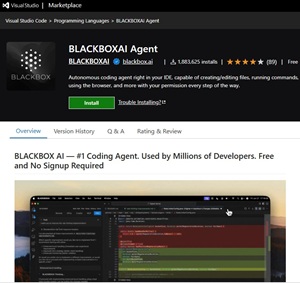 [Click on image for larger view.] BLACKBOXAI Agent (source: VS Code Marketplace).
This tool is designed to work through multi-step tasks: creating and editing files (with diff previews), executing terminal commands (for example, builds, installs, scripts), and interacting with web UIs via browser automation. It maintains project context, conversational history, and understanding of your workspace, and allows switching among AI model backends and integrating external "tools" via MCP servers.
BLACKBOXAI Agent also includes assistant-style features like code chat, snippet explanation, and commit message generation, bridging the line between conversational AI and autonomous code execution. It supports voice interaction, letting users speak commands instead of typing them, and can connect to GPUs for accelerated processing.
Although it shares its tagline with Cline, the BLACKBOXAI ecosystem extends beyond VS Code--it markets itself as a multi-platform AI agent suite, offering integrations across editors and browsers. That makes this entry one of the more ambitious attempts to embed agentic behavior throughout the developer stack.
Continue
"The leading open-source AI code agent," with 1.6 million installs.
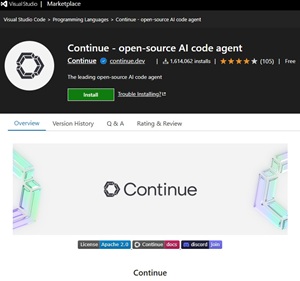 [Click on image for larger view.] Continue (source: VS Code Marketplace).
This tool takes the agentic concept and wraps it into a fully open-source framework, letting developers run customizable AI agents directly inside VS Code. It can operate as both a conversational assistant and a multi-step autonomous agent, handling tasks that span code editing, terminal operations, and even CI integrations. Users can chat with their codebase, ask for explanations, or trigger broader workflows that the tool executes step by step.
Continue can edit files inline, generate code completions, and help plan or refactor large chunks of a project. It supports configuration through simple local files, where developers define behaviors, rules, and model preferences. Under the hood, it runs a local background service to manage context and indexing, ensuring quick responses and persistent session memory between uses.
It's cross-platform and open source under the Apache 2.0 license, with active development on GitHub and support for a range of model providers including OpenAI and Anthropic. The project emphasizes flexibility and transparency, aligning with its tagline that it's "built by developers, for developers."
Codex
From advanced AI pioneer OpenAI, this provides "One agent for everywhere you code -- included in ChatGPT Plus, Pro, Business, Edu, and Enterprise plans."
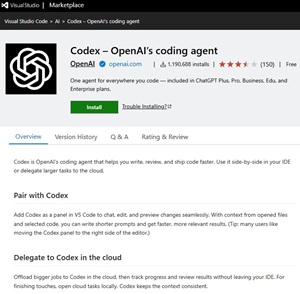 [Click on image for larger view.] Codex (source: VS Code Marketplace).
This offering brings the full power of OpenAI's ChatGPT directly into VS Code, functioning as a unified coding agent that bridges your editor and the ChatGPT web or desktop app. It lets developers chat with the model about active files, generate or edit code in place, and preview results before committing changes. Users can highlight a code block to ask for improvements or explanations, invoke the agent to refactor, or request new implementations from plain-language prompts.
The extension also maintains project context between chats, meaning you can pick up where you left off without re-explaining your code each time. On macOS, it integrates with the ChatGPT app to enable "Work with Apps" support, allowing VS Code to participate in a broader cross-application workflow.
Codex effectively serves as OpenAI's official on-ramp for bringing ChatGPT's agentic capabilities into IDE workflows, letting subscribers to any paid ChatGPT tier use the same AI they chat with in the browser as an in-editor coding partner.
Roo Code
This gives you "A whole dev team of AI agents in your editor."
 [Click on image for larger view.] Roo Code (source: VS Code Marketplace).
Coming in at 901K installs, Roo Code appears to be a direct derivation or fork of Cline -- in fact, one source describes it as "a fork of Cline, tweaked for more speed and flexibility." There is evidence it was perhaps called "Roo Cline" before being renamed "Roo Code." Whatever its origins, it supports multiple "modes" (Code, Architect, Ask, Debug, and Custom) so the AI can toggle between roles like builder, planner, question-answerer, or inspector.
You can ask it to generate code from natural language specs, refactor or debug existing code, write or update documentation, answer questions about your codebase, and automate repetitive tasks.
It can read and write across multiple files, execute terminal commands, and even control a browser session (when you approve).
Roo's "Custom Modes" lets you define specialized personas (for example, a security reviewer, test engineer, or documentation assistant), each with tailored instructions and tool permissions.
Roo Code is open source, model-agnostic (supports local or external AI backends), and emphasizes user control: nothing is run without your approval unless you explicitly enable auto-approval rules.
Qodo Gen
This was previously named Codium and is described as "a quality-first generative AI coding agent platform that offers busy developers a comprehensive AI code agent for generating code, writing unit tests, and creating documentation. With Qodo Gen, developers can leverage the power of AI directly within their IDE."
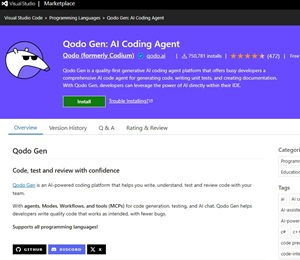 [Click on image for larger view.] Qodo Gen (source: VS Code Marketplace).
The tool, with 751K installs, positions itself as a quality-focused, full-stack AI development assistant built around an agentic architecture rather than simple autocomplete. It can generate new code, craft unit tests, and automatically produce documentation aligned with a project's existing conventions and style. The platform emphasizes reliability and code correctness, promoting itself as a "quality-first" solution that integrates seamlessly into the developer workflow.
Beyond text generation, Qodo Gen can analyze entire files or repositories to understand context before writing new code or tests. It supports conversational prompting, allowing developers to describe what they need in natural language and receive code that adheres to linting, testing, and framework-specific best practices.
The extension also connects to the broader Qodo ecosystem, which includes features for team collaboration, analytics, and model fine-tuning to fit organizational standards. Its agentic layer focuses on improving speed and precision across repetitive coding chores, effectively positioning Qodo Gen as an intelligent partner for writing, reviewing, and maintaining production-quality code within VS Code.
That's a wrap. Stay tuned as the space continues its amazing transformation.
About the Author
David Ramel is an editor and writer at Converge 360.