News
Uno Platform Studio 2.0 Adds New AI Tools for Cross-Platform .NET Development
Uno Platform announced Uno Platform Studio 2.0, adding new AI capabilities designed to support cross-platform .NET development with code, visual tools, and agent-based workflows.
The update introduces the Hot Design Agent, the Uno Platform MCP, and the Uno Platform App MCP, expanding the existing Studio toolset of Hot Reload, Hot Design, and Design-to-Code, the company said in a Nov. 11 blog post.
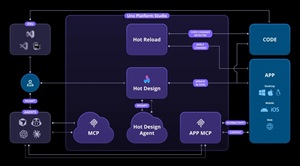 [Click on image for larger view.] Uno Platform Studio 2.0 (source: Uno Platform).
Studio 2.0 Overview
Studio 2.0 includes one new AI feature and two new toolchains. The Hot Design Agent provides real-time AI assistance for interface design, while the Uno Platform MCP offers structured access to Uno Platform documentation for development guidance. The App MCP adds runtime-level interaction with live applications. During the launch period, Studio AI features operate without credit limits.
Hot Design Agent
The Hot Design Agent works inside the live design surface used by Hot Design. It analyzes layout structure, control hierarchy, and bindings, allowing developers to direct the agent to reorganize layouts, adjust styles, or apply design changes. Proposed updates are previewed before being committed, maintaining full human control. The workflow is grounded in the running application, not static mockups.
Uno Platform MCP
Included in the Studio Community Edition, Uno Platform MCP provides semantic access to documentation and API guidance. It enables agents to retrieve current information about Uno Platform development practices inside tools such as Visual Studio and VS Code. When paired with the App MCP, it supports workflows where AI retrieves documentation, executes changes, and validates results in a live application.
Uno Platform App MCP
The App MCP is a local runtime service that exposes application state, the visual tree, control properties, and screenshots. It enables agents to inspect UI structure, simulate pointer and keyboard actions, and invoke automation peers. Supported platforms include Windows, WebAssembly, macOS, iOS, Android, and Linux. The tool is intended to assist with automated UI testing, debugging, and iterative development.
AI Development Scenarios
The announcement highlights several scenarios demonstrating how Studio 2.0 tools work together.
Generating an App from a Prompt: A full mobile weather app is produced from a single prompt, including data models, services, view models, resources, and UI layout. The agent is then able to build and launch the project, verify the UI using Hot Reload, and check interactions
Generating a Page from a Screenshot: Developers can provide a screenshot and ask the agent to match the interface. The agent analyzes layout, color, text, and control structure, generates corresponding components, and iteratively refines alignment and spacing using Hot Reload.
Modernizing Legacy Apps: The team tested modernization using the NotepadWPF project. After providing source code and screenshots, the agent generated an updated functional version within minutes.
Building from Figma: Using the Figma MCP along with Uno Platform MCPs, developers can provide a Figma screen link and instruct the agent to replicate the layout. The agent imports design structure, updates controls and resources, and uses Hot Reload to refine the running UI.
.NET Conf Session
Uno Platform will present a 30-minute session titled "Uno Platform. Now with AI" at .NET Conf on November 13 from 1:00 PM to 1:30 PM EST. The team will participate in discussion on the Uno Platform Discord server throughout the conference, including in a dedicated #dotnetconf channel. The announcement includes a riddle for the event's Decoder challenge.
Uno Platform 6.4 Release
Alongside Studio 2.0, the company released Uno Platform 6.4, which adds performance improvements and official support for .NET 10 and Visual Studio 2026. The announcement directs readers to the separate release blog for full details.
Availability
Studio 2.0 is available now. The Hot Design Agent is included in Studio Pro with a 30-day trial. Uno Platform MCP and App MCP are included in the Community Edition, with additional features available in the Pro version. AI-related tools operate without credit limits during launch. Feedback can be provided through email, social channels, or GitHub.
About the Author
David Ramel is an editor and writer at Converge 360.