News
How Blazor's Unified Rendering Model Shapes Modern .NET Web Apps
Modern .NET developers have gained new flexibility in how they build and render web applications, and that evolution was the focus when Microsoft MVP Allen Conway presented a session titled "The Ins & Outs of Blazor Rendering" during a Visual Studio Magazine webcast today.
Conway used his session in the two-part summit titled "What's Hot & New in Blazor Summit" talk to outline the fundamentals behind Blazor's rendering model, explain how modern .NET versions handle component updates, and walk through the different rendering modes introduced with .NET 8 and refined in .NET 9 and .NET 10. His session, titled "The Ins & Outs of Blazor Rendering," is being made available for on-demand replay by the sponsor, Developer Express.
 "Blazor brings the same high performance philosophy into the .NET world, but now powered by C# Razor and component states."
Allen Conway, Principal Consultant, Xebia
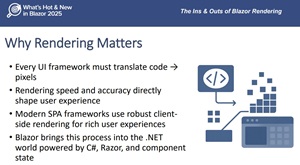
Why Rendering Matters
 [Click on image for larger view.] (source: Allen Conway).
Conway opened by emphasizing that every UI framework must convert code into pixels on the screen, and the efficiency of that process directly affects usability. He said modern frameworks succeed because they make small, incremental changes to the DOM rather than redrawing entire pages. According to Conway, this approach became a turning point around 2012 and 2013 as browsers matured and JavaScript frameworks adopted more efficient rendering strategies.
Against that backdrop, Conway explained how Blazor brings a similar model to .NET developers using C#, Razor, and component state. He said Blazor's approach is conceptually aligned with popular JavaScript frameworks but implemented in a way that takes advantage of .NET's type safety and predictable component structure.
How Blazor Differs from JavaScript Frameworks
 [Click on image for larger view.] (source: Allen Conway).
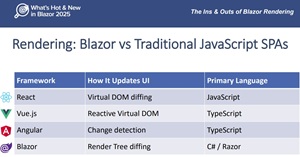
To orient Blazor within the broader landscape, Conway compared it to React, Vue, and Angular. He noted that React uses a virtual DOM, re-executing components and diffing the result against previous output. Vue tracks component dependencies in a reactive virtual DOM. Angular relies on what he described as zone-based change detection.
By contrast, he said Blazor uses a render tree that is more lightweight and structured than a virtual DOM. Instead of large JavaScript objects, the render tree consists of predictable frames representing elements, attributes, and text. Conway said the framework diffs these frames to determine minimal updates, resulting in efficient DOM changes.
The Blazor Rendering Pipeline
 [Click on image for larger view.] (source: Allen Conway).
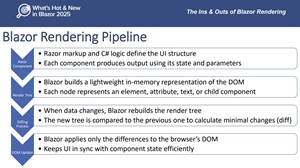
Conway walked through Blazor's four-step rendering pipeline:
- Razor markup and C# logic define the component's structure
- Blazor creates a lightweight in-memory render tree
- State changes trigger a rebuild of the tree and a diff against the prior version
- Blazor applies only the minimal differences to the DOM
He said this process allows Blazor to avoid full page rebuilds and update only the parts of the UI that changed. Conway also stressed that Blazor never mutates the DOM directly, instead computing the necessary changes based on render tree comparisons.
Component Lifecycle and State Updates
 [Click on image for larger view.] (source: Allen Conway).
The session also detailed how Blazor components re-render. Conway explained that components update when parameters change, when data bindings fire, or when developers explicitly trigger an update through the StateHasChanged method. He noted that rendering cascades from parent to child components, meaning a change higher in the hierarchy can trigger additional updates downstream.
Lifecycle events such as OnInitialized, OnParametersSet, and OnAfterRender provide hooks where developers can handle initialization, respond to parameter changes, or run logic after a rendering pass. Conway highlighted that out-of-band operations like background tasks require explicit re-rendering calls because they fall outside Blazor's automatic detection.
Optimizing Rendering
Conway shared several practices for predictable and efficient component updates. He recommended avoiding unnecessary re-rendering, using the @key directive to preserve element identity when rendering collections, isolating state in smaller components, and selectively preventing rendering through ShouldRender when appropriate. He also noted that immutable models can make diffs more predictable by allowing Blazor to determine changes more easily.
Server, WebAssembly, and the Role of SignalR
As part of the session, Conway explained how Blazor's rendering model is influenced by the underlying hosting technology. He said WebAssembly enables .NET assemblies to run inside the browser alongside JavaScript, but downloading the necessary runtime components can affect startup times. On the other hand, server-side rendering uses SignalR to establish a persistent connection, processing UI updates on the server and sending only the necessary changes to the client.
Conway noted that each approach has advantages and tradeoffs. SignalR-based rendering can offer fast startup but may be affected by high concurrent user counts, while WebAssembly provides full client-side execution once loaded.
Rendering Modes Introduced in .NET 8
A major part of the session focused on the rendering modes added in .NET 8 and enhanced in .NET 9 and .NET 10. Conway said earlier versions of Blazor required choosing between server and WebAssembly at the project level. The unified Blazor Web App model now allows developers to select a rendering mode per component through the rendermode directive.
He summarized the available modes:
- Static Server: prerendered HTML without interactivity
- Interactive Server: server-side interactivity over SignalR
- Interactive WebAssembly: client-side interactivity after WebAssembly loads
- Interactive Auto: starts as server-rendered and then uses WebAssembly when available
Conway said this flexibility lets developers mix rendering strategies within the same application, selecting the best approach based on startup expectations, required interactivity, or offline needs.
Choosing the Right Mode
 [Click on image for larger view.] (source: Allen Conway).
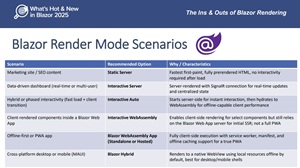
Different project types benefit from different rendering modes. Conway said Static Server is well-suited to marketing or SEO-focused pages that do not require interactivity. Interactive Server can support data-driven dashboards or real-time applications that rely on centralized state. Interactive Auto offers a hybrid model that provides fast initial load times while still enabling client-side execution. For offline-first scenarios, Conway noted that Blazor WebAssembly remains an option through standalone templates.
Live Coding Demonstrations
To reinforce the concepts, Conway also dove into nuts-and-bolts coding with screen-shared live demos of various techniques including component lifecycle behaviors, state management patterns, and other rendering-related examples. These demonstrations illustrated how the concepts discussed in the slides apply to real-world Blazor development workflows.
Conclusion
Conway concluded by reiterating that Blazor's unified rendering approach allows developers to dynamically choose whether components run on the server or in the browser while maintaining predictable, efficient updates. He said the combination of render tree diffing, flexible rendering modes, and familiar C# patterns gives .NET developers a streamlined path to building modern, interactive web applications without adopting an entirely separate JavaScript framework.
And Much More
Those are all concise summaries, of course, and you need to watch the on-demand replay to get the individual items fleshed out in detail -- along with many other actionable tips -- but this gives you the overall idea of Rivas' presentation.
And, although replays are fine -- this was just today, after all, so timeliness isn't an issue -- there are benefits of attending such summits and webcasts from Visual Studio Magazine and sister pubs in person. Paramount among these is the ability to ask questions of the presenters, a rare chance to get one-on-one advice from bona fide subject matter experts (not to mention the chance to win free prizes, such as the $300 AMEX gift card raffled off during this event thanks to the sponsor, DevExpress, which also presented a session).
With all that in mind, here are some upcoming summits and webcasts coming up in the next month or so from our parent company:
About the Author
David Ramel is an editor and writer at Converge 360.