News
VS 2026 Joins VS Code with Integrated Cloud Agent: Assign a Task, Close the IDE, Get a PR
Visual Studio has been playing catch-up with VS Code on agentic AI features for a while now. The latest step in that catch-up: Visual Studio 2026 has further integrated GitHub Copilot's cloud agent to the Copilot Chat picker, giving Windows IDE developers access to an async, PR-generating workflow that VS Code users have had longer.
It's understandable that the extension-driven VS Code editor gets AI features faster than the more monolithic IDE, and previous examples we've noted include "Hands On with Copilot Vision: VS Code's Head Start and How the IDE Is Catching Up" and "Visual Studio Catching Up to VS Code Editor in AI Tooling," the latter actually dating back to 2017, if you can believe that.
Microsoft yesterday announced the April 2026 update to Visual Studio 2026, v18.5 series, which includes the increased integration with cloud agent (still in preview). "This update brings cloud agent integration front and center, letting you start remote coding sessions without leaving the IDE," the company's Mark Downie said in a DevBlogs post. The feature actually appeared in preview last December.
In this instance, there wasn't really a big gap between when the cloud agent functionality appeared in the code editor and the IDE, both appearing in initial stages late last year, maybe eight weeks or so apart.
What Cloud Agent Is -- and Is Not
Most Copilot work in the IDE is synchronous and local: you prompt, the model responds, you stay in the loop. Now, when you select "Cloud" in VS 2026's Copilot Chat picker and send a task, Copilot asks permission to create a GitHub issue. That issue creation is the handoff point -- the moment you hand off local control to GitHub's infrastructure. From there, the cloud agent runs on GitHub Actions, clones your repo, does the work, and opens a pull request. You get a notification with a link to the PR. You can close Visual Studio in the meantime. The work continues without you.
That async, close-the-IDE-and-come-back workflow is the real story here. It is suited for well-defined, bounded tasks: adding a feature, writing tests, fixing a bug with a clear scope. It is not suited for exploratory back-and-forth, local-only projects, or anything requiring your immediate judgment in the loop. And it does have a cost dimension -- cloud agent draws from your monthly GitHub Actions minutes and Copilot premium request allowance, and the free Copilot tier is excluded entirely.
How It Appears in VS 2026
In testing on Visual Studio 2026 (version 18.5.2), the Cloud option was not visible in the Copilot Chat agent picker with a solution open but not connected to a remote repository. After connecting the project to a new GitHub-hosted repository via Git > Create Git Repository > Push to new remote, Cloud appeared in the picker immediately, without a restart. No additional configuration was needed beyond the "Enable Copilot coding agent (preview)" checkbox in Tools > Options > GitHub > Copilot, which was already enabled by default.
Again, note that this feature is for very specific functionality -- it's not conducive to basic questions like examine and explain this project because it requires the creation of a GitHub issue and a pull request, which means it needs to be tied to a GitHub-hosted repository. Before I figured that out, I asked it a simple "examine and explain" question and was surprised I was prompted to submit a GitHub issue.
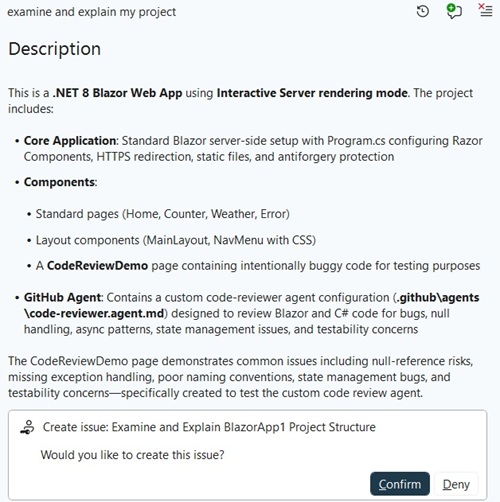 [Click on image for larger view.] GitHub Issue Required (source: Ramel).
"This is a different way of working that frees you up to focus on the parts of your project that need your full attention," Downie said.
If your solution isn't connected to a GitHub-hosted repo, the option simply doesn't appear, which is a more explicit way of surfacing the requirement than letting you select it and then fail at execution time.
The GitHub docs reference a setting called "Enable Copilot Cloud agent (preview)," but that label does not appear in the current VS 2026 UI. The only relevant toggle is "Enable Copilot coding agent (preview)" -- which aligns with GitHub's own note that the cloud agent was formerly called the Copilot coding agent. If that setting is checked and your solution is connected to a GitHub-hosted repo, Cloud will be available in the picker.
How It Compares to VS Code
VS Code surfaces cloud agent delegation differently -- via a dropdown at the left of the Copilot Chat input, labeled "Local" by default, with "Cloud" as an option. The underlying feature is the same: GitHub Actions runs the task, a PR comes back. The VS 2026 implementation has one notable UX difference: it gates the Cloud option in the picker on the presence of a GitHub-connected repository, so the option is simply absent if the precondition is not met. In VS Code, the option appears regardless and can be selected even without a GitHub-connected workspace -- where it would fail at execution time rather than at the selection stage. Neither approach is obviously better, but VS 2026's behavior does surface the requirement earlier and more explicitly.
The agent pickers are also worth comparing side by side (see figures below). Both include Cloud, Debugger, Modernize, and Profiler. VS Code adds two more -- Copilot CLI and Test -- a gap that reflects VS Code's extension-driven release cadence, which allows new agents to ship faster and more independently than the full IDE cycle permits. Given that VS 2026 has consistently picked up features that debuted first in VS Code, those two agents may well appear in the IDE in a future update -- though Microsoft hasn't announced a timeline for either.
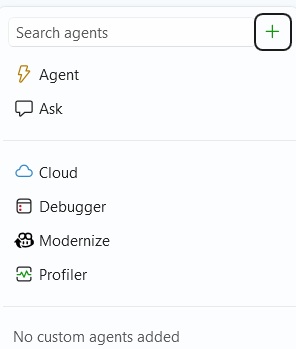 [Click on image for larger view.] VS 2026 Copilot Chat Agent Picker (source: Ramel).
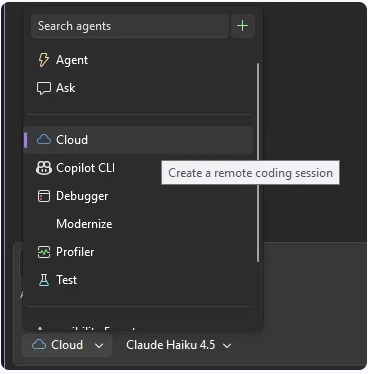 [Click on image for larger view.] VS Code Copilot Chat Agent Picker -- Copilot CLI and Test Are Absent from VS 2026 (source: Ramel).
What You Need
To summarize, to use cloud agent in VS 2026, you need a Copilot subscription at the Pro, Pro+, Business, or Enterprise tier -- the free tier is excluded. Your solution must be in a GitHub-hosted repository (not a local repo, not Azure DevOps). Copilot needs permission to create GitHub issues on your behalf, which it will prompt for on the first run. The feature is still in preview as of VS 2026 18.5.2.
For more on the broader April Update to Visual Studio 2026, including the IntelliSense prioritization change that affects how Copilot suggestions surface in the editor, see "Visual Studio 2026 Gives IntelliSense Priority in Longstanding Copilot Completion Clash."
About the Author
David Ramel is an editor and writer at Converge 360.