News
C++ Joins C# in Visual Studio's Deep Copilot Tier
Microsoft is expanding GitHub Copilot's deepest Visual Studio integration to C++, giving the AI assistant compiler-backed insight into entire C++ codebases so it can refactor and modify projects across multiple files. The new C++ code editing tools are now in public preview in the latest Visual Studio 2026 Insiders release, putting C++ alongside C# as the only two languages in Visual Studio positioned for this kind of symbol-aware, multi-file Copilot editing.
Microsoft's Dec. 16 announcement frames the feature around what it calls "refactoring at scale," describing large, wide-sweeping C++ edits as a common and taxing task that traditionally requires manual searches and incremental changes across many files.
The core change is that Copilot agent mode in Visual Studio can now call C++-specific code editing tools that expose rich, project-wide symbol information. Microsoft says these tools let Copilot go beyond file search and operate with greater context when making changes that span multiple files and sections of a codebase.
According to a Dec. 16 GitHub changelog entry, the tools extend Copilot's ability to understand and modify C++ code "at scale" by providing deep symbol awareness to support more reliable multi-file editing.
Both announcements describe the same set of core capabilities, including Copilot being able to:
- View all references across a codebase
- Understand symbol type, declaration, scope, and other metadata
- Visualize class inheritance hierarchies
- Trace function call chains
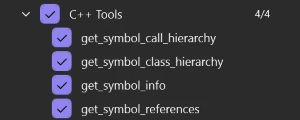 [Click on image for larger view.] C++ Tools List (source: Microsoft).
Microsoft also shared a private preview data point from a participant: "With C++ code editing tools for GitHub Copilot in Visual Studio, we've seen noticeably better overall results, with fewer errors and faster processing on large projects."
For many Visual Studio users, the significance is not that Copilot can write or suggest C++ code, but that Copilot is being wired into deeper IDE-level understanding of a C++ project. In Visual Studio, C# has long been the language most associated with deep semantic tooling, including reliable solution-wide refactoring, because the IDE can reason about symbols, types, and usage across an entire codebase.
This update is Microsoft applying a similar idea to C++: give Copilot agent mode access to the kind of symbol-level data needed to make coordinated changes across many files without relying only on text context. In practical terms, the pitch is fewer missed references when changing a function signature, updating ownership semantics, or applying a systematic refactor across a large C++ solution.
How To Enable the Public Preview
The GitHub changelog outlines a basic setup flow: open a C++ project in Visual Studio 2026 Insiders, enable the C++ code editing tools under Tools > Options in the GitHub Copilot settings area, reopen the solution if needed, then enable the specific tools from Copilot Chat using the Tools icon.
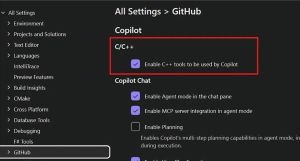 [Click on image for larger view.] C++ Tools Setting (source: Microsoft).
Microsoft notes that tool names and UI may change during the public preview.
What Microsoft Says Is Next
Microsoft says it plans to evolve its integration with Visual Studio tools and expand this kind of support to other Copilot surfaces, including Visual Studio Code. For now, the announcement marks a clear line: C++ is joining C# as a language where Copilot in Visual Studio is being positioned for deeper, project-wide refactoring workflows, not just file-by-file suggestions.
About the Author
David Ramel is an editor and writer at Converge 360.