Visual Studio Toolbox
Buzz About VS Code Extension for Codebase Visualization
A new Visual Studio Code extension called Nogic sparked a wide-ranging Hacker News discussion, with commenters praising its graph-based approach to understanding complex codebases while also raising concerns about performance, scalability, and its initially closed-source status.
A Visual Studio Code extension called Nogic drew significant attention on Hacker News
after being shared as a Show HN project. The extension visualizes a codebase as a graph, aiming to help developers understand structure and relationships as projects grow larger and more complex.
Nogic is a free tool with 4,872 installs as of this writing and a 4.3 out of 5 rating from seven reviewers.
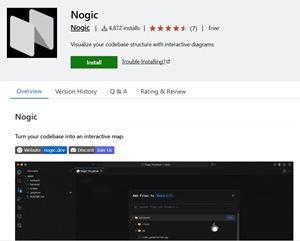 [Click on image for larger view.] Nogic (source: davelradindra).
Listed features include:
- Unified View -- Browse files, classes, and functions in a hierarchical graph
- Boards -- Organize specific parts of your codebase into focused views
- Quick Search -- Find elements with Cmd/Ctrl+K
- Quick Add -- Add code components with Cmd/Ctrl+I
- Auto-sync -- Code changes reflect automatically in the visualization
 Built-in Retina Display in Action (source: davelradindra).
The creator (davelradindra) explained in the nine-day-old thread the motivation behind the tool by writing, "AI tools make code grow faster than developers can build a mental model by jumping between files." They added that "exploring structure visually has been helping me onboard to unfamiliar codebases faster."
Interest in Visual Code Exploration
Many commenters responded positively to the idea of graph-based code visualization. One wrote, "Very cool visualization," while another said, "This is incredibly needed!!" Several compared Nogic to existing tools, including Code Canvas and earlier approaches such as Doxygen-generated call graphs.
Some developers described how visualization tools are becoming more relevant alongside AI-assisted development. One commenter said, "With AI coding agents, I keep watching the visualization rather than the changeset first."
Performance and Scalability Feedback
Performance emerged as a common concern. One user reported that Nogic was "very slow on a not too complex codebase," adding that it ran at "like 5-10FPS at best, not really usable unfortunately." Another said the extension "crashes on a more complex project" after adding a folder with "2000+ files."
In response, the creator acknowledged the feedback, stating, "We are actively improving on the performance!" and noting prior experience with similar tools by adding, "I am a previous code canvas user too."
Closed Source Concerns
A recurring theme in the discussion was hesitation around the extension being closed source. One commenter wrote, they "will always skip closed source editor extensions," citing security and trust concerns. Another was more direct, stating, "Closed source vscode extensions: not for me."
Several commenters argued that delaying open sourcing could limit adoption. One said, "not open sourcing it is a mistake," while another wrote, "until it's open-sourced, it'll be a nope for me."
The creator repeatedly responded to these concerns by saying, "We will make it open source soon!"
Language Support and Ecosystem Fit
Language coverage was also discussed. One commenter noted that the extension currently supports "Only JS, TypeScript, and Python," adding, "You got me all excited for a C visualizer!" Others debated the feasibility of code graphing in dynamically typed ecosystems, with one stating, "it's an unsolvable problem without static type annotations."
Availability across VS Code derivatives also came up, with requests to publish to Open VSX. The creator later confirmed broader availability, responding, "It's available on Open VSX now!"
About the Author
David Ramel is an editor and writer at Converge 360.