News
Visual Studio Insiders Further Refines Copilot Usage Tracking
In the wake of GitHub Copilot sticker shock following a switch to usage-based billing last month, Microsoft is further integrating Copilot usage information into Visual Studio, adding a direct path from the chat prompt box to developers' monthly plan details as it continues to address the impact of the move.
The July 2026 Visual Studio 2026 Insiders release notes describe an "Access your Copilot usage" improvement in Visual Studio 18.9. Developers can click the donut chart in the upper-right corner of the Copilot prompt box to see how much of the current conversation's context window has been consumed, then use a new button to open their full Copilot plan-usage details.
The existing route through the Copilot badge menu remains available, so the change primarily brings monthly usage information closer to the place where developers are actively interacting with Copilot. "Jump to your Copilot plan usage from the context window or the badge menu, whichever works best for you," Microsoft said.
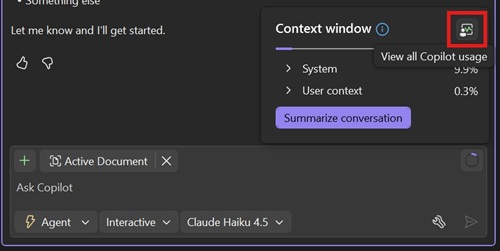 [Click on image for larger view.] "Click the donut chart in the upper right corner of your prompt box to see your context window usage, then click the button to open your full plan usage details." (source: Microsoft).
The distinction between the two measurements is important. The donut chart itself reports consumption of the current chat's context window, which can include conversation history, attached files and other information sent to the model. Rather than being a monthly AI Credit meter, the new control connects that context view to the separate plan-usage window.
Microsoft also said it has "refined the usage window and notifications to make them clearer and easier to act on," adding that developers will be told when they are approaching their limit and what options they have for continuing. The release notes do not identify new measurements or alert types, however.
That makes the Insiders work an incremental user-interface refinement rather than a new Copilot usage-tracking system. The core functionality arrived in the Visual Studio June stable update, which refreshed the Copilot Usage window with real-time monthly usage information and made it accessible through the Copilot badge menu.
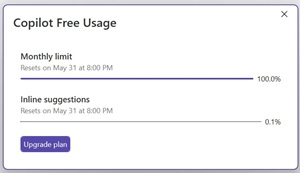 [Click on image for larger view.] Refreshed Copilot Usage Window In June Stable Build (source: Microsoft).
That release also introduced proactive alerts when developers approach or reach a limit and when paid overages activate. The quota-warning threshold can be configured to determine how early those notifications appear. The development was previously examined in "Visual Studio Takes Aim at Copilot Billing Shock."
At the time, Microsoft called the June improvements "the start of a broader investment in Copilot usage visibility" and told developers to expect more in upcoming releases. The new prompt-box entry point and notification refinements appear to be the next installment in that effort.
Tracking a New Billing Problem
GitHub activated usage-based billing for Copilot plans on June 1, changing the unit of consumption to GitHub AI Credits. Copilot interactions consume input, output and cached tokens, with the model selected and the number of tokens consumed determining the resulting credit charge.
The transition quickly prompted complaints from developers who said routine prompts, long conversations and agentic workflows could consume large portions of their monthly allowances. Developer reaction was examined in "Copilot Billing Shock Hits Developers."
Microsoft and GitHub have since introduced a steady stream of measures intended to expose, control or reduce that consumption. They have included a Copilot spend meter in Visual Studio Code, session-level cost information, user and organizational budget controls, and reporting that shows AI Credits consumed during the current billing cycle.
Microsoft has also begun measuring whether new agent functionality justifies its token consumption. A public Agent Skills evaluation dashboard, for example, compares quality, execution time and token usage with and without individual skills. A broader review of the company's meters, caps and token-saving measures is available in "Copilot AI Billing Shock Met with Meters, Caps and Token-Saving Tools."
The Visual Studio Insiders improvement shows how the dev team is still focusing on this issue.
More Cost Context in the Model Picker
The same Insiders update redesigns Visual Studio's Copilot model picker and adds a more comprehensive model-management view.
Developers can pin commonly used models to the top of the picker and collapse models they use less frequently. A new Manage models command opens an expanded view showing cost information, capabilities and context-window sizes for each model. Custom models and Copilot-provided models can also be managed from the same interface.
The cost information is particularly relevant under usage-based billing because different models have different token prices. The expense of a Copilot interaction depends on both the selected model and the number of input, output and cached tokens involved.
Together, the two improvements continue Microsoft's effort to retrofit greater cost visibility into Copilot development workflows. They do not change the underlying billing system, but they make it easier for Visual Studio developers to find usage information and consider model cost before additional credits are consumed.
About the Author
David Ramel is an editor and writer at Converge 360.