News
VS Code Team Member Blames User Trust Decisions in Repo-Based Attacks
A Visual Studio Code team member pushed back on criticism that VS Code is enabling threat actors to compromise developers through malicious repositories, arguing that the editor's Workspace Trust model is designed to prevent exactly that scenario -- and that users who click through the warning are bypassing the intended protection.
This occurred in a robust discussion thread (301 comments) in a Hacker News post submitted by Jamf Threat Labs, which on Jan. 20 published "Threat Actors Expand Abuse of Microsoft Visual Studio Code," describing how threat actors are abusing VS Code task configuration files to execute malicious commands when victims clone and open booby-trapped Git repositories.
A related issue is malicious VS Code extensions, which have long been a problem. We reported on this threat in December (see "Threat Actors Keep Weaponizing VS Code Extensions").
VS Code Team Member: Workspace Trust Is the Security Model
A commenter with the handle Tyriar (Daniel Imms) framed the reported technique as a case of users granting trust to untrusted code, rather than a hidden or silent exploit path in the editor.
"VS Code team member here :wave:" Tyriar wrote. "As called out elsewhere, workspace trust is literally the protection here which is being circumvented. You're warned when you open a folder whether you trust the origin/authors with pretty strong wording."
He emphasized that VS Code is not a passive text editor and that code execution is inherent to the tool's purpose and ecosystem.
"VS Code is an IDE and the core and extensions can execute code based on files within the folder in order to provide rich features like autocomplete, compilation, run tests, agentic coding, etc."
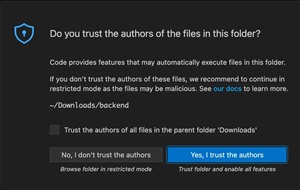 [Click on image for larger view.] Trusting Authors (source: Jamf Threat Labs).
Tyriar argued that even if automatic tasks were disabled by default, users could still be exposed once they trust a malicious workspace. "Even if automatic tasks were disabled by default, you'd still be vulnerable if you trust the workspace."
Restricted Mode as the Alternative
A major point of Tyriar's responses was that users have an option not to trust a folder, and that Restricted Mode exists specifically to limit risk when opening unfamiliar repositories.
"It's perfectly fine to not trust the folder, you'll just enter restricted mode that will protect you and certain things will be degraded like language servers may not run, you don't be able to debug (executes code in vscode/launch.json), etc."
Tyriar also described Workspace Trust as a response to an earlier period where warnings were fragmented across features and extensions.
"Before workspace trust existed, we started noticing many extensions and core features having their own version of workspace trust warnings popping up. Workspace trust unified this into a single in your face experience."
He recommended using folder structure and pre-configured trust settings to avoid repeatedly making trust decisions while still keeping unknown projects isolated.
"I personally have all my safe git clones in a dev/ folder which I configured to trust, but I also have a playground/ folder where I put random projects that I don't know much about and decide at the time I open something."
Criticism: Warning Fatigue and User Confusion
Other participants in the discussion challenged the idea that a modal warning is sufficient protection, arguing that many users will click through it without understanding the implications.
One commenter said, "Even after years of using Code, I don't know the precise definition of 'restricted mode'." Another argued the warning reads like boilerplate: "Code provides features that may automatically execute files in this folder."
Tyriar defended the wording and said it was intentionally short and general because the behavior depends on extensions and workspace contents.
"'May' is the most correct word though, it's not guaranteed and VS Code (core) doesn't actually know if things will execute or not as a result of this due to extensions also depending on the feature."
He added that the team intentionally avoided overwhelming users with more technical detail in the initial decision point, "but we determined this is probably too much information and instead tried to distill it to simplify the decision."
Potential Changes Raised in the Thread
While defending the current model, Tyriar also acknowledged feedback that users often open folders for quick one-off edits and log inspection, not necessarily for full IDE workflows.
After a commenter described real-world situations where developers open unfamiliar folders under time pressure, Tyriar replied: "Good point about one off edits and logs, thanks for all the insights. I'll pass these discussions on to the feature owner!"
Tyriar also suggested that VS Code could avoid prompting for trust in certain high-risk locations.
"One thing I've got from this is we should probably open /tmp/, C:\, ~/, etc. in restricted mode without asking the user. But a lot of the solutions proposed like opening everything in restricted mode I highly doubt would ever happen as it would further confusion, be a big change to UX and so on."
He said he created follow-up issues tied to the discussion, including: "Revise workspace trust wording 'Browse'" and "Don't ask to enable workspace trust in system folders and temp directories."
Tasks Default Change Planned for VS Code 1.109
In another exchange, a researcher argued VS Code should warn specifically when a tasks file exists, especially when it includes a "command" parameter and when presentation settings hide evidence of execution.
Tyriar responded with a planned product change: "We're planning on switching the default in 1.109 with https://github.com/microsoft/vscode/issues/287073".
However, he cautioned against treating tasks as the only risk factor in a trusted workspace.
"Tasks is just one of the things this enables, and in the core codebase we are unable to determine what exactly it enables as extensions could do all sorts of things."
Tyriar reiterated that the modal trust decision is intended to capture the broader risk model.
"At a certain point, it's really on the user to not dismiss the giant modal security warning that describes the core risk in the first sentence and say they trust things they don't actually trust."
AI Adds Pressure for Better Isolation
As commenters noted that VS Code is increasingly used by non-developers through AI-assisted workflows, Tyriar said AI increases complexity and called out sandboxing as an area of active investment.
"AI certainly made everything in this area more complicated," he wrote. "I 100% agree about sandboxing and we have people investing in this right now, there's an early opt-in version we just landed recently in Insiders."
Tyriar also argued that threat detection based on specific files or folders is incomplete in an AI-driven environment, where the attack surface can include content such as prompts.
"In this new LLM-assisted world a malicious repository could be as innocuous as a plain text prompt injection attack hidden in a markdown file."
Jamf: Repo-Based Attacks Abusing VS Code Tasks
Jamf Threat Labs said the activity it tracked begins when a victim clones and opens a malicious Git repository, often under the pretext of a recruitment process or technical assignment. The repositories identified in this activity are hosted on either GitHub or GitLab and are opened using VS Code.
When the project is opened, VS Code prompts the user to trust the repository author. Jamf said that if trust is granted, the application automatically processes the repository's tasks.json configuration file, which "can result in embedded arbitrary commands being executed on the system."
On macOS, Jamf said this results in a background shell command using nohup bash -c and curl -s to retrieve a remote JavaScript payload and pipe it directly into Node.js, enabling execution to continue even if VS Code is terminated.
What the Exchange Shows
The Jamf report highlights how threat actors are integrating malware delivery into common developer workflows. The Hacker News discussion shows that Microsoft is defending Workspace Trust as a foundational security model for VS Code, while also receiving feedback that the warning experience may not match real-world user behavior.
Tyriar's replies suggest the VS Code team is aware of that gap and is considering adjustments to defaults and messaging, while also emphasizing that VS Code is a developer tool designed to execute code and automate workflows once a workspace is trusted.
About the Author
David Ramel is an editor and writer at Converge 360.