In-Depth
Beyond the Magic Word: Testing VS Code 1.109's New Agentic AI Workspace Priming
The January 2026 update to Visual Studio Code (v1.109) marks a significant shift in how GitHub Copilot interacts with specialized developer workflows.
While previous versions required users to manually invoke specific skills, the new release introduces workspace "priming" via the /init command. This allows the AI agent to proactively recognize context and suggest multi-step workflows the moment a file is opened.
The VS Code 1.109 update post says: "When you run /init
, the agent discovers existing AI conventions in your workspace (such as copilot-instructions.md
or AGENTS.md
), analyzes your project structure and coding patterns, and generates comprehensive workspace instructions tailored to your project. The /init
command is implemented as a contributed prompt file, so you can customize its behavior by modifying the underlying prompt."
Because I had earlier toyed around with new Agent Skills tech (see "Hands On with New Experimental GitHub Copilot 'Agent Skills' in VS Code"), I had a ready-made setup in VS Code to see if it could improve my workflow for my "quote-cleaner" skill, which started out as a simple PoC test to see if it could change curly quotes to straight quotes for our CMS, but which I have since evolved into a robust agent to handle all the formatting for articles from different freelancers, as well as provide summaries, fill out a Key Takeaways box and generate social media posts to promote the article without me having to explicitly ask for it. As it is now, it's set up so in the GitHub Copilot Chat window I have to say "format this [freelancer name] article."
So I was wondering if /init would allow the agent to recognize that when I open an unformatted article draft, it should automatically apply the quote-cleaner workflow for a specific freelancer without me having to explicitly ask for it (my SKILL.md file has different sections on how to handle formatting for different freelancer articles). The answer is yes, and in this article I'll share the results of my testing of this new feature, which I found to be a small upgrade in how I interact with AI agents in VS Code, but which proves the concept and could result in significant improvements for coders or even my journalistic use case, with more work (this was written the day after the announcement).
The Handshake: Indexing with /init
The core of this update is the ability for the agent to index a project's unique structure and instruction set before a task begins. In my hands-on test, running the /init command caused the agent to scan the .github/skills/quote-cleaner/SKILL.md file and existing project guidelines. The agent confirmed this "handshake" by reporting that it had updated workspace instructions to reflect the content-repo structure and the required Quote Cleaner workflow.
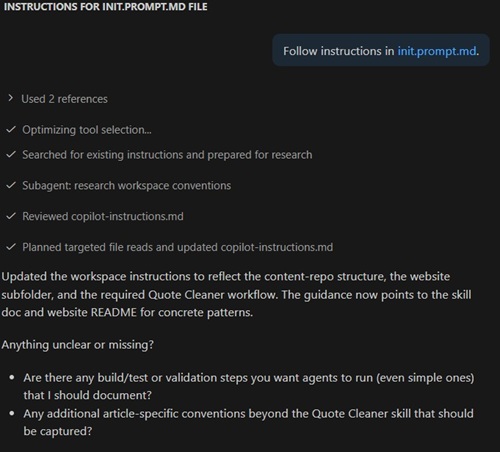 [Click on image for larger view.] Updated Instructions (source: Ramel).
Proactive Recognition: The McCaffrey Test
The real-world utility of this priming became evident when opening an unformatted HTML article draft from a freelancer with the last name of McCaffrey, who writes code-heavy data science tutorials. Without an explicit request to "format this McCaffrey article," a generic query about "next steps" triggered a sophisticated analysis. The agent identified the file as a "McCaffrey article draft" and noted it was missing CMS-ready formatting steps. This demonstrates that the agent is now monitoring the active editor for markers--such as "Listing 1" or specific authorial placeholders--that match the indexed SKILL.md.
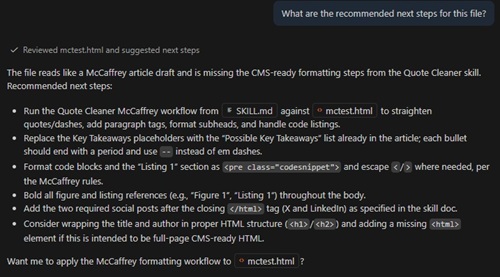 [Click on image for larger view.] Chat Response (source: Ramel).
Orchestrating Complex Editorial Workflows
Beyond simple identification, the v1.109 agent mapped out and executed a comprehensive plan. In my live test, the agent processed 23,201 bytes of raw HTML, reducing it to 23,017 bytes of cleaned, CMS-ready code. Notably, the agent displayed "agentic intuition" by automatically fixing a side effect where the quote-cleaner had inadvertently altered file paths inside code blocks--a level of detail that usually requires manual intervention.
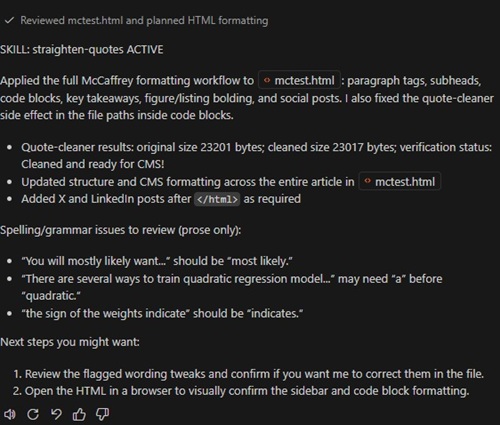 [Click on image for larger view.] Chat Recap (source: Ramel).
Technical Sidebar: Post-Execution Audit
| Task Category | Agent Output/Result |
| Quote Cleaning | Original: 23201 bytes | Cleaned: 23017 bytes. Status: "Cleaned and ready for CMS!" |
| Contextual Fixes | Automatically corrected quote-cleaner side effects in code block file paths. |
| Editorial Review | Flagged subject-verb agreement (e.g., "weights indicate" vs "indicates") and missing articles. |
| Social Generation | Generated X and LinkedIn posts appended after the closing </html> tag. |
Conclusion: From Tools to Teammates
The January 2026 release of VS Code effectively moves the AI agent from a tool you command to a teammate that anticipates your needs. By combining /init workspace priming with the new Agent Sessions view, VS Code has created an environment where complex, rule-based tasks--like technical journalism editing--can be automated with high confidence and minimal user prompt engineering.
The "agentic" capabilities in v1.109 extend far beyond simple code generation. The release introduces a specialized Subagent architecture that allows a primary agent to delegate tasks to independent, parallel "workers" without exhausting the main context window. This means while your primary agent manages the overarching article structure, it can simultaneously deploy a Search subagent to verify external facts and a formatting subagent to apply CMS tags--all running concurrently to maximize efficiency.
Furthermore, the integration of Model Context Protocol (MCP) Apps allows these agents to have a "visual voice." Instead of just outputting text, agents can now render interactive UI components--like tables or task boards--directly in the chat, allowing you to reorder content or approve edits with a single click. Combined with the new Copilot Memory feature, which lets agents "remember" your specific editorial quirks across sessions, VS Code is no longer just a text editor--it is a mission control for an AI-driven editorial desk.
About the Author
David Ramel is an editor and writer at Converge 360.