In-Depth
Why Copilot's Auto Mode for AI Models Ignores Your Actual Task
When you fire up an AI Chat session with GitHub Copilot in Visual Studio Code or Visual Studio 2026, you might expect the initial model used to assist you is based on the specific coding task you're working on. But that's not the case.
Rather than a fixed default model, you start with, "Auto," a mechanism designed first to avoid degraded service and rate limits by selecting from an allowed pool (for example GPT-5/mini, Claude Sonnet/Haiku, GPT-4.1) based on availability, plan, and org policy; Microsoft and GitHub have publicly outlined a next step to make Auto task-aware, yet they've stopped short of announcing general availability for that behavior.
According to a December 2025 GitHub Changelog, the service currently routes users to "readily available, high quality models" primarily to mitigate rate limits and manage global capacity. However, the company noted that the system is slated for an upgrade where it "will become even more intelligent, gaining enhanced capabilities that allow Copilot to select the most appropriate model for your task, matching the model to the complexity level of your request." September 2025 documentation for Visual Studio Code echoes this roadmap, stating that "as we introduce picking models based on task complexity, this behavior will change over the next iterations." For now, the implementation remains an infrastructure-first tool, further incentivized by a "10% request discount" for paid subscribers who utilize the Auto setting instead of manually locking in a specific high-reasoning model.
Similarly, a September 2025 GitHub Changelog for VS Code addressing Auto model selection said that “while this preview of auto optimizes for availability,” the team is “actively working on future updates to make it more intelligent to account for your task.”
And yet here we are in February 2026 and other factors like availability and policy compliance still take precedence over explicit task matching in Auto model selection, which is the default for new users. This means that if you're working on a complex coding problem, you might not get routed to the most powerful model that could assist you best, but rather to one that's currently more available or compliant with your organization's policies.
Why might that be?
The gap between the "task-aware" vision and today's reality likely stems from the logistical challenges of real-time model routing and global service stability. While Microsoft has not explicitly detailed specific technical hurdles, that September 2025 VS Code blog post confirms that the "immediate goal" for the Auto mechanism is to "manage capacity" and "reduce the likelihood of rate limits." This infrastructure-first priority ensures service stability for millions of concurrent users, particularly as the system navigates a model deprecation window in February 2026 that sees older versions of GPT and Claude retired on Feb. 17. By prioritizing availability, the broker can maintain a "10 percent request discount" for paid subscribers--effectively a financial incentive to remain in a load-balanced ecosystem rather than manually locking into specific high-reasoning models that may be under heavy strain.
Furthermore, the "Auto" selection remains strictly bound by a user's subscription tier and remaining monthly allowance. According to GitHub's billing documentation, premium models are subject to multipliers that draw down a monthly quota of "premium requests." If a paid user exhausts this allowance, the Auto mechanism is designed to pivot to a "0x multiplier" model--such as GPT-4.1--to prevent service interruption. This creates a scenario where the system's primary mandate is to respect billing caps and policy constraints, which currently takes precedence over the inherent complexity of a developer's prompt. For now, the implementation serves as a reliable traffic controller, leaving task-specific optimization as a documented "next step" that remains in the works.
While the "Auto" broker currently acts as an infrastructure manager, Microsoft has included transparency features to help developers audit these behind-the-scenes decisions. In both Visual Studio 2026 and VS Code 1.109, you can get a full list of models by opening up a pick list. Also, you can see exactly which model was selected for a specific turn by hovering over the chat response. This tooltip reveals the model name and the applicable multiplier, allowing you to verify if the broker opted for a high-reasoning model like Claude Sonnet or pivoted to a high-speed variant to avoid latency. For many users, this audit trail is the only way to confirm whether the "10 percent discount" was applied to a premium request or if the system defaulted to a "0x" model due to quota limits.
As a GitHub Copilot Pro subscriber, some of the models I have access to are shown below.
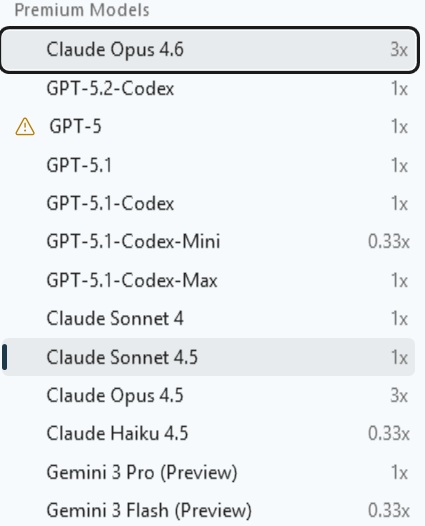 Some of My Visual Studio 2026 Community Edition Models with a Copilot Pro Subscription (source: Ramel).
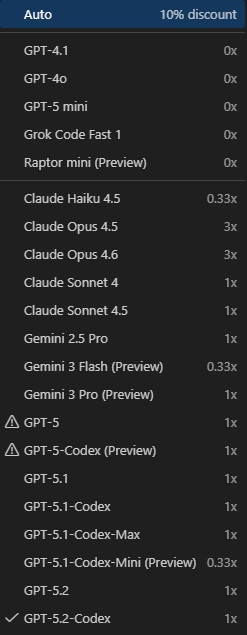 Some of My VS Code 1.109 Models with a Copilot Pro Subscription (source: Ramel).
For developers who require consistent reasoning power and wish to bypass the availability-first logic of the broker, manual control remains an option. By clicking the model picker in the chat window, you can shift from "Auto" to a specific model, though doing so forfeits the 10 percent usage discount.
Here's a comparison of some of the more popular models available in VS Code and Visual Studio, along with their ideal use cases and cost multipliers.
Furthermore, power users in VS Code can now use settings.json to define permanent model overrides for specific sub-tasks, ensuring that critical functions like the "Plan" or "Fix" agents always leverage the most capable models regardless of the general chat window's setting. Until Microsoft delivers on its vision of a truly task-aware broker, these manual configurations remain the best way to ensure that the AI's capability actually matches the complexity of the code.
About the Author
David Ramel is an editor and writer at Converge 360.