News
WinForms Gets Some AI Love in Visual Studio February Update
Microsoft yesterday published its "Visual Studio February Update," describing changes across AI assistance, debugging, testing, and modernization scenarios.
According to the post, the features are available in the Visual Studio 2026 Stable Channel as part of the February 2026 feature update (18.3).
The update introduces a WinForms Expert agent intended to guide common WinForms development tasks and pitfalls. Microsoft says it covers guidance on "Designer vs. regular code," modern .NET patterns (including .NET 8-10), layout recommendations using TableLayoutPanel and FlowLayoutPanel, CodeDOM serialization rules, and exception handling patterns for async event handlers. The post also says, "The WinForms Agent is automatically implemented and included in the system prompt when necessary."
WinForms remains supported and continues to ship updates with each .NET release for Windows-only desktop apps, while Microsoft's current .NET UI investments include Blazor for web UI and .NET MAUI for cross-platform client apps.
Smarter Test Generation with GitHub Copilot
Visual Studio now includes an integrated unit test generation workflow using GitHub Copilot. Microsoft describes invoking the workflow by typing "@Test" in GitHub Copilot Chat and notes support for xUnit, NUnit, and MSTest. For more details on the workflow and supported scopes, see: Overview of GitHub Copilot testing for .NET.
Slash Commands for Custom Prompts
Microsoft says Copilot Chat now supports surfacing custom prompts via slash commands: type "/" and custom prompts appear at the top of the list with a bookmark icon. The update also adds "/generateInstructions" (described as generating a copilot-instructions.md file using repository context such as coding style and preferences) and "/savePrompt" (described as extracting a reusable prompt from the current thread and saving it for later use via "/" commands).
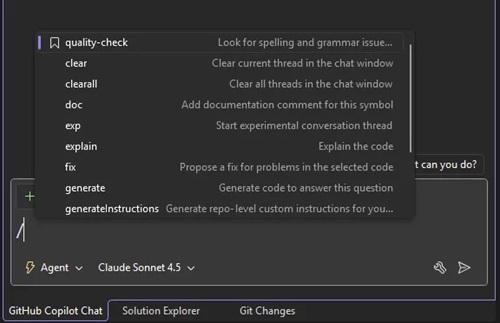 [Click on image for larger view.] Slash Commands for Custom Prompts (source: Microsoft).
C++ App Modernization Public Preview
The February update notes that GitHub Copilot app modernization for C++ is available in public preview. Microsoft describes it as helping update C++ projects to newer MSVC versions and resolve upgrade-related issues. For the associated documentation, see: Modernize your C++ project with GitHub Copilot app modernization.
DataTips in IEnumerable Visualizer
Microsoft says you can now use DataTips in the IEnumerable Visualizer while debugging. The post describes hovering over a cell in the visualizer grid to see a DataTip showing the full object behind that value, intended to simplify inspection of collections containing complex or nested data.
Analyze Call Stack with Copilot
Microsoft says Visual Studio now supports analyzing the call stack with Copilot when debugging stops. The post describes selecting "Analyze with Copilot" in the Call Stack window to get an explanation of why the app is not progressing, such as whether the thread is waiting on work, looping, or blocked. For additional Microsoft documentation on Copilot-assisted debugging actions in Visual Studio, see: Debug with GitHub Copilot.
Profiler Agent with Unit Test Support
Microsoft says the Profiler Agent ("@profiler") now works with unit tests. The post describes using existing unit tests to measure performance changes and says the agent can discover relevant unit tests or BenchmarkDotNet benchmarks that exercise performance-critical code paths. If suitable tests or benchmarks are not available, Microsoft says the agent can create a small measurement setup to capture a baseline and compare results after changes, and notes this approach can be useful for C++ projects where benchmarks are not always practical.
Faster and More Reliable Razor Hot Reload
For Razor and Blazor workflows, Microsoft says Hot Reload is now faster and more reliable by hosting the Razor compiler inside the Roslyn process. The post also says the update reduces blocked edits and increases the number of changes that can apply without a rebuild, including file renames and several previously unsupported code edits. When a rebuild is still required, Microsoft says Hot Reload can automatically restart the app instead of ending the debug session.
About the Author
David Ramel is an editor and writer at Converge 360.