News
VS Code 1.110 Ships with Agent Plugins, Browser Tools and Session Memory
Visual Studio Code 1.110 is now available in the stable channel, with Microsoft positioning the release around making agents more usable for longer and more complex workflows. "This release makes agents practical for longer-running and more complex tasks, giving you more control and visibility, new ways to extend agents, and smarter session management," the team said.
The March 4 release (labeled the February 2026 version) details a set of agent-focused additions, including plugins, an experimental set of browser tools, session memory improvements, manual context compaction, chat session forking, and a new Agent Debug panel, along with updates across chat accessibility, the terminal and debugging. Full details are in the VS Code 1.110 release notes.
Agent Plugins Add Packaged Customizations
VS Code 1.110 introduces agent plugins, described as installable bundles of chat customizations distributed via plugin marketplaces and surfaced in the Extensions view. In documentation that accompanies the release, Microsoft defines them this way: "Agent plugins are prepackaged bundles of chat customizations that you can discover and install from plugin marketplaces in Visual Studio Code."
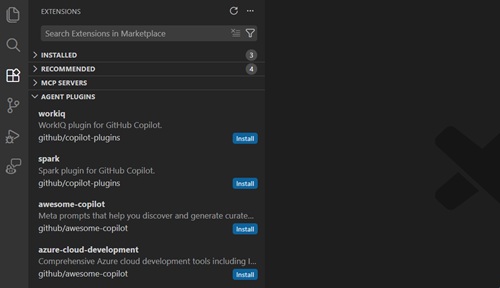 [Click on image for larger view.] Agent Plugins (source: Microsoft).
The team notes that Agent plugins are currently in preview and points to the agent plugins documentation for details, including the setting used to enable or disable support (chat.plugins.enabled) and the types of customizations plugins can bundle.
Microsoft also describes how plugin discovery is integrated into the Extensions experience, including searching for and installing agent plugins. The feature is presented as one of several ways to extend and manage agent behavior alongside prompts, skills, hooks and other customizations referenced throughout the update.
Experimental Agent Browser Tools Build on Integrated Browser
VS Code 1.110 adds a set of tools intended to let agents read from and interact with the product's integrated browser. The release notes frame the feature as an extension of work started in the prior release: "In the previous release, we added a new integrated browser in VS Code desktop which lets you interact with web pages directly within the editor." Building on that, the team wrote, "In this release, we added a set of tools for agents to read and interact with the integrated browser."
For background on how the browser capability was previewed in pre-release builds, see Visual Studio Magazine's earlier coverage of the Insiders build: "VS Code v1.110 Insiders: AI Agents Gain Native Browser Access and Global Instructions."
 [Click on image for larger view.] VS Code Insiders 1.110: Native Browser Integration in Chat. (source: Ramel).
The tools are marked Experimental in the notes and are controlled by a setting (workbench.browser.enableChatTools). Microsoft says that as the agent interacts with a page, "it sees updates to page content and any errors and warnings in the console," and adds, "The tools work out of the box without the need to install any extra dependencies." The release notes enumerate the tool surface (including page navigation, content and appearance, user interaction, and custom browser automation: runPlaywrightCode), and describe how pages opened by the agent run in private, in-memory sessions by default, with explicit sharing required to give the agent temporary access to a page in the integrated browser.
For baseline context on the embedded browser itself, Microsoft maintains a separate Integrated Browser documentation page.
Session Memory, Compaction and Forking Target Longer Conversations
Several updates in 1.110 focus on sustaining longer agent sessions without losing context or requiring users to restart from scratch. Under "Session memory for plans," the notes state: "Plans created by the Plan agent now persist to session memory and stay available across conversation turns." The release notes add that, "When you ask for refinements, the agent builds on the existing plan instead of starting from scratch."
For managing growing conversation history, the release introduces manual context compaction controls alongside automatic compaction behavior. The notes describe compaction as a way to "free up context space" and document the /compact slash command for manual use. Microsoft also provides additional guidance in its documentation on managing context for AI, which covers how context is assembled and managed for Copilot Chat experiences.
VS Code 1.110 also adds chat session forking to support branching approaches. Microsoft describes it in documentation as follows: "Forking a chat session creates a new, independent session that inherits the conversation history from the original session." The same page notes that "The forked session is fully separate from the original, so changes in one session do not affect the other," and documents two mechanisms: using /fork or forking from a checkpoint. Details are in the Manage chat sessions documentation.
New Agent Debug Panel and Background Agent Improvements
A new Agent Debug panel arrives in preview to help developers understand what happens during agent runs, especially as customizations accumulate. "The Agent Debug panel gives you deeper visibility into your chat sessions and how your chat customizations are loaded," Microsoft explains in the release notes. The notes also say the panel "shows chat events in real time, including chat customization events, system prompts, tool calls, and more" and that it "replaces the old Diagnostics chat action with a richer, more detailed view."
Background agents are another focus area in 1.110. The release notes describe a series of improvements meant to align background agent capabilities and experience with local and cloud agents, including compaction controls and expanded availability of chat customization options as slash commands. Microsoft also maintains a dedicated page for background agents, describing them as sessions that "run autonomously on your local machine while you continue other work in the editor" and report progress back to chat.
Chat Accessibility and UI Refinements
Beyond agent features, Microsoft includes an accessibility-focused section that targets screen reader support, keyboard navigation and chat interaction awareness. "This release improves screen reader support, keyboard navigation, and awareness of chat interactions so that every developer can work effectively with VS Code's AI features," the notes state. Among the changes described are a toggle for including thinking content in the accessible view, improvements to the question carousel for screen reader users (including navigation keys), and notification signals for chat questions and confirmations.
The update also adds configuration for chat-related notifications. In a section on OS notifications for chat responses and confirmations, Microsoft explains that notifications previously appeared only when VS Code was not focused, and adds: "You can now configure these notifications to appear even when the window is in focus by setting the settings value to always." Separately, VS Code now supports configuring notification placement via workbench.notifications.position, with options top-right, bottom-right or bottom-left.
Terminal, Debugging and Source Control Additions
Outside the agent and chat work, VS Code 1.110 includes updates to the integrated terminal, debugging and source control. In the terminal, the notes state: "The VS Code terminal now supports the Kitty graphics protocol, enabling high-fidelity image rendering directly in the terminal," along with settings guidance for enabling image rendering.
In debugging, Microsoft documents JavaScript debugger changes including custom property replacements via Symbol.for('debug.properties') and an updated set of browser debugging controls (renaming Event Listener Breakpoints to Browser Options, and adding an "Emulate a focused page" option). In source control, the release notes describe a new setting (git.addAICoAuthor) to append a Co-authored-by trailer for commits with AI-generated contributions, and note that Git blame hover tooltips now show co-authors from commit trailers.
VS Code 1.110 is available now, with Microsoft providing installers across Windows, macOS and Linux from its update service and enumerating the new and updated settings throughout the release notes.
About the Author
David Ramel is an editor and writer at Converge 360.