News
Microsoft Launches Azure Skills Plugin to Give AI Coding Agents Real Azure Expertise
Microsoft has announced the Azure Skills Plugin, a new package designed to close the gap between writing code and getting that code running on Azure.
Microsoft this week explained the bundles curated Azure skills, the Azure MCP Server, and the Foundry MCP Server into a single install -- giving AI coding agents not just advice about Azure, but the actual tools to act on it.
The problem the plugin addresses is a familiar one for developers who work with AI coding assistants. Tools like GitHub Copilot and Claude Code are genuinely capable at generating and explaining code. Where they fall short is in the deeper judgment that cloud deployments require: selecting the right Azure service for a given workload, validating pre-flight requirements, managing permissions and quotas, and orchestrating an end-to-end deployment pipeline. Without structured guidance, agents tend to offer generic directions rather than actionable steps grounded in real Azure workflows.
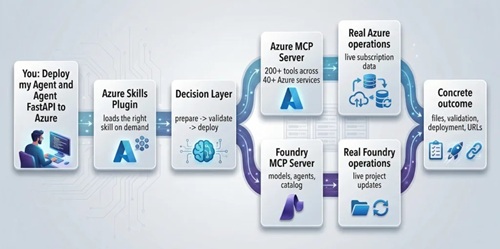 [Click on image for larger view.]The Flow (source: Microsoft).
Three Layers in One Install
The Azure Skills Plugin addresses that gap by packaging three distinct capability layers together.
The first layer is a set of more than 19 Azure skills -- detailed, reusable workflow instructions that teach an agent how Azure work actually gets done. These skills are not simple prompt snippets; they encode decision trees, sequencing logic, and guardrails drawn from real Azure expertise. Key skills include azure-prepare, which analyzes a project and generates infrastructure code and a deployment manifest; azure-validate, which runs pre-flight checks before a deployment attempt; azure-deploy, which orchestrates the pipeline through the Azure Developer CLI; azure-cost-optimization, which identifies waste and produces concrete savings recommendations; and azure-diagnostics, which troubleshoots live failures using logs, metrics, and KQL queries. The full set covers compute, storage, observability, AI, compliance, RBAC, messaging, and migration scenarios.
The second layer is the Azure MCP Server, now maintained inside Microsoft's consolidated MCP repository. MCP -- Model Context Protocol — is an open standard that lets a coding agent call external tools in a structured, auditable way. In practice, the Azure MCP Server exposes 200+ structured tools across 40+ Azure services, translating intentions into real operations: listing resources, checking prices, querying logs, running diagnostics, provisioning infrastructure, and driving deployment workflows. Where the skills layer tells the agent what to do, the MCP layer gives it the hands to do it.
The third layer is the Foundry MCP Server, which connects the agent to Microsoft Foundry for model deployment, agent management, and model catalog work. Developers building AI-powered applications on Azure gain an execution layer specifically tuned to model and agent scenarios, rather than stopping at generic cloud guidance.
Works Across Agent Hosts
One of the plugin's stated design goals is portability. The same package can run inside GitHub Copilot in VS Code, Copilot CLI, Claude Code, and any other tool that supports the skills-and-plugins model. That means a team using multiple agent hosts does not need to maintain separate configurations or duplicate institutional knowledge across toolchains -- the Azure expertise travels with the plugin, wherever it is installed.
When installed, the plugin places Azure skills into a .github/plugins/azure-skills folder in the workspace and configures the MCP servers through a .mcp.json file that the install process sets up automatically.
Why Skills Matter Now
According to Microsoft, the skills model is resonating with development teams because it solves a specific and practical problem: agents are capable but often lack the situational knowledge required to perform complex, multi-step work reliably. Skills load on demand, keeping the agent's context focused. They are stored as plain text, making them version-controlled, auditable, and easy to improve over time. And because they pair directly with MCP servers, they combine workflow guidance with an execution layer in the same package.
Microsoft emphasizes that this approach requires thoughtful use of real credentials and real Azure resources. The recommended security posture relies on curated skills from trusted sources, explicit tool approvals, and least-privilege access -- treating the agent as a capable but supervised collaborator rather than an autonomous actor.
Getting Started
Prerequisites include a compatible agent host such as GitHub Copilot in VS Code or Claude Code, Node.js 18 or later, the Azure CLI signed in with az login, and optionally the Azure Developer CLI signed in with azd auth login for deployment workflows. The plugin is available at aka.ms/azure-plugin. The source and documentation for the skills package are on GitHub at microsoft/azure-skills.
Microsoft describes the Azure Skills Plugin as the first in a series. Upcoming posts from the team will cover step-by-step install guidance, an architectural deep dive into how skills and MCP work together, the core prepare-validate-deploy workflow, and a full walkthrough of deploying a real application to production entirely through a coding agent.
About the Author
David Ramel is an editor and writer at Converge 360.