The Data Science Lab
Random Forest Regression Using C#
Dr. James McCaffrey presents a complete end-to-end example of random forest regression to predict a single numeric value, implemented using C#. A random forest is a collection of basic decision tree regressors that have been trained on different subsets of the source training data. The technique reduces model overfitting to give more accurate predictions on new, previously unseen data.
The goal of a machine learning regression problem is to predict a single numeric value. For example, you might want to predict the price of a house based on its square footage, number of bedrooms, property tax rate, and so on.
A simple decision tree regressor encodes a virtual set of if-then rules to make a prediction. For example, "if house-age is greater than 10.0 and house-age is less than or equal to 13.5 and bedrooms greater than 3.0 then price is $525,665.38." Simple decision trees usually overfit their training data, and then the tree predicts poorly on new, previously unseen data.
A random forest is a collection of simple decision tree regressors that have been trained on different random subsets of the source training data. This process usually goes a long way toward limiting the overfitting problem.
To make a prediction for an input vector x, each tree in the forest makes a prediction and the final predicted y value is the average of the predictions. A bagging ("bootstrap aggregation") regression system is a specific type of random forest system where all columns/predictors of the source training data are always used to construct the training data subsets.
This article presents a complete demo of random forest regression using the C# language. A good way to see where this article is headed is to take a look at the screenshot in Figure 1. The demo program begins by loading synthetic training and test data into memory. The data looks like:
-0.1660,  0.4406, -0.9998, -0.3953, -0.7065,  0.4840
 0.0776, -0.1616,  0.3704, -0.5911,  0.7562,  0.1568
-0.9452,  0.3409, -0.1654,  0.1174, -0.7192,  0.8054
 0.9365, -0.3732,  0.3846,  0.7528,  0.7892,  0.1345
. . .
The first five values on each line are the x predictors. The last value on each line is the target y variable to predict. There are 200 training items and 40 test items.
The demo creates a random forest regression model, evaluates the model accuracy on the training and test data, and then uses the model to predict the target y value for x = [-0.1660, 0.4406, -0.9998, -0.3953, -0.7065].
After displaying the first three training data items, the next part of the demo output shows how a random forest regression model is created:
Setting nTrees = 150
Setting maxDepth = 8
Setting minSamples = 2
Setting minLeaf = 1
Setting nCols = 4
Setting nRows = 190
Creating and training random forest regression model
Done
The second part of the demo output shows the model evaluation, and using the model to make a prediction:
Accuracy train (within 0.10) = 0.9150
Accuracy test (within 0.10) = 0.6750

MSE train = 0.0003
MSE test = 0.0012

Predicting for x =
  -0.1660   0.4406  -0.9998  -0.3953  -0.7065
y = 0.4863
The six parameters that control the behavior of the demo random forest regression model are nTrees, maxDepth, minSamples, minLeaf, nCols, nRows. The nTrees parameter specifies how many decision trees should be created for the forest. The values for all six parameters must be determined by trial and error.
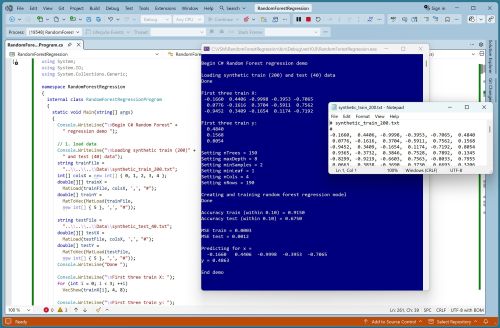 [Click on image for larger view.] Figure 1: Random Forest Regression Using C# in Action.
The maxDepth parameter specifies the number of levels of each decision tree in the forest. If maxDepth = 1, a perfectly balanced decision tree has 3 nodes: a root node, a left child and a right child. If maxDepth = 2, a balanced tree has 7 nodes. In general, if maxDepth = n, the resulting balanced tree has 2^(n+1) - 1 nodes. The decision trees used for the demo run shown in Figure 1 have maxDepth = 8 so each of the 150 trees has 2^9 - 1 = 512 - 1 = 511 nodes. Many of these tree nodes could be empty.
The minSamples parameter specifies the fewest number of associated data items in a tree node necessary to allow the node to be split into a left and right child. The demo trees use minSamples = 2, which is the fewest possible because if a node has only 1 associated item, it can't be split any further.
The minLeaf parameter specifies how many associated rows there must be in a node after splitting has occurred during training. The demo uses minLeaf = 1, which is the fewest possible because it prevents a leaf node from being associated with no data items in which case there would be no predicted y value.
The nRows and nCols parameters specify the number of rows and columns to use when creating the random subsets of the training data. The source data has 200 rows and nRows is set to 190, which is 95% of the rows. The nCols parameter is set to 4 which is 1 less than the number of columns in the training data.
The random forest regression model scores 91.50% accuracy on the training data (183 out of 200 correct), and 67.50% accuracy on the test data (27 out of 40). A prediction is scored as correct if it's within 10% of the true target y value.
This article assumes you have intermediate or better programming skill but doesn't assume you know anything about random forest regression. The demo is implemented using C# but you should be able to refactor the demo code to another C-family language if you wish. All normal error checking has been removed to keep the main ideas as clear as possible.
The source code for the demo program is too long to be presented in its entirety in this article. The complete code and data are available in the accompanying file download, and they're also available online.
The Demo Data
The demo data is synthetic. It was generated by a 5-10-1 neural network with random weights and bias values. The idea here is that the synthetic data does have an underlying, but complex, structure which can be predicted.
All of the predictor values are between -1 and +1. There are 200 training data items and 40 test items. When using decision trees for regression, it's not necessary to normalize the training data predictor values because no distance between data items is computed. However, it's not a bad idea to normalize the predictors just in case you want to send the data to other regression algorithms that require normalization (for example, k-nearest neighbor regression).
Random forest regression is most often used with data that has strictly numeric predictor variables. It is possible to use random forest regression with mixed categorical and numeric data, by using ordinal encoding on the categorical data. In theory, ordinal encoding shouldn't work well. For example, if you have a predictor variable color with possible encoded values red = 0, blue = 1, green = 2, then red will always be less-than-or-equal to any other color value in the decision tree construction process. However, in practice, ordinal encoding for random forest regression often works well.
Understanding Random Forest Regression
The motivation for combining many simple decision tree regressors into a forest is the fact that a simple decision tree will always overfit training data if the tree is deep enough. A deep enough decision tree will predict its training data perfectly (except if some of the training data is inconsistent), but is likely to predict poorly on new, previously unseen data. By using a collection of trees that have been trained on different random subsets of the source data, the averaged prediction of the collection is much less likely to overfit.
The demo source training data has 200 rows and nRows is set to 190, so the data subsets have fewer rows than the original source training data. However, you can specify the same number of rows as the source data because the random subsets of training data are constructed "with replacement," so some rows will be repeated and some rows will not be used in a random subset.
The demo program selects row indices from the source data with replacement using this function:
private static int[] GetRandomRowIdxs(int N, int n,
  Random rnd)
{
  // pick n rows from N with replacement
  int[] result = new int[n];
  for (int i = 0; i < n; ++i)
    result[i] = rnd.Next(0, N);
  Array.Sort(result);
  return result;
}
Each result row is selected independently, with equal probability (1/200 = 0.05 for the demo data) from the source data. When a random subset of the training data is created, all of the columns of the source data (5 in the demo) are used. But when a tree is trained, only nCols (4 in the demo) are used.
After the collection of simple decision trees has been trained, making a prediction is simple:
public double Predict(double[] x)
{
  // average of predicted values
  double sum = 0.0;
  for (int t = 0; t < this.nTrees; ++t) // each tree
    sum += this.trees[t].Predict(x);
  return sum / this.nTrees;
}
For an input vector x, the predicted y value is just the average of the predicted values of all of the trees in the forest collection. Simple.
The Demo Program
I used Visual Studio 2026 (Community free edition) for the demo program. I created a new C# console application and checked the "Place solution and project in the same directory" option. I specified .NET version 10. I named the project RandomForestRegression. I checked the "Do not use top-level statements" option to avoid the hideous program entry point shortcut syntax.
The demo has no significant .NET dependencies and any relatively recent version of Visual Studio with .NET (Core) or the older .NET Framework will work fine. You can also use the Visual Studio Code program if you like.
After the template code loaded into the editor, I right-clicked on the file Program.cs in the Solution Explorer window and renamed the file to the more descriptive RandomForestRegressionProgram.cs. I allowed Visual Studio to automatically rename class Program.
The overall program structure is presented in Listing 1. All the control logic is in the Main() method in the Program class. The Program class also holds helper functions to load data from file into memory and display data. All of the random forest regression functionality is in a RandomForestRegressor class. All of the decision tree regression functionality is in a separate DecisionTreeRegressor class. The RandomForestRegressor class exposes a constructor and 4 methods: Train(), Predict(), Accuracy(), MSE().
Listing 1: Overall Program Structure
using System;
using System.IO;
using System.Collections.Generic;

namespace RandomForestRegression
{
  internal class RandomForestRegressionProgram
  {
    static void Main(string[] args)
    {
      Console.WriteLine("Begin C# Random Forest" +
        " regression demo ");

      // 1. load data
      // 2. create and train model
      // 3. evaluate model
      // 4. use model to make a prediction

      Console.WriteLine("End demo ");
      Console.ReadLine();
    } // Main()

    // helpers for Main()
    static double[][] MatLoad(string fn, int[] usecols,
      char sep, string comment) { . . }

    static double[] MatToVec(double[][] mat) { . . }

    static void VecShow(double[] vec, int dec, int wid) { . . }
  } // class Program

  // ========================================================

  public class RandomForestRegressor
  {
    public int nTrees;
    public int maxDepth;
    public int minSamples;
    public int minLeaf;
    public int nSplitCols;  // number of cols to use each split
    public int nRows;
    public List<DecisionTreeRegressor> trees;
    public Random rnd;

    // core functionality
    public RandomForestRegressor(int nTrees, int maxDepth,
      int minSamples, int minLeaf, int nCols, int nRows,
      int seed = 0) { . . }

    public void Train(double[][] trainX, double[] trainY) { . . }

    public double Predict(double[] x) { . . }

    public double Accuracy(double[][] dataX, double[] dataY,
      double pctClose) { . . }

    public double MSE(double[][] dataX, double[] dataY) { . . }

    // helpers for Train()
    private static int[] GetRandomRowIdxs(int N, int n,
      Random rnd) { . . }
    private static double[][] MakeRowsSubsetX(double[][] trainX,
      int[] rndRows) { . . }
    private static double[] MakeSubsetY(double[] trainY,
      int[] rndRows) { . . }
  } // class RandomForestRegression

  // ========================================================

  public class DecisionTreeRegressor
  {
    public int maxDepth;
    public int minSamples;
    public int minLeaf;
    public int numSplitCols;
    public List<Node> tree = new List<Node>();
    public Random rnd;

    public double[][] trainX;  // store data by ref
    public double[] trainY;

    public DecisionTreeRegressor(int maxDepth = 2,
      int minSamples = 2, int minLeaf = 1,
      int numSplitCols = -1, int seed = 0) { . . }

    public void Train(double[][] trainX,
      double[] trainY) { . . }

    public double Predict(double[] x) { . . }

  } // class DecisionTreeRegressor

  // ========================================================

} // ns
The demo starts by loading the 200-item training data into memory:
string trainFile =
  "..\\..\\..\\Data\\synthetic_train_200.txt";
int[] colsX = new int[] { 0, 1, 2, 3, 4 };
double[][] trainX =
  MatLoad(trainFile, colsX, ',', "#");
double[] trainY =
  MatToVec(MatLoad(trainFile,
  new int[] { 5 }, ',', "#"));
The training X data is stored into an array-of-arrays style matrix of type double. The data is assumed to be in a directory named Data, which is located in the project root directory. The arguments to the MatLoad() function mean load columns 0, 1, 2, 3, 4 where the data is comma-delimited, and lines beginning with "#" are comments to be ignored. The training y data in column [5] is loaded into a matrix and then converted to a one-dimensional vector using the MatToVec() helper function.
The 40-item test data is loaded into memory using the same pattern that was used to load the training data:
string testFile =
  "..\\..\\..\\Data\\synthetic_test_40.txt";
double[][] testX =
  MatLoad(testFile, colsX, ',', "#");
double[] testY =
  MatToVec(MatLoad(testFile,
  new int[] { 5 }, ',', "#"));
The first 3 training items are displayed like so:
Console.WriteLine("First three train X: ");
for (int i = 0; i < 3; ++i)
  VecShow(trainX[i], 4, 8);
Console.WriteLine("First three train y: ");
for (int i = 0; i < 3; ++i)
  Console.WriteLine(trainY[i].ToString("F4").PadLeft(8));
In a non-demo scenario, you might want to display all the training data to make sure it was correctly loaded into memory.
Training the Random Forest Regression Model
The random forest regression model is prepared for training using these 6 statements:
int nTrees = 150;  // aka n_estimators
int maxDepth = 8;
int minSamples = 2;
int minLeaf = 1;
int nCols = 4;  // aka max_features
int nRows = 190;  // aka max_samples
From a practical point of view, the main challenge when working with a random forest regression model is finding good values for the six model parameters. They must be determined manually, by trial and error, or programmatically ("grid search").
The model is created and trained using these statements:
RandomForestRegressor rfr =
  new RandomForestRegressor(nTrees, maxDepth,
  minSamples, minLeaf, nCols, nRows, seed: 1);
rfr.Train(trainX, trainY);
Console.WriteLine("Done ");
Expressed in high-level pseudo-code, the random forest regression Train() method is:
loop number of trees in forest
  create random training data subset
  create a decision tree using forest parameters (maxDepth, etc.)
  train the tree on the subset, using random nCols on each split
  add trained tree to forest list of trees
end-loop
Although each regression scenario is different, when exploring model parameters, I recommend starting with minSamples = 2 and minLeaf = 1 because these give a set of granular decision trees. When you experiment with the maxDepth parameter, you'll often find some value, that once set, increasing it doesn't affect the model accuracy and mean squared error metrics very much.
For the nCols and nRows parameters, a reasonable place to start is roughly 90% of the number of source columns and rows. For example, if the source training data has 5 predictor columns, you might start at 0.90 * 5 = 4 rounded to an integer number of columns. If the source training data has 200 rows, you might start at 0.90 * 200 = 180 rows for the subsets.
If you always use 100% of the columns in the training data, a random forest regression model is called a bagging tree ("bootstrap aggregation tree"). In other words, a bagging tree is just a type of random forest. The reason that 2 terms, "bagging" and "random forest," are used is that bagging trees were introduced first in a 1994 research paper, and then the ideas were extended to random forest in a 2001 research paper.
A good value for the number of trees to use varies wildly depending on the dataset. Increasing the value of nTrees usually gives more accurate predictions on the training data at the expense of poorer accuracy on the test data.
Evaluating and Using the Random Forest Regression Model
The accuracy of the trained random forest model is computed and displayed like so:
double accTrain = rfr.Accuracy(trainX, trainY, 0.10);
Console.WriteLine("Accuracy train (within 0.10) = " +
  accTrain.ToString("F4"));
double accTest = rfr.Accuracy(testX, testY, 0.10);
Console.WriteLine("Accuracy test (within 0.10) = " +
  accTest.ToString("F4"));
When computing the accuracy of a regression model, you must specify how close a prediction must be to be scored as correct. The demo program uses 10% for the closeness threshold. A reasonable percentage will vary from problem to problem.
The mean squared error of the trained model is computed and displayed:
double mseTrain = rfr.MSE(trainX, trainY);
Console.WriteLine("\nMSE train = " + mseTrain.ToString("F4"));
double mseTest = rfr.MSE(testX, testY);
Console.WriteLine("MSE test = " + mseTest.ToString("F4"));
Mean squared error is a more granular metric than accuracy. The MSE values can be used to determine if the random forest model is severely overfitting on the training data.
The demo concludes by using the trained random forest model to make a prediction:
double[] x = trainX[0];
Console.WriteLine("Predicting for x = ");
VecShow(x, 4, 9);
double predY = rfr.Predict(x);
Console.WriteLine("y = " + predY.ToString("F4"));
The x input is the first training data item. The predicted y value is 0.4863 which is quite close (off by less than 1%) to the actual y value of 0.4840.
Wrapping Up
Random forest regression, and its variant bagging tree regression, suffer from a bit of disrespect in the research community. Random forest models are so simple that they can't generate many ideas for exploration in research papers. And believe me, in research, the publish-or-perish imperative is still alive and well. On the other hand, random forest and bagging tree regression models seem to have a good reputation among machine learning practitioners (most of my colleagues, at least) because the models often work well and are relatively interpretable, especially compared to regression techniques such as neural networks and Gaussian process regression systems.
Random forest and bagging regression systems are related to 2 techniques called adaptive boosting regression and gradient boosting regression.Examples include AdaBoost.R2 (adaptive boosting regression version 2) regression, gradient boosting machine (GBM) regression, LightGBM regression, and XGBoost (extreme gradient boosting) regression. All of these techniques use an ensemble of decision tree regressors that are trained on different subsets of the source training data. None of these ensemble techniques works best for all data scenarios, which is why all of them are used.