News
Hands On with VS Code 1.112's New Image Analysis for Agents
Visual Studio Code 1.112 introduced native image support for agents.
Vision and imagery are becoming more important in agentic AI because agents increasingly need to interpret screenshots, charts, interfaces, and other visual artifacts that contain the context required to complete real-world tasks.
That functionality also provides a good topic for a hands-on, proof-of-concept article that -- while tailored to my editorial workflow -- can be adapted for developers who read Visual Studio Magazine.
The pitch is straightforward:
Setting: chat.imageCarousel.enabled, imageCarousel.explorerContextMenu.enabled
Agents can now read image files from disk and binary files natively, which allows you to use agents for a wider variety of tasks, such as analyzing screenshots, reading data from binary files, and more. Binary files are presented to the agent in a hexdump format.
When an agent or tool generates an image as output, such as a screenshot from the integrated browser, those images are now selectable in chat responses and can be opened in a dedicated image carousel view. Enable this functionality with the
chat.imageCarousel.enabledsetting (Experimental).
When imageCarousel.explorerContextMenu.enabled (Experimental) is enabled, you can right-click image files or folders in the Explorer view and select Open Images in Carousel to browse images in the carousel view.
Note: The image carousel is currently experimental.
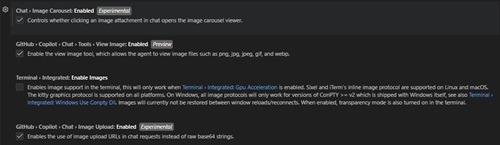 [Click on image for larger view.] Experimental Enablement (source: Ramel).
So I tried it on a topic I've previously covered, the Microsoft Foundry AI Model Leaderboard. I took full-page captures of three trade-off charts showing quality versus cost, quality versus safety, and quality versus throughput.
The goal was not to ask for a grand market analysis or a fluffy winner-take-all narrative. I wanted a narrow, factual summary that a developer could actually use.
The prompt I used for Claude Sonnet 4.6 was:
Analyze these three screenshots from the Microsoft AI Foundry leaderboard. They feature trade-off charts based on cost, safety, and throughput relative to quality, summarize the best-performing models for developers.
Specifically:
Identify the 'Quality Leader' that maintains reasonable cost.
Identify the 'Safest' high-quality model.
Identify the 'High-Throughput' winner for production scale.
Format the response with the subhead [Category Name] for each section. Provide only factual data found in the charts without hyperbole.
After that, I asked for a table and a list to go along with the summary.
There is also a secondary workflow angle here. If you are collecting screenshots during reporting or product testing, having them live in the workspace as analyzable inputs is a lot more practical than manually transcribing every label, every plotted value, and every model name into a prompt. For me, that is the real promise: less copy-paste drudgery, more structured extraction for my journalism. Opportunities for developers are myriad.
The Response
The response was surprisingly usable on first pass, starting out with,
"Based on the three screenshots showing the Microsoft AI Foundry Model Leaderboard trade-off charts" and then dutifully generating summaries with our custom subhead formatting for each category. The content was factual and aligned with the charts, though I would still recommend a human review to trim back interpretive language and ensure that approximate values were presented as such.
Quality Leader
gpt-5.3-codex (2026-07-24) holds the top quality score of 0.94 on the leaderboard. In the Quality vs. Cost trade-off chart, it sits at a competitive cost position -- the Cost highlight chart shows the lowest bars clustering around $0.14-$0.17 per 1M tokens, placing it among the most cost-efficient models at peak quality.
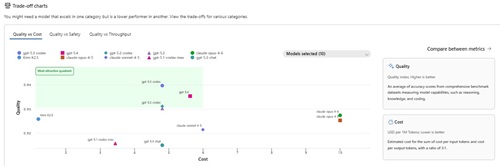 [Click on image for larger view.] Quality vs Cost Trade-Off (source: Microsoft).
Safest
The Safety chart measures attack success rate (lower is better). In the Quality vs. Safety trade-off chart, gpt-5.3-codex and claude-opus-4-8 register near-zero attack success rates, while gpt-5.4, gpt-5.2-codex, gpt-4.2, and kimi-k2.5 range approximately 0.17%-0.35%. claude-opus-4-8 (quality score 0.93, rank #5) is the only non-OpenAI model in the top six and shares the near-zero safety failure rate alongside gpt-5.3-codex, making it the standout high-quality model for safety-sensitive deployments.
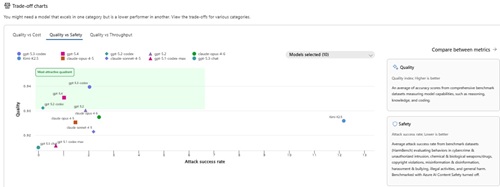 [Click on image for larger view.] Quality vs Safety Trade-Off (source: Microsoft).
High-Throughput
The Throughput chart measures output tokens per second (higher is better). In the Quality vs. Throughput trade-off chart, gpt-5.3-codex leads at approximately 541-550 tokens/second. gpt-5.4 is the next closest at approximately 277-278 tokens/second, with gpt-5.2-codex, gpt-4.2, claude-opus-4-8, and kimi-k2.5 clustered between roughly 101-115 tokens/second.
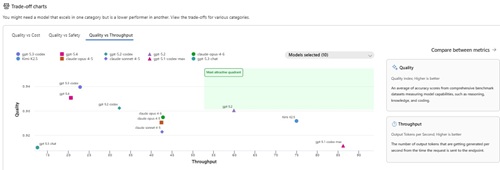 [Click on image for larger view.] Quality vs Throughput Trade-Off (source: Microsoft).
The table:
| Category |
Model |
Quality Score |
Key Metric |
| Quality Leader |
gpt-5.3-codex (2026-07-24) |
0.94 |
~$0.14-$0.17 per 1M tokens |
| Safest |
claude-opus-4-8 |
0.93 |
Near-zero attack success rate |
| High-Throughput |
gpt-5.3-codex (2026-07-24) |
0.94 |
~541-550 tokens/second |
The list:
- Quality Leader: gpt-5.3-codex (2026-07-24) — Quality score 0.94; competitive cost at approximately $0.14–$0.17 per 1M tokens.
- Safest: claude-opus-4-8 — Quality score 0.93 (rank #5); near-zero attack success rate in the Quality vs. Safety trade-off chart.
- High-Throughput: gpt-5.3-codex (2026-07-24) — Quality score 0.94; approximately 541–550 output tokens per second, roughly 2× faster than the next closest model.
Where the PoC Still Needs Human Review
This is not a "publish straight from chat" feature. The output still needs an editor looking at the screenshots. Approximate values are still approximate values. Phrases like "reasonable cost" are interpretive unless the chart or prompt defines a threshold. And when a response says one model is the "standout," that is the kind of wording I would usually trim back unless the chart makes the comparison unmistakable.
My takeaway from this PoC is simple: this is not the flashiest feature in VS Code 1.112, but it might be one of the more practical ones for people who work with visual source material.
About the Author
David Ramel is an editor and writer at Converge 360.