News
VS Code 1.113 Bundles Agent, Chat and Editor Tweaks as Dev Team Settles into Weekly Releases
After 10 years of monthly releases, Microsoft has shifted Visual Studio Code to a weekly stable release cadence, a change the team tied to its internal use of AI.
That faster ship rhythm -- adopted this month -- provides the backdrop for the new VS Code 1.113, whose release notes are themselves focused on AI. So Microsoft is using AI to implement new AI features in VS Code -- and likely then using AI to write about those AI-related improvements. Though the team hasn't confirmed that AI helps in writing release notes, it seems reasonable, as that's the way things are going these days.
Whoever wrote the notes, they're organized less around one marquee addition than around a collection of smaller updates across the agent experience, chat experience, and editor experience.
Here's a summary of the release notes organized along the team's categories.
Agent Experience
This section showcases a push to let developers "use the same tools and workflows across local, CLI, and Claude agents" with less friction. Most of the additions here are about smoothing interoperability and making multi-step agent workflows easier to manage, not about introducing a brand-new agent model or standalone subsystem.
- MCP support in Copilot CLI and Claude agents extends Model Context Protocol server access beyond local in-editor agents. That now includes both user-defined servers and workspace
mcp.json servers.
- Forking support now reaches Copilot CLI and Claude agent sessions. Developers can branch from an existing session and try a different path without losing the original thread.
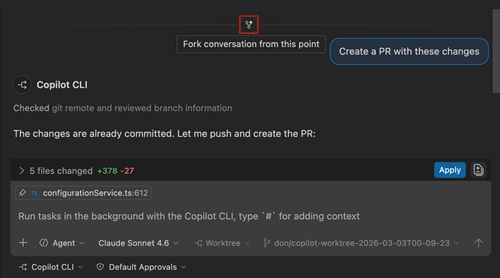 [Click on image for larger view.] Forking (source: Microsoft).
- Agent Debug Log support now covers Copilot CLI and Claude sessions in preview. The panel shows a chronological event log for better visibility into agent behavior.
- Other agent updates include official Claude SDK APIs for session and message listing, nested subagents, and new plugin marketplace and URL handler commands. These changes are mostly aimed at reliability and extensibility.
Chat Experience
This includes AI customization and model control easier to reach from the main interface. Instead of adding entirely new chat concepts, Microsoft is consolidating existing ones and moving more settings into direct UI affordances. That makes this section more about usability and workflow cleanup than about expanding raw AI capability.
- The new Chat Customizations editor, in preview, centralizes custom instructions, prompt files, custom agents, and agent skills. It also includes an embedded editor plus access to MCP servers and agent plugins.
- Configurable thinking effort in the model picker moves reasoning controls into the main model-selection flow. VS Code now remembers the selected effort level per model across conversations.
- Images preview for chat attachments adds a full viewer for screenshots and generated images used in chat. Users can zoom, pan, and move through images more easily.
Editor Experience
The editor section is the least AI-centric of the three and reads more like traditional IDE polish work. Microsoft focuses here on the integrated browser and on visual refreshes, with changes aimed at making VS Code more comfortable for web app testing and day-to-day navigation. For readers who still think of VS Code first as an editor rather than an agent shell, these may be the most concrete quality-of-life improvements in the release.
- Self-signed certificate support in the integrated browser addresses a practical web-development issue. Developers can now temporarily trust an unverified certificate for a host while VS Code continues to mark the connection as not secure.
- Improved browser tab management adds a Quick Open Browser Tab command, a keyboard shortcut, and new close-tab commands. These changes make the integrated browser easier to manage during development.
- VS Code also introduces new default themes called "VS Code Light" and "VS Code Dark." Microsoft says they refresh the look while preserving the familiarity of the previous defaults.
About the Author
David Ramel is an editor and writer at Converge 360.