News
OpenClaw Gets a Microsoft 365 Champion While VS Code Tooling Stays Nascent
Microsoft appears to have found an OpenClaw champion, but not in the place many developers might expect.
In a recent social media post, Omar Shahine said his new Microsoft job is about "Bringing OpenClaw + personal agents to Microsoft 365!"
Clicking on his icon reveals: "OpenClaw + Microsoft 365, Corporate Vice President @ Microsoft. I write a newsletter on products http://omarknows.com & http://omarknows.ai"
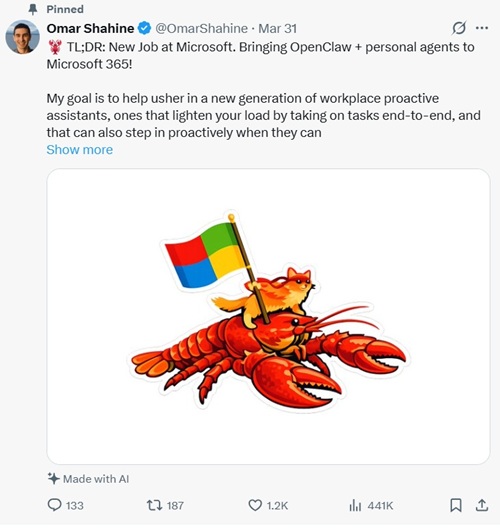 OpenClaw Post (source: X).
This is clearly an important topic. As can be seen, the post boasts some 441K views, 1.2K likes, 187 reposts and 133 replies at the time of this writing.
Shahine said that Microsoft and the OpenClaw community have already "hit the ground running with a fully integrated Teams plugin for OpenClaw." That framing points squarely at workplace assistants and collaboration software, not at any dev tooling such as Visual Studio Code -- which seems a likely place for Microsoft to make some investment -- and certainly not Visual Studio 2026.
That direction makes more sense than it may first appear. OpenClaw is not primarily documented as a coding assistant. Its docs describe it as a self-hosted system centered on a single long-running Gateway process that owns channel connections and the WebSocket control plane. The default Gateway WebSocket endpoint is ws://127.0.0.1:18789, while the browser-based Control UI is served by the same Gateway and is typically opened at http://127.0.0.1:18789/. The quick-start docs tell users to install OpenClaw, run onboarding, verify the Gateway is running, and then open the dashboard in a browser. That Gateway-first architecture helps explain why the editor story still feels more like connected plumbing than polished product.
That has also been my experience. In Getting My OpenClaw Around VS Code, the current crop of extensions felt more like front ends or bridge layers for a separately running OpenClaw environment than like self-contained editor products. In I, OpenClaw, Tackled Visual Studio 2026, and I Had My Human Do the Typing, the Visual Studio angle looked thinner still.
That is why Shahine's post stands out. Microsoft now appears to have an OpenClaw champion for Microsoft 365 before it has anything resembling a mature OpenClaw story in its primary developer tooling.
Social Reaction Was Upbeat, But One Reply Cut to the Core
The immediate social response to Shahine's post, at least in the replies I reviewed, was mostly enthusiastic but not very deep. Replies such as "Huge," "That's pretty exciting news!!" and "OpenClaw to Teams W" reflected quick approval of the Microsoft-plus-Teams angle more than serious discussion of architecture or tooling.
One response was more revealing: "Can you just give us a decent CLI?"
That line is worth dwelling on because it captures the tension in the OpenClaw story better than the congratulatory replies do. The comment reads as a skeptical developer reality check. Before big promises about proactive workplace agents and Microsoft 365 integrations, some technical users appear to be asking for a stronger foundation: a cleaner command-line experience, simpler setup, and a toolchain that feels more finished. For a system as Gateway-, setup-, and control-plane-centric as OpenClaw, the command-line interface is not a side detail. It is one of the main ways users install it, configure it, check status, troubleshoot problems, and build trust in the environment. That makes the CLI complaint more than just snark. It points directly at the lack-of-dev-tooling angle.
Why Microsoft 365 Looks Like the More Natural Fit
On the public evidence, Microsoft 365 simply looks like the more natural landing zone. OpenClaw's architecture docs describe a system built to connect channels, nodes, and control surfaces through the Gateway, not just a sidebar coding assistant. Its channel docs also show Microsoft Teams as a supported integration path, and the CLI reference includes MS Teams among the supported channels. That fits the "personal agents at work" idea much more neatly than a pure editor story does.
Microsoft's broader public material points in the same direction. Microsoft Tech Community has published posts about running OpenClaw agents on Azure Linux VMs and integrating Microsoft Foundry with OpenClaw. Those are infrastructure and platform stories, not editor stories. A recent Windows Central report likewise framed Shahine's move as part of a Microsoft 365 push around proactive personal AI agents.
Seen that way, the Microsoft 365 focus is not odd. It is revealing. It suggests Microsoft may see OpenClaw first as a workplace-agent framework tied to Teams, Microsoft 365, Azure, and model plumbing, not as a major new editor strategy.
Why the VS Code Story Still Feels Thin
There is no shortage of OpenClaw-adjacent activity in the VS Code Marketplace. Listings exist for OpenClaw Extension, OpenClaw-VSCode, and OpenClaw Node for VS Code. But the common thread is that these tools still largely connect to, manage, or act through a running Gateway rather than replace it. The OpenClaw-VSCode listing explicitly says it connects VS Code to a local OpenClaw Gateway via WebSocket and requires the Gateway to be running on ws://127.0.0.1:18789. The OpenKnot extension is positioned as a status bar shortcut and terminal-driven connector to OpenClaw. The Node extension is more ambitious, exposing IDE capabilities through the VS Code APIs to a Gateway-connected assistant, but even there the core idea is still that the editor is an endpoint in a larger OpenClaw system.
That is not necessarily bad. For advanced users who want a self-hosted control plane, that architecture may be the point. But it does help explain why the current VS Code experience can feel immature compared with tools that present as editor products first. Instead of opening the editor and getting a polished integrated assistant, users often first have to think about a localhost Gateway, a browser dashboard, a token, a terminal, or PowerShell.
That distinction matters for the Visual Studio Magazine
audience. Readers focused on VS Code, Visual Studio, .NET, and Microsoft-centric developer tooling are used to evaluating tools in terms of workflow value: what they add in the editor, how quickly they get you working, and whether they reduce friction. Right now, OpenClaw's public tooling story still leans more toward orchestration and infrastructure than smooth day-to-day development experience.
And Visual Studio IDE Barely Registers Yet
The Visual Studio IDE story looks thinner still. Publicly visible OpenClaw momentum has centered on the Gateway, Teams integration, Azure deployment, channel support, and VS Code-side experimentation. I did not find a comparable public push around first-party Visual Studio IDE integration. At least for now, the OpenClaw conversation around Microsoft's flagship IDE appears largely absent.
The real takeaway from Shahine's post is that Microsoft appears to see more immediate potential in OpenClaw as a Microsoft 365 personal-agent and Teams story than as a mature developer-tooling story.
The social reaction supports that reading. The quick enthusiasm centered on Microsoft plus OpenClaw plus Teams. The sharpest skeptical response asked for a "decent CLI," which is really another way of saying the foundation still feels rough for technical users. That makes the contrast sharper, not weaker: Microsoft may be embracing the OpenClaw vision at the Microsoft 365 level while the developer experience still feels unfinished.
For now, then, OpenClaw's Microsoft moment appears to be landing in Teams and Microsoft 365, not in the editor. And until the VS Code tooling becomes less Gateway-centric and more workflow-native, the developer side of that story is likely to remain nascent.
About the Author
David Ramel is an editor and writer at Converge 360.