News
Visual Studio Code 1.114 Keeps Weekly Cadence Rolling with Chat, Search and TypeScript Updates
Microsoft has announced Visual Studio Code 1.114, the latest release in the editor's new weekly Stable cadence. That cadence began with version 1.111 on March 9, 2026, which the VS Code team described as the first of its weekly Stable releases facilitated by the dev team's use of AI for coding. And speaking of AI, this is the rare release that doesn't include much significant new functionality in that space, though there are some chat/agent tweaks.
Version 1.114 is a relatively modest update built around incremental improvements instead of a major headline feature. In the official release announcement, Microsoft highlights updates to chat workflows, semantic codebase search, media handling in the image carousel, TypeScript 6.0 support, Python environment behavior, and enterprise controls for AI agent availability.
- Video support in the image carousel: VS Code 1.114 expands the image carousel so it can now display videos in addition to images. Users can open supported media from chat or from the Explorer context menu, then move through mixed media with playback controls and carousel navigation.
- Copy Final Response command: The release adds a Copy Final Response command for chat sessions. Microsoft says the command copies only the final Markdown response, without including intermediate agent reasoning or tool-call details that can appear in other copy flows.
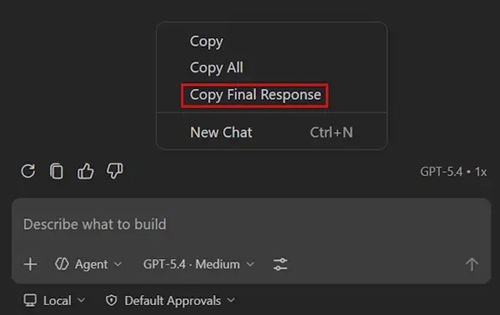 Copy Final Response (source: Microsoft).
- Troubleshooting earlier chat sessions: The /troubleshoot skill now works with previous sessions instead of only the active one. Developers can add #session, choose an earlier session from a picker, and investigate issues such as ignored custom instructions or slow responses after the fact.
- Simplified #codebase search behavior: Microsoft has narrowed the #codebase tool to semantic search only. The company also removed the previous local-versus-remote index distinction, so users now see a simpler indexed-state model while Copilot handles indexing automatically when needed.
- TypeScript 6.0 in the editor: VS Code now ships with TypeScript 6.0 for built-in JavaScript and TypeScript language support. Microsoft describes the update as a major release that includes fixes and improvements, while also deprecating older options on the road to TypeScript 7.0, a landmark release beginning the language's new Go-based experience.
- Python environment workflow fixes: The release includes several fixes in the Python Environments extension. Among them, a saved workspace interpreter selection now takes precedence over a terminal-activated virtual or conda environment after restart, and env-file notifications now include a Don't Show Again option.
- Enterprise policy for Claude agent: For managed environments, VS Code 1.114 adds a group policy that can disable the Claude agent. When that policy is enabled, the related setting is marked as organization-managed and end users cannot re-enable the agent themselves.
About the Author
David Ramel is an editor and writer at Converge 360.