News
Microsoft Keeps Adding VS 2026 MCP Functionality to VS 2022, but Not Much Else
Microsoft this month announced that Azure MCP tools now ship built into Visual Studio 2022, replacing the earlier extension-based approach.
Last week's announcement is the latest example of the company moving selected Visual Studio 2026-era functionality -- mostly concerning the Model Context Protocol -- into the older IDE.
The Azure MCP tools are integrated into Visual Studio 2022 version 17.14.30 or higher, replacing the GitHub Copilot for Azure (VS 2022) extension, with some 13,000 installs. Microsoft said the tools now ship with the Azure development workload, though they are disabled by default and must be turned on manually in the GitHub Copilot Chat tool picker. The company also said some Visual Studio 2026-specific tools are not available in Visual Studio 2022.
The new setup follows Microsoft's November 2025 announcement that Azure MCP Server was built directly into Visual Studio 2026 as part of its broader AI-native, agentic-workflow push (see the Visual Studio Magazine article, "Visual Studio 2026 Integrates Azure MCP Server for Agentic Cloud Workflows"). In that earlier rollout, Microsoft highlighted natural-language access to Azure resources, diagnostics, deployment tasks, infrastructure generation and Azure CLI command generation from inside the IDE.
For Visual Studio 2022 users, the result is a more direct path to the same general Azure MCP experience inside Copilot Chat. Instead of relying on a separate add-on, the tooling now comes with the Azure workload itself, giving the long-lived 17.14 servicing line another dose of functionality first introduced in the newer product wave.
To enable the Azure MCP Server, in the Copilot Chat window, select the Select tools button (the two wrenches icon). Find Azure MCP Server in the list and toggle it on.
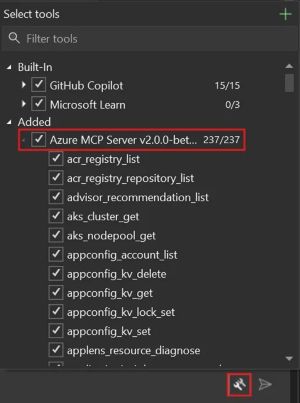 [Click on image for larger view.] Enabling the Azure MCP Server (source: Microsoft).
More MCP Features Followed the Same Path
The new Azure MCP integration is the most visible example, but it is not the only MCP-related functionality that later surfaced in the Visual Studio 2022 17.14 channel.
In the December 2025 Visual Studio 2026 release notes, Microsoft added MCP Authentication Management, describing a unified place to manage credentials for MCP servers, including accounts outside the Visual Studio keychain. That same capability now appears in the Visual Studio 2022 17.14 release notes.
The same is true for MCP Server Instructions, which lets developers view instruction files shipped with MCP servers directly inside Visual Studio, and for MCP Elicitations and sampling, which adds chat-based handling for server requests for additional information and sampling interactions. Both now also appear in the Visual Studio 2022 17.14 notes.
Microsoft also introduced MCP Server Management in the Visual Studio 2026 release stream as a more unified interface for configuring servers, handling authentication and checking status. That same management experience is now listed in the Visual Studio 2022 17.14 release notes as well.
Taken together, those additions show Microsoft doing more than just dropping Azure MCP tools into the older IDE. The company has also carried over pieces of the newer MCP administration and interaction model, giving Visual Studio 2022 users a broader slice of the MCP experience that Microsoft had already documented in the Visual Studio 2026 line.
Outside MCP, the Pattern Gets Much Smaller
Beyond the MCP space, Microsoft doesn't introduce many features or much functionality into the older IDE after it appears in VS 2026. One exception is Copilot Profiler Agent in Visual Studio 2026 Insiders, which Microsoft introduced in September 2025 as an AI-powered performance assistant built into Visual Studio.
Later that same month, in its Visual Studio 2022 September update, Microsoft said it was bringing the Profiler Agent to Visual Studio 2022 as well. The feature works with GitHub Copilot and Visual Studio profiling tools to analyze CPU usage, memory consumption and runtime behavior, surface bottlenecks, and help generate or improve BenchmarkDotNet benchmarks.
That smaller non-MCP list is an important qualifier. A number of other Copilot-era features often mentioned in this context were already arriving in the Visual Studio 2022 servicing stream before, or alongside, the Visual Studio 2026 launch window.
What the New Announcement Says About Microsoft's Direction
The latest Azure MCP move suggests Microsoft wants its large installed base on Visual Studio 2022 to gain access to more of the newer AI-assisted Azure workflow without requiring a jump to the newer IDE just to get started. At the same time, the company is still drawing a line around full parity by reserving some Visual Studio 2026-specific tools and experiences for the newer product line.
That leaves Visual Studio 2022 in an in-between state: still clearly the older branch, but increasingly equipped with selected pieces of the newer Copilot and MCP tooling stack when Microsoft decides those pieces fit the 17.14 servicing model.
While it's rare for features or functionality to make it into VS 2022 after appearing in VS 2026 (several AI systems couldn't exactly agree on the Profiler Agent timing, in fact), some appear in both at about the same time , including:
About the Author
David Ramel is an editor and writer at Converge 360.