In-Depth
Special Embrace? VS Code Adapts to Claude Code's Ecosystem
Microsoft is increasingly treating Claude as a first-class option across dev tooling and AI products.
For one prominent example of that trend, Microsoft's Visual Studio Code editor is extending Claude support beyond the model picker, adding compatibility with Claude Code's files, folders and agent workflows.
The move stands out because Claude appears to be getting unusually detailed treatment among third-party AI coding assistants in VS Code. Microsoft's editor also supports other non-Copilot agents, including OpenAI Codex, but the documented Claude support reaches beyond agent-session management into Claude Code's surrounding configuration system -- including memory files, rules, agents, skills, hooks and plugin formats.
Of course, Microsoft and OpenAI early on formed a special AI relationship, to the tune of billions of dollars in investments and deep integration across Azure, GitHub Copilot, Microsoft 365 Copilot and more. But like that May-December courtship familiar to many high schoolers, both companies seem to be expanding beyond that initial AI bromance.
That tilt toward Claude has also shown up inside Microsoft's developer tooling work. In a February 2025 VS Code blog post introducing GitHub Copilot agent mode, the VS Code team said it had been self-hosting the feature across its own repositories and hobby projects, then singled out Anthropic's model work: "Today, the VS Code team prefers Claude Sonnet over GPT-4o for our Copilot agent mode use cases. In initial testing of Claude 3.7 Sonnet, we've seen significant improvements in Copilot agent mode functionality."
Microsoft's relationship with Anthropic and its Claude models has been growing across the board, exemplified with Anthropic's models being available in Azure, a recent partnership to bring Claude to Microsoft Foundry, and Claude models available through GitHub Copilot and VS Code's multi-agent development features.
That matters because AI coding assistants are increasingly becoming more than chat interfaces attached to large language models (LLMs). Tools such as GitHub Copilot, Claude Code, OpenAI Codex and others now bring their own conventions for project instructions, agent definitions, reusable skills, hooks, memory files and command-line workflows. Those artifacts help determine how an assistant behaves inside a codebase, what context it loads, what tasks it can perform and how repeatable its work becomes.
For developers, that means model choice is only part of the AI coding-tool story. The surrounding workflow layer -- instruction files, rules, skills, hooks and agent sessions -- is becoming increasingly important. VS Code's recent Claude-related updates suggest Microsoft is treating that layer as something the editor needs to understand, not merely something handled outside the editor by a separate assistant.
Claude Compatibility in VS Code
Clear evidence of that Claude accommodation appears in the VS Code 1.109 release notes, where Microsoft added a section titled "Claude compatibility." Microsoft said: "If you use both VS Code and Claude, you no longer need to maintain separate configuration files. VS Code now reads Claude configuration files directly, so your agents, skills, instructions, and hooks work across both tools without duplication."
The release notes list Claude file locations detected by VS Code, including CLAUDE.md files in the workspace root, .claude/CLAUDE.md, ~/.claude/CLAUDE.md, instruction files in .claude/rules, agent definitions in .claude/agents, and skill definitions in .claude/skills and ~/.claude/skills.
That goes beyond supporting Claude as a selectable model. It shows VS Code adapting to Claude Code's configuration conventions -- the files and folders developers use to steer Claude's behavior inside a project.
In fact, VS Code 1.109, the January 2026 version, published Feb. 4, seem almost like Claude's coming-out party in the editor. Here are some quotes:
-
Many of you are using Anthropic's Claude models in VS Code. These models now support thinking tokens to give you more visibility into the model's reasoning process.
- Agent Extensibility - reuse your knowledge with Claude agent support and new Anthropic model capabilities, and enjoy rich chat interactions with MCP Apps.
- Third-party coding agents (Preview): If you have third-party coding agents, such as Claude and Codex, configured as part of your GitHub Copilot subscription, VS Code will show these options after selecting the cloud agent type.
- VS Code uses the same hook format as Claude Code and Copilot CLI, so you can reuse existing hook configurations across tools.
- By default, VS Code looks for skills definitions in the .github/skills and .claude/skills folder of your workspace, or in the ~/.copilot/skills or ~/.claude/skills folder in your user home.
- Tool search tool: We enabled the tool search tool to help Claude discover and select the most relevant tools for your task from a larger pool of available tools.
Microsoft also used Claude in an example of multiple model support for custom agents, with the example actually showing a preference for Claude Sonnet 4.5 over GPT-5 in Copilot.
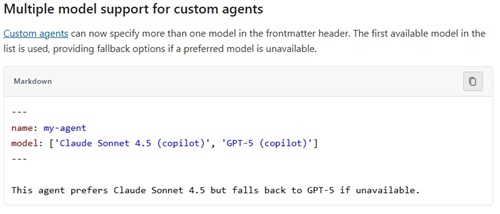 [Click on image for larger view.] Multiple Model Support (source: Microsoft).
Elsewhere, Microsoft's custom-instructions documentation gives CLAUDE.md its own section. It says VS Code "automatically detects a CLAUDE.md file and applies it as always-on instructions, similar to AGENTS.md." The documentation says that is useful for developers who use Claude Code or other Claude-based tools alongside VS Code and want "a single set of instructions recognized by all of them."
VS Code searches for CLAUDE.md in the workspace root, the workspace .claude folder, the user's home directory and a local CLAUDE.local.md variant. Support can be enabled or disabled through the chat.useClaudeMdFile setting, according to the same documentation.
Claude as an Agent, Not Just a Model
The Claude support also shows up in VS Code's third-party agent documentation, which includes a dedicated "Claude Agent (Preview)" section. Microsoft says Claude agent sessions are powered by Anthropic's Claude Agent SDK directly in VS Code, and that the Claude agent can "plan, execute, and iterate on coding tasks with its own set of tools and capabilities."
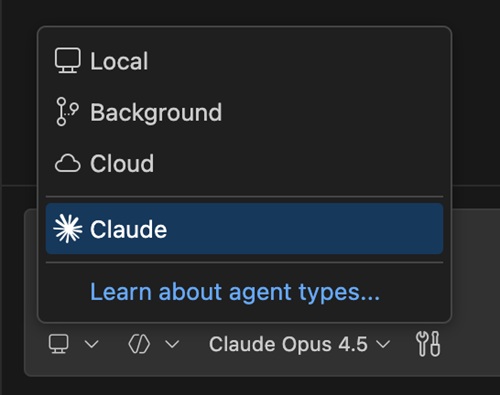 Claude Agent (source: Microsoft).
The same documentation lists Claude-specific slash commands inside VS Code. They include /agents for creating and managing Claude agents, /hooks for lifecycle hooks, /memory for opening and editing CLAUDE.md memory files, and /init for initializing a new CLAUDE.md file.
Microsoft framed the broader direction in a VS Code blog post titled "Your Home for Multi-Agent Development." The post said VS Code 1.109 lets developers run Claude and Codex agents directly alongside GitHub Copilot, locally or in the cloud, under the same GitHub Copilot subscription. It also said Claude "uses the official Claude Agent harness by Anthropic, so you get the same prompts, tools, and overall architecture as other Claude implementations."
That post makes clear that VS Code is not treating Claude as the only third-party agent. Codex is also part of the picture. But the Claude-specific file and workflow compatibility gives Claude a particularly visible place in VS Code's multi-agent story.
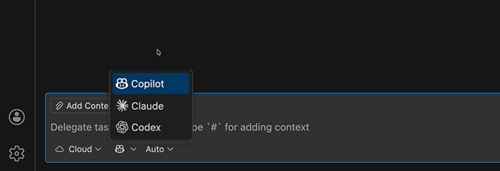 [Click on image for larger view.] Copilot, Cloud and Codex Cloud Agents (source: Microsoft).
The Claude angle also intersects with Copilot's shift to usage-based billing. As noted in "VS Code Curbs Token Use Ahead of Copilot's Controversial Usage-Based Billing Switch," token consumption has become a more visible issue for developers as Copilot moves toward usage-based pricing. In that context, Claude has figured prominently in Microsoft's efficiency work: VS Code 1.118 enables the token-saving tool search tool by default for Claude Sonnet 4.5 and Opus 4.5, while GPT-5.4 users must manually enable similar support through Responses API settings. Anthropic prompt caching also factors into the efficiency story for agentic workflows, with Claude's caching behavior supporting the kind of multi-turn token reuse that matters more as billing becomes tied to usage.
Plugin and Workflow Compatibility
Microsoft has also documented Claude compatibility in the plugin layer. VS Code's agent plugin documentation says VS Code auto-detects plugin formats by looking for format-specific manifest paths, including Claude's .claude-plugin/plugin.json.
The same documentation says the plugin format is shared between VS Code, GitHub Copilot CLI and Claude Code, so "a single plugin repository can work across all three tools." It also lists Claude-specific differences such as Claude-format hook locations and the ${CLAUDE_PLUGIN_ROOT} token used to reference files within a Claude-format plugin directory.
That gives Microsoft another concrete integration point with Claude Code's surrounding ecosystem. The pattern is not limited to models or chat sessions; it extends into reusable agent components and cross-tool plugin conventions.
Why CLAUDE.md Is Getting Attention
The VS Code support comes as CLAUDE.md files have become a frequent topic in Claude Code discussions across the internet. Anthropic's Claude Code memory documentation describes CLAUDE.md files as Markdown files that give Claude persistent instructions for a project, personal workflow or organization. Anthropic says Claude reads them at the start of every session.
The same documentation says Claude Code has two complementary memory systems: CLAUDE.md files written by users, and auto memory written by Claude based on corrections and preferences. Both are loaded at the start of a conversation, but Anthropic says Claude treats them as context, not enforced configuration.
Anthropic's guidance also explains why developers are spending time on how to write effective CLAUDE.md files. It says specific, concise and well-structured instructions work best, and recommends a target of under 200 lines per CLAUDE.md file. It also says CLAUDE.md is the place to write down information a developer would otherwise have to re-explain, such as build commands, conventions, project layout and "always do X" rules.
Anthropic also notes that Claude Code reads CLAUDE.md, not AGENTS.md. For repositories that already use AGENTS.md for other coding agents, Anthropic recommends creating a CLAUDE.md file that imports AGENTS.md, with optional Claude-specific instructions below the import.
Broader Microsoft-Anthropic Ties
The VS Code work is happening against a broader backdrop of closer Microsoft-Anthropic cooperation. In November 2025, "Microsoft, NVIDIA and Anthropic announced strategic partnerships." Microsoft said Anthropic is scaling Claude on Azure, powered by NVIDIA, and that Anthropic committed to purchase $30 billion of Azure compute capacity and contract additional compute capacity up to one gigawatt.
Microsoft also said it committed to continuing access for Claude across "Microsoft's Copilot family," including GitHub Copilot, Microsoft 365 Copilot and Copilot Studio. As part of the same announcement, Microsoft said it committed to invest up to $5 billion in Anthropic.
Anthropic's own announcement, "Claude now available in Microsoft Foundry and Microsoft 365 Copilot," said Claude Sonnet 4.5, Haiku 4.5 and Opus 4.1 were available in public preview in Microsoft Foundry. Anthropic said developers can use Claude models in Microsoft Foundry with Claude Code, its AI coding agent.
Anthropic also said Claude powers the Researcher agent in Microsoft 365 Copilot, enables custom agent development in Copilot Studio, and is available in preview in Excel Agent Mode for building and editing spreadsheets directly in Excel.
For developers, the result is a different Microsoft-Anthropic relationship than the one that existed when Microsoft's AI strategy was most visibly associated with OpenAI. OpenAI remains central to Microsoft's AI portfolio, but Claude now appears across multiple Microsoft surfaces: VS Code, GitHub Copilot, Microsoft Foundry, Microsoft 365 Copilot, Copilot Studio and Excel Agent Mode.
Visual Studio 2026 IDE
The evidence is stronger in VS Code than in the full Visual Studio IDE for Claude Code-specific file compatibility. VS Code documentation directly mentions CLAUDE.md, .claude folders, Claude agents, Claude skills and Claude plugin conventions. Visual Studio documentation and blog posts more clearly support a model-choice and Copilot-agent story, including Claude model availability through GitHub Copilot, rather than VS Code-style support for Claude Code files and folders.
So Microsoft has not embraced Claude everywhere in the same way. VS Code, specifically, is becoming a multi-agent development environment that recognizes Claude Code's surrounding ecosystem. Claude is not only showing up as a model option; its instructions, rules, agents, skills, hooks and plugins are becoming part of the VS Code workflow layer.
The broader trend is that AI coding tools are converging around reusable Markdown instructions and agent configuration files, while also competing to make their own conventions stick. VS Code's recent Claude support suggests Microsoft is not trying to hide those conventions behind Copilot alone. Instead, it is letting the editor understand them directly.
That is why the CLAUDE.md buzz matters. It is not only another reminder that Markdown is useful for AI instructions. It is a sign that one assistant's instruction file has become important enough to be recognized by the editor many developers already use.