News
Uno Platform Pitches WPF Modernization for the AI Agent Era
Uno Platform is putting new emphasis on modernizing Windows Presentation Foundation (WPF) applications, framing the long-running Microsoft desktop technology as a practical target for AI-assisted, cross-platform migration rather than a class of applications that must remain Windows-only indefinitely.
WPF is Microsoft's .NET user interface framework for building Windows desktop applications. Microsoft describes WPF as a Windows-only UI framework that includes Extensible Application Markup Language (XAML), controls, data binding, layout, 2D and 3D graphics, animation, styles, templates, documents, media, text and typography. That combination made WPF a mainstay for line-of-business apps, internal enterprise tools and desktop utilities, especially in organizations with long-running investments in C#, XAML and the Model-View-ViewModel (MVVM) design pattern.
Uno's case for WPF modernization starts with the limitation built into that history: WPF apps run on Windows. In its real-world WPF modernization showcase, Uno says many production WPF apps still power "enterprise dashboards, internal tools, and line-of-business apps" after a decade or more of use, but user and business expectations have moved toward apps that can run on macOS, Linux, iOS, Android and the browser.
Uno Platform is an open source .NET platform for building single-codebase applications across Windows, macOS, Linux, iOS, Android and WebAssembly. For WPF teams, its pitch is not a move away from .NET, but a move from a Windows-only XAML surface to a cross-platform one.
Uno is not presenting its platform as the answer to every WPF modernization scenario. Its guidance frames modernization as a set of choices: stay on WPF when Windows-only modernization is enough; consider Windows App SDK or WinUI for Windows-focused updates; consider other .NET options where they fit; and consider Uno Platform when the goal is to move a WPF codebase toward cross-platform targets while preserving C#, XAML and MVVM patterns where practical. More on that below.
Uno's Microsoft ties are also relevant to its WPF modernization pitch. The company has described a formal technology collaboration with Microsoft's .NET team that includes contributions to .NET MAUI, .NET for Android, .NET for iOS, the .NET runtime and SkiaSharp. Microsoft likewise credited Uno Platform's "deep collaboration with the .NET MAUI team" in the .NET 10 Release Candidate 2 announcement, saying Uno's work helped align .NET for Android with Android 16 and API 36.1. Uno also said it is co-maintaining SkiaSharp with Microsoft, and a separate Uno post described how Microsoft's Windows Community Toolkit team used Uno Platform to support WinUI 2, WinUI 3 and WebAssembly from a single codebase.
Regarding the WPF modernization push, Uno says developers do not have to discard everything already built: "The UI logic, the ViewModels, the business rules -- most of that is perfectly portable."
Why WPF Apps Are a Focus
The company is also drawing a distinction between modernizing WPF in place and migrating beyond WPF. In its WPF modernization decision guide, Uno says a team that simply thinks "WPF feels old" may be best served by staying on WPF, moving to .NET 10 LTS, adopting Fluent theming, adding dark mode and using AI-assisted development tooling. Migration, by contrast, applies when the trigger is cross-platform reach -- for example, when a customer needs the app on macOS, Linux, mobile or the browser.
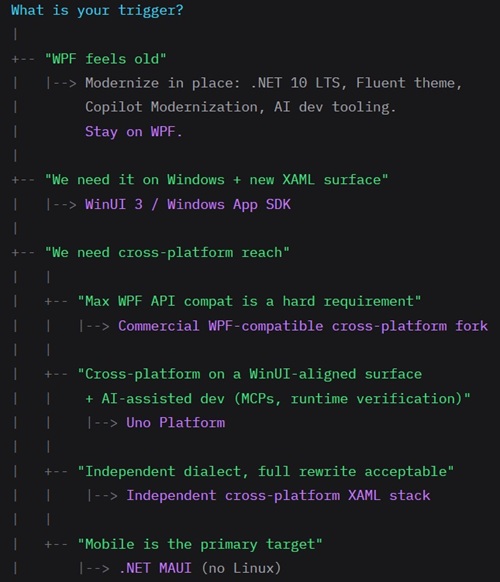 [Click on image for larger view.] WPF Modernization Trigger (source: Uno Platform).
The decision guide states the distinction this way: "Modernization in place is moving the existing WPF app forward on its current target" while "Migration is leaving Windows-only." Uno's decision tree places Uno Platform in the branch for teams that want cross-platform reach on a WinUI-aligned surface, with AI-assisted development, Model Context Protocol (MCP) tooling and runtime verification.
That positioning matters because many WPF apps are not greenfield projects. They may include years of code-behind, third-party controls, Windows-only APIs, custom styles, static services, desktop shell integration and workflows that cannot be paused for a rewrite. Uno's recent WPF content repeatedly returns to that constraint: modernization has to account for production systems that still need to ship.
AI Agents Handle the Mechanical Work
Uno's WPF modernization story leans heavily on AI agents, but not as a push-button replacement for engineering work. In AI-Assisted WPF Migration: What Actually Works in 2026, the company describes a three-layer pattern: an AI agent with access to a documentation MCP server, a runtime MCP server that can inspect the running application, and human review at every code-generation step.
The article contrasts that with earlier AI-assisted rewrite attempts, where developers pasted XAML into a chat window, accepted the rewrite, built the project and then fixed what broke. Uno says that pattern could work for simple namespace swaps or basic control mappings, but often failed when a page compiled while still having layout, data or runtime behavior problems. "Code that compiles is not code that works," the company says.
In Uno's preferred loop, the agent queries current documentation and migration patterns, generates the replacement XAML and code-behind, builds the app, runs it under an application MCP server, inspects the visual tree, captures screenshots, checks properties and simulates input. The company summarizes the shift as moving from "agent guesses, human catches the regressions" to "agent generates, agent verifies against the running app, human reviews."
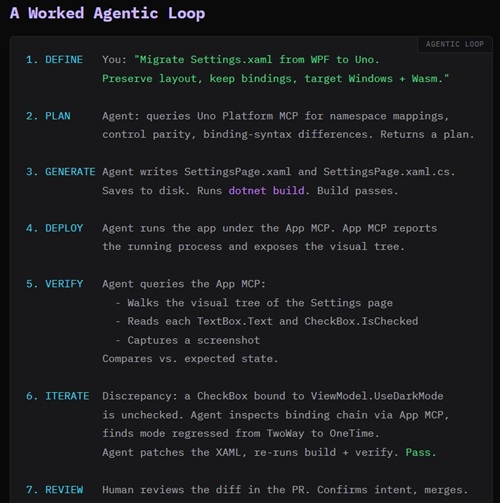 [Click on image for larger view.] Worked Agentic Loop (source: Uno Platform).
Uno says that agentic pattern is useful for repetitive migration work such as namespace replacements, binding syntax updates, control mapping and VisualStateManager rewrites. But it also limits what the agent owns. The human still owns architectural decisions such as which windows become pages, which singletons become dependency-injected services, and which platform-specific calls need abstraction.
Case Studies Show Gains and Gaps
Uno has backed the modernization message with public migration examples. In a case study on porting the Text-Grab WPF optical character recognition app, Uno reports that the migration produced 57 percent less C# code, 70 percent less XAML, 52 percent less working-set memory, 59 percent fewer threads and a 44 percent smaller output directory, while reaching about 92 percent feature parity.
The same post is careful about the incomplete parts of the migration. "We didn't hit 100%," it says. The remaining gaps included Windows-specific system integration, global hotkeys, system tray behavior, startup-on-login support, multi-monitor capture and some AI-related OCR paths. Some items were described as solvable with more time, some as framework limitations and some as trade-offs associated with moving toward cross-platform reach.
Uno's analysis of the Text-Grab migration also shows where WPF code tends to move cleanly and where it does not. Pure C# logic, models, enums, parsers, text manipulation and some ViewModels transferred with little or no semantic change. Simple UI pages and service abstractions also fit the migration pattern. More complex areas included multi-window architecture, Windows-only APIs, screen capture, global hotkeys, resource dictionaries, control templates and platform-specific desktop behavior.
In the Material Design in XAML Toolkit showcase, Uno demonstrated a separate AI-assisted migration using a WPF sample app with many UI controls and pages. The company described the migration as iterative: build a new Uno Platform app beside the WPF app, create the navigation shell, migrate one page at a time and validate each page with MCP-based testing. "The WPF app stays in production while the Uno Platform app grows alongside it," Uno says.
Incremental Migration with Uno Islands
For teams that cannot pause a production WPF app, Uno is also promoting Uno Islands, a hosting mechanism that embeds Uno Platform XAML pages inside an existing WPF or Windows Forms application. The idea is to migrate one screen at a time, while the WPF shell continues to ship.
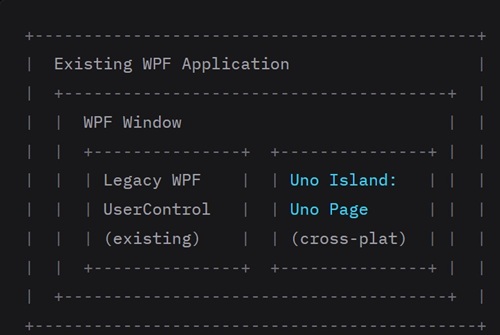 [Click on image for larger view.] Uno Islands Conceptualized (source: Uno Platform).
Uno describes the pattern as a way to decouple the platform decision from delivery to users. A team can start with a lower-risk page, such as settings, about or a simple form; host it inside the existing WPF window; wire up data and commands across the boundary; ship that screen; and then repeat. The WPF windows that wrap migrated pages become thinner over time, until the final step is replacing the WPF shell with an Uno Platform shell.
The company is also explicit about what Uno Islands does not solve. It is a host pattern, "not a magic bridge." Platform-specific code such as P/Invoke, screen capture, hotkey registration and shell integration still needs abstraction. WPF controls remain WPF controls until they are migrated. WPF resource dictionaries, themes and styles do not automatically apply to Uno pages because theme keys differ between surfaces.
Scoping the Work
Uno's modernization content also includes estimating guidance. In How Long Does a WPF Migration Actually Take?, the company says migration effort is driven mainly by architectural complexity, platform-specific dependencies and third-party control surface. The post says AI-assisted tooling can make mechanical translation roughly 60 percent to 70 percent faster than a fully manual migration, but it also warns teams to count Windows-only APIs and commercial control-suite usage honestly before quoting a project.
The same article gives pattern-level estimates for common tasks. Namespace swaps are described as minutes of work with near-complete AI coverage. Binding syntax changes are estimated at five to 15 minutes per page, with human verification required for modes and update triggers. Window-to-page conversion is estimated at one to two hours per window because it involves architectural decisions. Custom styles, control templates, commercial grids, charting and scheduling controls can take longer because they touch control surfaces that do not map mechanically.
Using Text-Grab as a worked example, Uno estimated roughly nine engineer-weeks for an 84-file, 15-window WPF app with screen capture, hotkeys and OCR, using AI-agent assistance. The phased estimate included project setup, ViewModels and services, XAML translation, platform abstractions, theme and style work, cross-target builds, verification and polish.
The Broader Modernization Message
Taken together, Uno's recent WPF posts present modernization as a set of choices rather than a single rewrite path. Some teams can stay on WPF and move forward with .NET 10 LTS, Fluent styling and AI-assisted development. Some can migrate screen by screen with Uno Islands. Some can build a parallel Uno Platform application and migrate page by page. Some can use agents to accelerate the mechanical pieces while developers make architecture, platform and product decisions.
That makes Uno's WPF modernization effort less about one tool than a stack of related approaches: cross-platform XAML, C# and MVVM reuse, page-by-page migration, Uno Islands hosting, dependency-injection refactoring, platform abstraction, MCP-backed documentation, runtime UI inspection, screenshots, visual tree validation, Hot Reload, Hot Design and human review.
The company's central claim is that the economics of WPF migration have changed as AI agents take on more of the repetitive translation work. But its examples also show that modernization remains an engineering project, especially where WPF apps depend on Windows-specific behavior or heavily customized desktop UI. Uno's phrase for that split is concise: "Agents do the lift, humans set the direction."
About the Author
David Ramel is an editor and writer at Converge 360.