In-Depth
Hands On with GitHub Copilot App Technical Preview: Turning a Blazor Issue into a PR
GitHub's new Copilot desktop app is not just another place to ask for a code snippet.
The new technical preview was just announced yesterday during Microsoft Build 2026, with GitHub describing it as "a control center for agent-native development."
The GitHub Copilot app repo describes it as "a desktop application purpose-built for agent-driven development." The repo says the app gives users a single place to direct AI agents across parallel workstreams, work with GitHub issues and pull requests, and manage the development lifecycle without switching among terminals, IDEs and browser tabs.
I will vouch for that last item. It was refreshing to work on a Blazor app and have the tool display the working app right there, akin to the new "integrated browser" functionality that Microsoft is adding to its dev tooling like Visual Studio Code. The old days of switching to a browser tab to check the result of a code change are apparently disappearing, though I still find myself going to localhost to ensure things are still working "live." The app makes that easy enough, providing you with a clickable link. And speaking of VS Code, the app is tightly linked to that super-popular code editor, too, for other kinds of hands-on work -- a nice touch. More on that below.
Aligning with the previously mentioned messaging, GitHub's documentation describes the app as a desktop application for agent-driven development that brings parallel workstreams, GitHub integration and pull request (PR) lifecycle management into one place. The technical preview is available to GitHub Copilot Business, GitHub Copilot Enterprise, GitHub Copilot Pro and GitHub Copilot Pro+ users, with support for Windows, macOS and Linux.
The idea is to give agentic coding work a home of its own. Instead of asking a coding assistant for help inside an editor, developers can use the app to start from GitHub context, choose a session mode, let an agent create a branch, write code and run tests, review the diff, open a pull request and check pull request status from the same desktop workspace.
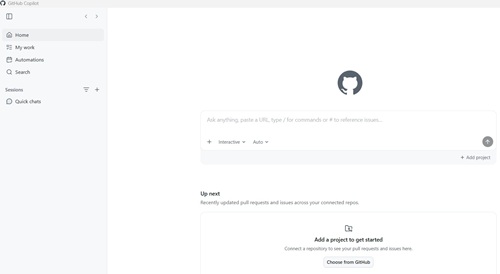 [Click on image for larger view.] GitHub Copilot App Home (source: Ramel).
That makes the app different from earlier Copilot experiences focused mainly on inline code suggestions or editor chat. It is aimed at a broader software-development workflow: triaging issues, directing agents, reviewing changes, watching builds, creating pull requests and working across multiple branches or tasks at the same time.
GitHub's technical-preview announcement describes the app as a GitHub-native desktop experience for starting agentic development from the work in front of you, keeping it isolated, steering it as it goes and landing the change through pull request review.
What the App Is Supposed to Do
The potential use cases are practical software-maintenance tasks: implementing a small GitHub issue, fixing a bug, adding a test, updating documentation, responding to pull request feedback or running multiple small tasks in parallel without manually juggling terminals, branches and browser tabs.
GitHub Docs lists several capabilities relevant to that workflow. The app can run multiple isolated agent sessions, each with its own git worktree and branch. It supports Interactive, Plan and Autopilot session modes. It can browse issues, start sessions from them, create and close pull requests, review pull requests, view continuous integration (CI) check results and search across repositories. It also supports customizations such as Model Context Protocol (MCP) servers, skills, extensions and plugins.
The desktop interface reflects that workflow. In my session, the app showed tabs for Changes, PR, Plan and Terminal. The Plan tab showed the agent's task list, the Changes tab showed the code diff, the PR tab showed the pull request and the Terminal tab exposed command-line activity. A Run button was present, though this project required a configured run script before one-click preview would work.
There was also an Open button with the Visual Studio Code logo, which opens the current session's worktree folder directly in VS Code, essentially the same as running code . from the worktree directory, opening VS Code with the files, git history and current branch ready to go. That demonstrates the app is not necessarily a replacement for VS Code. It can serve as an agentic workflow surface while still letting developers inspect, edit or debug the same worktree in a familiar editor.
The app also includes an Automations area. In the version I tested, that screen showed suggested automation scenarios such as issue triage, changelog draft, repo audit, performance improvements, accessibility audit and fresh build. I did not test automations in this proof-of-concept, but the screen indicates another direction for the product: recurring or event-triggered agent work, not just one-off sessions.
The Hands-On Test
For this proof-of-concept, I used the same BlazorApp1 repo that has been part of earlier hands-on AI tooling experiments to test whether an agent could suggest a Razor component or explain and fix an error. Here, the question was whether the GitHub Copilot app could handle more of the surrounding developer workflow: start from a GitHub issue, plan the work, edit the repo, build the project, push a branch and open a pull request.
The issue was intentionally small. I created issue #1 in GitHub asking for a simple About page in the Blazor app. The requested acceptance criteria were to add a new About page, add a visible navigation link, include the app name, include a one-sentence description, add a "Last updated" line, keep the styling consistent with the existing Blazor template and build the project.
In the Copilot app's My Work view, the repo appeared as dsramel/BlazorApp1. The issue appeared directly in that repo view. From there, the app exposed actions for starting work, including new quick chat, new individual sessions and new session.
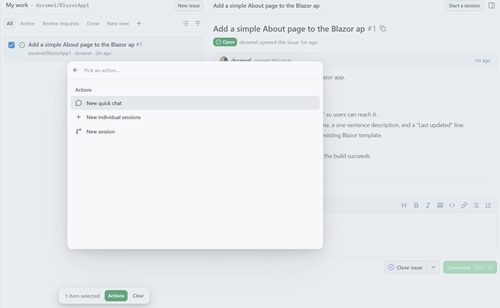 [Click on image for larger view.] GitHub Copilot App Actions (source: Ramel).
From Issue to Plan
Starting from the issue launched a session on a branch eventually named dsramel/add-about-page. Copilot began by reading the issue and exploring the codebase. It opened the project structure and inspected existing pages such as Home.razor and Counter.razor, along with layout files including NavMenu.razor and MainLayout.razor.
It then produced a plan. The plan said it would create BlazorApp1/Components/Pages/About.razor with a route of /about, app-name text, a one-sentence description and a static "Last updated" line. It also said it would edit BlazorApp1/Components/Layout/NavMenu.razor to add an About navigation link, then build the project.
That plan was easy to review, even for a non-coding journalist. It named the files, described why they would change and limited the work to the requested feature.
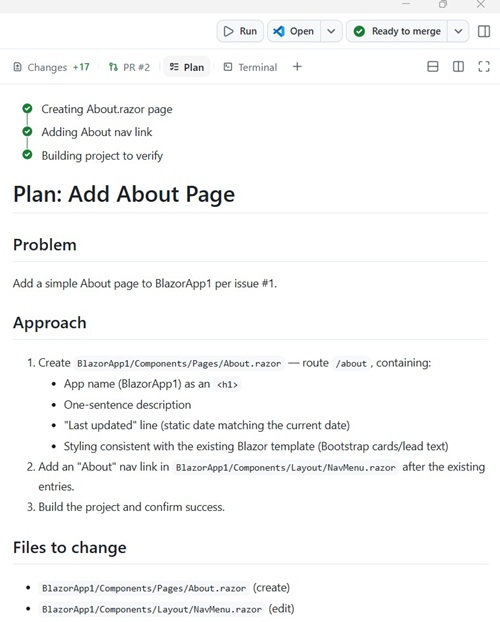 [Click on image for larger view.] GitHub Copilot App Plan (source: Ramel).
One visible detail was more technical. The activity stream showed SQL-style task updates such as UPDATE todos SET status = 'done'. That appears to be implementation detail from the agent's task tracking. For a developer, it is mostly noise. For a hands-on test, it was also evidence that the app was orchestrating a task list, not just returning a chat response.
The First Pull Request Looked Clean
Copilot created the new About page and edited the left navigation menu. It then ran dotnet build, reported that the build succeeded with exit code 0, committed the changes, pushed the branch and created PR #2, titled "Add simple About page."
The pull request targeted master from dsramel/add-about-page. It included a description that said it closed issue #1. It summarized the change as a new About.razor file and an edited NavMenu.razor file, and it reported that dotnet build exited with code 0.
The diff also looked reasonable at first glance. About.razor was created with @page "/about", an h1, a lead paragraph and a "Last updated" line. NavMenu.razor gained an About NavLink.
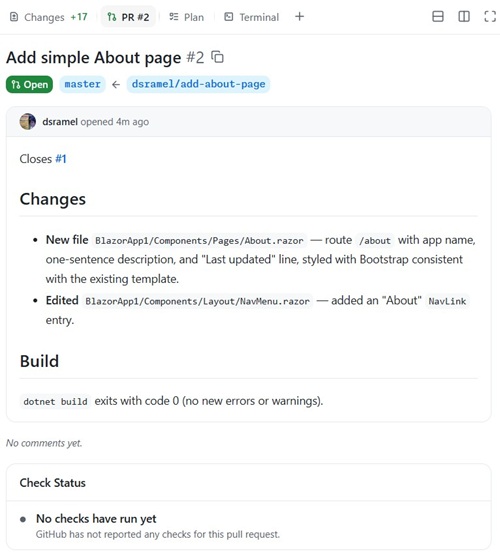 [Click on image for larger view.] Add Simple About Page (source: Ramel).
At that point, the app showed the PR as ready to merge. That was a useful point to pause. A build result means the code compiled. It does not mean the app behavior was correct.
The Run Button Needed Setup
The next step was to verify the change in the running app. The Copilot app displayed a Run button, but clicking it did not immediately launch the Blazor app. Instead, it prompted me to configure a run script to preview changes with one click.
That was the first practical limitation of the session. Copilot had built the project and created the PR, but one-click preview was not automatically configured for this repo. For developers, that may be a minor setup step. For non-coders experimenting with agentic development, it is a reminder that "build succeeded" and "I verified it in the browser" are not the same checkpoint. The apps own Copilot chat helped me fill out that setting with the correct script command so I could preview the app in both the app and on a browser at localhost. However, instead of filling out the fields with the correct details itself, it just guided me as to what goes where. Agentic AI still has its limitations.
Browser Testing Found the Gap
When I first ran the app manually, the first result was not correct. The app had a visible About link at the top right, but that was the default Blazor template link pointing to Microsoft Learn documentation. It did not go to the new local /about page. The left-nav About entry also did not show up the way I expected.
That meant the first PR was only superficially correct. The files had changed. The build had passed. The PR had been created. But the visible app behavior did not satisfy the issue. I always attribute these hiccups to user error, or PEBKAC (Problem Exists Between Keyboard And Chair), but I'm never sure.
I went back to Copilot and explained the problem in plain English: the top-right About link still pointed to Microsoft Learn, the local About page was not reachable from the visible navigation, and Copilot needed to inspect the actual Blazor layout being rendered.
The Fix Required Another File
After more prompting, Copilot found the missing piece. The default Blazor template had a hardcoded About link in MainLayout.razor pointing to https://learn.microsoft.com/aspnet/core/. Copilot edited that link to point to the local /about page instead.
That changed the final file list. The complete implementation was not just About.razor and NavMenu.razor. It also required MainLayout.razor.
Copilot later summarized the session this way: it read issue #1, explored the codebase, renamed the working branch, created About.razor, added About to the left sidebar navigation, fixed the top-right About link, built the project twice, committed and pushed two commits, opened PR #2 and diagnosed a runtime issue. The app's full, verbatim summary is presented below.
The runtime issue was the most confusing part of the session. Copilot found that an old dotnet run process was still running from the original repo folder at C:\Users\dramel\source\repos\BlazorApp1. The agent's changes were in a separate worktree, so the browser was still serving the old version of the app until the old process was killed and the app was restarted from the correct worktree.
In plain English, Copilot had changed the right code, but the browser was showing the wrong running copy of the app.
That is where the VS Code-logo Open button becomes more than a convenience. Opening the session's worktree in VS Code would give a developer a clearer view of the actual branch and folder the agent was modifying. In a workflow built around isolated worktrees, knowing which folder is running matters.
The Final Result
After the additional layout change and restart from the correct worktree, the app behaved as expected. The left navigation showed an About entry. The top-right About link remained visible but now pointed to the local page. The About page displayed the app name, one-sentence description and "Last updated: June 3, 2026" line.
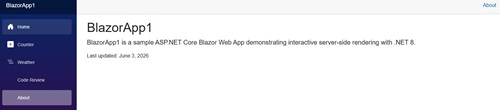 [Click on image for larger view.] Successful About Page (source: Ramel).
The final set of changed files was limited to three files: About.razor, NavMenu.razor and MainLayout.razor. Copilot reported two successful builds with zero errors and only pre-existing warnings from unrelated code in CodeReviewDemo.razor.
Expanding on the previous summary of what the app did, here's its own summary:
What GitHub Copilot Did on BlazorApp1
1. Read the issue
Fetched issue #1 from GitHub, which asked for a simple About page with a nav link, app name, description, "Last updated" line, and consistent styling.
2. Explored the codebase
Opened and read the project structure, existing pages (Home.razor, Counter.razor, etc.), NavMenu.razor, MainLayout.razor, and launchSettings.json to understand how the app was built before touching anything.
3. Renamed the working branch
Renamed the auto-generated branch to dsramel/add-about-page for clarity.
4. Created About.razor
Created a new page at BlazorApp1/Components/Pages/About.razor with:
- Route: /about
-
BlazorApp1 as the app name
- A one-sentence description using Bootstrap's .lead style
- A "Last updated: June 3, 2026" line
5. Added "About" to the left sidebar nav
Edited BlazorApp1/Components/Layout/NavMenu.razor to add an "About" NavLink pointing to /about, consistent with the existing Home/Counter/Weather/Code Review entries.
6. Fixed the top-right "About" link
Discovered that the default Blazor template hardcodes an "About" link in MainLayout.razor pointing to https://learn.microsoft.com/aspnet/core/. Edited that link to point to the local /about page instead and removed target="_blank".
7. Built the project twice
Ran dotnet build after each set of changes to confirm 0 errors. Only pre-existing warnings from unrelated code (CodeReviewDemo.razor) appeared.
8. Committed and pushed
Two commits pushed to the feature branch on GitHub:
- Commit 1:
- About.razor + NavMenu.razor
- Commit 2:
- MainLayout.razor fix
9. Opened a pull request
Created PR #2 on GitHub: "Add simple About page", linked to close issue #1.
10. Diagnosed and fixed a runtime issue
When the app wasn't showing changes in the browser, investigated and found the old dotnet run process was still running from the master branch at C:\Users\dramel\source\repos\BlazorApp1. Killed it and restarted the app from the correct worktree folder so the changes were actually served.
What Worked
The GitHub Copilot app handled a substantial amount of the development workflow. It did not just suggest code. It read a GitHub issue, inspected the repo, created a plan, renamed a branch, edited files, built the project, committed changes, pushed the branch and opened a pull request linked to the original issue.
The app's tabs made that process easier to follow than a single long chat transcript. Plan showed the intended work. Changes showed the diff. PR showed the pull request. Terminal exposed command output. The Open button offered a path into VS Code when a developer wanted to leave the agent workspace and inspect the files directly.
For routine software-development work, that is the app's central value proposition. The target use case is not merely "write me code." It is "take this issue, work in an isolated branch, show me the plan, let me review the diff, build it, open the PR and keep the GitHub workflow visible."
What Still Needed Human Judgment
The first result looked more complete than it was. The build passed. The PR existed. The app indicated the work was ready to merge. But browser testing showed that the visible About link still went to external documentation and the local About page was not wired into the rendered layout correctly.
That is not a small distinction. A pull request can be syntactically valid and still fail the user's actual acceptance criteria.
The worktree issue also showed how agent-native development can add a new kind of confusion. Is the browser running the original repo, the agent's worktree or some other local process from a previous session? Developers who already work with branches and worktrees may understand that quickly. A non-coder experimenting with agentic tools may not.
Bottom Line
This proof-of-concept showed why GitHub Copilot App is more than another Copilot surface. It moved agentic development into a desktop workflow built around GitHub issues, branches, worktrees, diffs, terminals and pull requests.
It also showed why the human role does not disappear. The agent completed the requested workflow and created a pull request, but the first implementation still required manual browser verification, follow-up prompting and an additional layout fix. The final working version arrived through iteration, not one-click trust.
For developers, the app's promise is that agent work can be made more visible, reviewable and tied to the GitHub lifecycle. For hands-on testers and non-coders, the lesson is more basic: inspect the plan, review the diff, run the app, confirm the browser behavior and make sure the running process is actually using the worktree the agent changed before clicking merge.