News
VS Code 1.124 Focuses on Agent Autonomy and Parallel Sessions
Microsoft has released Visual Studio Code 1.124, a June 2026 update centered on agentic AI workflow changes in the editor, with Autopilot now enabled by default and new background-session capabilities added to the Agents window.
The VS Code 1.124 release notes, dated June 10, 2026, describe the release as focused on making it faster to work across agent sessions and giving agents more autonomy to finish tasks. The main developer-facing changes are in the preview Agents window and the preview Autopilot permission level, while the remainder of the release includes integrated browser updates, enterprise Copilot plugin policies and smaller editor workflow changes.
Autopilot Becomes the Default
Autopilot, still labeled Preview in the release notes, is described by Microsoft as one of the chat permission levels that lets agents take initiative and act autonomously without explicit user approval for each action. In VS Code 1.124, Microsoft says Autopilot is now enabled by default in VS Code.
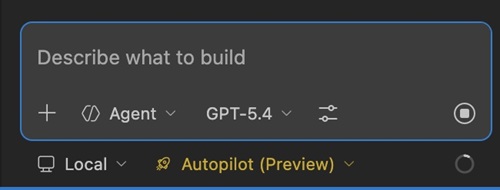 [Click on image for larger view.] Autopilot Preview Input (source: Microsoft).
The release notes also document organization-level controls around the feature. Organizations can control the visibility and use of Autopilot through the chat.tools.global.autoApprove setting, while individual users can configure the default permission level for new chats with chat.permissions.default. The current permission level can also be changed in the chat input box.
The update also introduces Advanced Autopilot, controlled by the chat.autopilot.advanced.enabled setting. Microsoft frames the feature around the problem of deciding when an agent has completed a task: stopping too soon can leave work incomplete, while continuing too long can use unnecessary time and tokens. Advanced Autopilot changes how Autopilot decides when to keep iterating and when to finish.
Instead of fixed rules, Advanced Autopilot uses a small utility model that reads the chat transcript and decides whether the task is done. The objective Autopilot is working toward is shown in a tooltip above the chat so the user can see what the agent is trying to accomplish. Microsoft also documents a limit: Autopilot loops a maximum of three times before it stops.
Agents Window Adds Background Sending
Another major agentic workflow feature in VS Code 1.124 is background sending for new sessions in the preview Agents window. Microsoft describes the Agents window as a dedicated companion window for exploring, iterating on and reviewing agent sessions across projects and machines.
Before this update, starting a new session required waiting for it to load before composing the next one, according to the release notes. In VS Code 1.124, users can send a request in the background from the new session view by pressing Alt+Enter, or by holding Alt and selecting Send.
After a background send, the view resets immediately and keeps state such as the selected model and context, while clearing only the query text. Microsoft says that lets users continue queueing requests. Each started session appears in the sessions list once it commits. Sending a prompt with Enter still navigates into the new session as before.
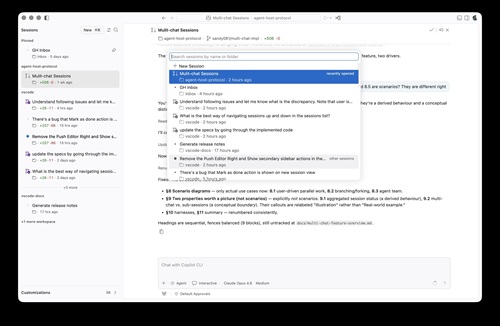 [Click on image for larger view.] Recent Sessions (source: Microsoft).
The Agents window also gains several navigation and session-management changes. Users can press Ctrl+R, or Cmd+R on macOS, to open a Quick Pick that lists sessions in recently opened and other groups. The picker supports search across both session title and folder. Enter opens the selected session, Cmd/Ctrl+Enter opens it to the side, and Right Arrow opens it in the background while keeping the picker open.
Other session-navigation additions include Ctrl+Tab and Ctrl+Shift+Tab for moving back and forward through visited sessions in most-recently-visited order. The Previous Session and Next Session commands step through the visible sessions list in display order, respecting grouping, filtering and collapsed sections. Users can also focus a session by position with Ctrl+1 through Ctrl+9, or Cmd+1 through Cmd+9 on macOS.
VS Code 1.124 also restores Agents window layout state after reloads or reopening. Microsoft says the previously visible sessions and their state are restored automatically, including the visible sessions grid, per-session layout and sessions list state. The release also adds a Close All Sessions command, available with Ctrl+K Ctrl+W, or Cmd+K Cmd+W on macOS, while a session has focus.
Other Changes in VS Code 1.124
The rest of the release includes editor, browser and enterprise updates:
- Single-file diff in the Changes view is available in Preview through
sessions.changes.openSingleFileDiff.
- The Agents window adds a side bar chevron for widening the editor when a file is open.
- The simple file dialog can now create a folder while opening a folder.
- The integrated browser now retains visited-page history and surfaces history suggestions in the URL bar.
- The integrated browser toolbar now allows all overflow-menu actions to be surfaced persistently.
- The
typeInPage tool now supports a submit parameter for agentic text entry and Enter submission in one tool call.
- Enterprise admins can centrally control chat plugins and plugin marketplaces through Copilot plugin policies.
- Microsoft lists no deprecated features or settings for this release.
The integrated browser changes include a configurable workbench.browser.maxHistoryEntries setting for the maximum number of remembered history items. Browser history can be managed with Cmd+H on macOS or Ctrl+H on Windows and Linux from within a browser tab.
For agentic browser interaction, the typeInPage tool previously required two separate tool calls to type text and press Enter. In 1.124, the tool supports a submit parameter so agents can complete that flow in one tool call, reducing round trips for common text-entry scenarios.
On the enterprise side, VS Code now reads policy from the same configuration file that already drives enterprise plugin standards for Copilot CLI, according to the release notes. Admins can centrally control which chat plugins and plugin marketplaces are available to developers. Microsoft documents three policy-backed settings: chat.plugins.enabledPlugins, chat.plugins.extraMarketplaces and chat.plugins.strictMarketplaces.
About the Author
David Ramel is an editor and writer at Converge 360.