News
Visual Studio 2026 Gives Copilot Built-In Skills -- and Makes Them Prove Their Worth
Visual Studio 2026 is giving GitHub Copilot a collection of ready-made .NET and Azure playbooks, expanding Agent Skills from a customization mechanism developers assemble themselves into expert guidance shipped directly with the IDE.
Starting with the v18.8 release, Visual Studio includes built-in Agent Skills created by Microsoft's .NET and Azure teams. They are designed to help Copilot perform structured development tasks more reliably, covering scenarios ranging from creating ASP.NET Core endpoints and reviewing .NET performance to preparing, validating and deploying applications on Azure.
The development marks the next stage for Agent Skills support in Visual Studio. Developers can still create and share their own skills, but they no longer have to start every specialized workflow from scratch or search for a community-built package.
What Is an Agent Skill?
An Agent Skill is a reusable package of instructions that teaches an AI agent how to handle a particular kind of task. Rather than applying general guidance to every Copilot interaction, skills are dynamically selected and loaded when the model determines that they match the user's request.
A skill typically resides in its own directory and is centered on a file named SKILL.md. The file includes metadata describing the skill and instructions explaining when and how the agent should use it. The directory can also contain scripts, examples, templates, reference documents and other supporting resources.
That makes skills different from broad custom instructions such as .github/copilot-instructions.md. Custom instructions establish rules that should generally apply across a project -- naming conventions, formatting preferences or preferred programming patterns, for example. Skills are intended for narrower workflows, such as creating an API endpoint, diagnosing a performance problem or deploying an application.
As Microsoft explained, developers can "define a skill once, and the agent applies it automatically whenever it's relevant."
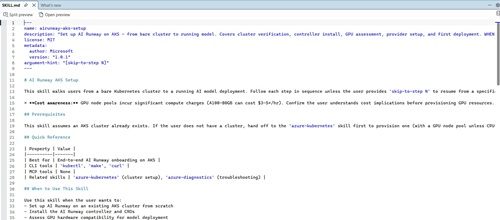 [Click on image for larger view.] The
 airunway-aks-setup Skill (source: Ramel).
The built-in airunway-aks-setup example illustrates how much procedural knowledge can be packaged into one skill. Its SKILL.md file describes an end-to-end workflow for setting up AI Runway on Azure Kubernetes Service (AKS), including cluster verification, controller installation, graphics processing unit (GPU) assessment, provider configuration and an initial model deployment.
The skill also includes operational guardrails. It warns that GPU node pools can incur significant compute charges and instructs the agent to confirm that the user understands the cost implications before provisioning those resources. It identifies prerequisite and troubleshooting skills to which the agent can hand off work, showing how multiple skills can be combined into a larger workflow.
Microsoft Now Supplies the Playbooks
The main change in Visual Studio 2026 v18.8 is not basic support for the Agent Skills format. It is Microsoft's decision to bundle its own skills with the IDE, providing specialized guidance produced by the teams responsible for .NET and Azure.
The skills appear under a Built-in category in the Copilot tool picker. Developers can hover over a skill to view its description and file location, open the full SKILL.md file or navigate to its directory. The skills only appear when the corresponding .NET or Azure development workloads are installed.
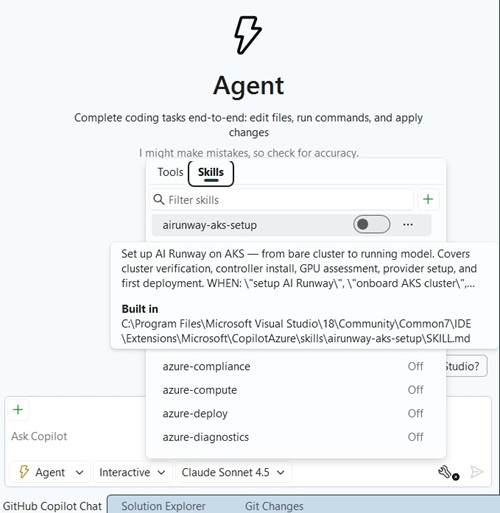 [Click on image for larger view.] Built-in Capabilities, Descriptions, Installation Paths (source: Ramel).
The Azure catalog shown in Visual Studio includes skills such as airunway-aks-setup, azure-compliance, azure-compute, azure-deploy and azure-diagnostics. Microsoft's announcement highlighted several starting points for both .NET and Azure development:
| Skill or Workflow |
Purpose |
dotnet-webapi |
Guides the creation and modification of ASP.NET Core endpoints, including HTTP semantics, OpenAPI metadata and error handling. |
analyzing-dotnet-performance |
Scans .NET code for approximately 50 performance antipatterns involving asynchronous code, memory, strings, collections, LINQ, regular expressions, serialization and input/output operations. |
azure-prepare |
Generates infrastructure and deployment assets such as Bicep or Terraform files, azure.yaml, Dockerfiles and managed identity configuration. |
azure-validate |
Performs predeployment checks covering configuration, infrastructure definitions, permissions and build validation. |
azure-deploy |
Executes deployments through tools such as Azure Developer CLI, Bicep or Terraform and includes error-recovery guidance. |
azure-kusto |
Helps agents write and run Kusto Query Language queries for logs, telemetry and time-series analysis. |
microsoft-foundry |
Covers model discovery and deployment, agent creation, evaluations and fine-tuning with Microsoft Foundry. |
The azure-prepare, azure-validate and azure-deploy skills are designed as a connected deployment chain. Work can pass from infrastructure preparation to preflight validation and then deployment, giving the agent an established process rather than leaving it to improvise each stage independently.
Another VS Code-First AI Feature
The arrival of Agent Skills in the full Visual Studio IDE also continues a familiar Microsoft development pattern in which emerging Copilot functionality first appears in Visual Studio Code.
Visual Studio Magazine examined experimental Agent Skills in VS Code 1.108 in January, creating a custom copy-editing skill that used a SKILL.md file to automate repetitive article-formatting work.
The Visual Studio implementation has since added a graphical panel for finding, creating, inspecting and managing skills. The v18.8 development takes that progression further by turning skills into workload-aware capabilities that Microsoft can distribute and maintain as part of the IDE.
Skills Must Prove Their Worth
The built-in skills are currently switched off by default, leaving developers to review and enable the ones they want to use. Microsoft said it is evaluating both the effectiveness and cost of enabling them automatically.
That evaluation is closely connected to Copilot's transition to usage-based billing. Loading a skill adds instructions and possibly supporting material to the agent's context, consuming tokens before any resulting code or action is produced. A well-designed skill could still lower the overall cost of a task by helping the agent reach the correct result with fewer failed attempts, corrections and repeated prompts.
Microsoft is tracking that tradeoff through a public evaluation dashboard that compares agent quality and efficiency with and without individual .NET skill plugins (see "Copilot AI Billing Shock Met with Meters, Caps and Token-Saving Tools").
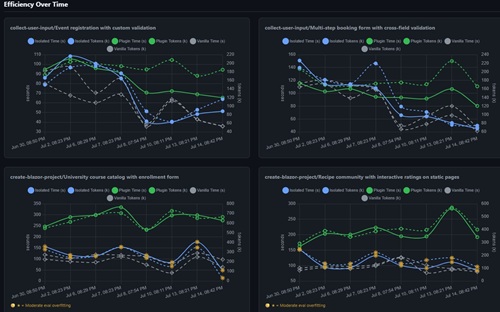 [Click on image for larger view.] Efficiency Over Time (source: GitHub).
"We will turn on the skills when we find evidence that these skills would improve your agent performance," Microsoft said.
That points to a staged approach in which built-in skills can graduate from optional additions to default Copilot capabilities after testing demonstrates that their performance gains outweigh their context and token overhead. Skills that fail to deliver enough improvement can remain optional, be revised or presumably be replaced by better-performing versions.
The result is an emerging feedback loop for agent customization: Microsoft product teams package their domain expertise into structured workflows, Visual Studio exposes those workflows as individually selectable skills, and evaluation data determines which ones become part of the default agent experience.
Agent Skills began as a way for developers to teach Copilot their own specialized procedures. In Visual Studio 2026, Microsoft is now taking on some of that teaching itself -- while requiring its built-in lessons to demonstrate that they are worth both the developer's time and the tokens they consume.
About the Author
David Ramel is an editor and writer at Converge 360.