News
Visual Studio 2019 v16.8 Preview Update Adds Codespaces
To coincide with the Microsoft Ignite 2020 IT pro/developer event, the Visual Studio dev team shipped a new update, Visual Studio 2019 v16.8 Preview 3.1, with the main attraction being support for Codespaces, now in a limited beta.
Codespaces is a GitHub project that lets developers set up a cloud-hosted, containerized and customizable development environment. It earlier came in two separate versions. One was Visual Studio Codespaces, basically a renamed Visual Studio Online offering. The other was a GitHub project -- appropriately named GitHub Codespaces -- working with the open source, cross-platform Visual Studio Code editor. But the former was merged into the latter earlier this month.
Now, that merged project works with the full-fledged, flagship Visual Studio IDE.
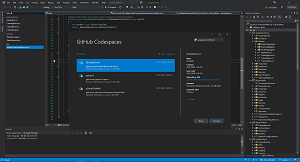 [Click on image for larger view.] Codespaces (source: Microsoft).
Earlier in the month, the team published release notes for Visual Studio 2019 v16.8 Preview 3.0, which we covered here. There was no mention of Codespaces.
At the start of this week's Ignite 2020 event -- presented online only due to the COVID-19 pandemic -- the VS 2019 16.8 Preview 3.1 update was announced with Codespaces support. That means developers can now use Codespaces with an online browser, VS Code or Visual Studio.
 [Click on image for larger view.] Create GitHub Codespaces from Visual Studio 2019 (source: Microsoft).
"GitHub Codespaces for Visual Studio is now available as a limited beta in Visual Studio 2019 Preview 3.1," Microsoft said in a Sept. 22 blog post. "This gives you an instant cloud development environment that lets you code from anywhere.
"You can use the features you love from Visual Studio 2019 in a codespace to develop, test, and deploy modern apps including ASP.NET Core web apps, .NET Core, CMake, and C++ console/library apps. GitHub Codespaces for Visual Studio is available to a subset of GitHub users that sign-up while in limited beta. Over time, more users will get access based on availability and sign up date."
Developers can sign up for the beta from here.
In explaining the benefits of the cloud-hosted model, Microsoft said, "On a local machine, Visual Studio competes with other apps for resources with limits in CPU and disk space. With Codespaces, many of the CPU intensive operations like loading the solution, building, and debugging are offloaded to the cloud. This allows you to work on enterprise scale application without impacting your local machine's resources. This also allowed us to dramatically reduce what we install locally when you're building apps in a Codespace. Installing Visual Studio to connect to GitHub Codespaces takes minutes."
That installation process is explained in a 32-second video.
For more coverage of Microsoft Ignite 2020 from Visual Studio Magazine and sister sites, see:
About the Author
David Ramel is an editor and writer at Converge 360.