Practical ASP.NET
Defining Templates with jTemplate
A combination of client-side code, WCF services, and jQuery lets you retrieve data from your sever and display it to the user using Web Services and client-side code.
In my article,
Integrating jQuery, Web Services, and AJAX and ASP.NET, I used a combination of client-side coding and ASP.NET controls to create a page that displayed and updated a single customer record. In this article, I'm going to extend that case study to display multiple records (next week's column will add updates). To do that, I'm also going to go beyond the core jQuery library to use jTemplate.
A jTemplate template integrates data collections and JavaScript code with HTML. To use jTemplates you'll need both the jTemplate libraries (available here) and jQuery (see the article). I placed the jTemplate library (jquery-jtemplates.js) in a folder in my Web site named js/jquery. To pull the file into my Web page, I added a reference to the ScriptManager on my site's Master Page (which already contains a reference to the jquery library):
‹asp:ScriptManager ID="ScriptManager1" runat="server"›
        ‹ Scripts›
            ‹asp:ScriptReference Path="~/js/jquery/jquery-1.3.2.js" /›
            ‹asp:ScriptReference Path="~/js/jquery/jquery-jtemplates.js" /›
        ‹/Scripts›
With my page configured, my next step is to create a Web Service that, when passed a customer Id, returns a collection of Order objects.
The Web Service
The case study in the article provided solutions using both WCF and ASMX files. I'm more cramped for space here, so I'll extend just the WCF solution by adding a new method. As in the article, the method uses a LINQ statement against the Entity Framework model I created from the Northwind database. While Entity Framework and LINQ aren't essential, the resulting code is so simple that it gives me more room to talk about jTemplate. This routine retrieves the customer's Orders, creates a List of data transfer objects, and then returns that List:
 _
    Public Function GetCustomerOrders(ByVal CustomerId As String) _
              As List(Of NorthwindOrder)
        Dim entsNW As New northwndModel.northwndEntities
        Dim ords = From ord In entsNW.Orders _
                             Where ord.Customers.CustomerID = CustomerId _
                             Select ord

        Dim order As NorthwindOrder
        Dim NwOrds As New List(Of NorthwindOrder)
        For Each ord As northwndModel.Orders In ords
            order = New NorthwindOrder
            order.OrderId = ord.OrderID
            order.ShippedDate = ord.ShippedDate
            NwOrds.Add(order)
        Next

        Return NwOrds
End Function
Here's the data transfer object:
‹pre class="codesnippet"›
‹DataContract(System.Runtime.Serialization.Namespace:="")› _
Public Class NorthwindOrder
‹DataMember()› Public OrderId As Integer
‹DataMember()› Public ShippedDate As String
End Class
I'd already added a reference to this Service to the ScriptManager (again, see the article). I do, however, have to add a call to my Web Service method to my ASPX page. I've already wired up an event to fire when the user selects a customer (see article) so I just have to add a new call to that event:
NWCusts.GetCustomerOrders(lb.value, CustomerRetrieved, GenericFailure);
Adding the Template
The next step is to define the template. The following template will generate an HTML table, which displays two properties from the Orders object: OrderId and ShippedDate. In jTemplate, a template consists of HTML with JavaScript (enclosed in {}) , jTemplate functions (prefixed with #), and jTemplate global variables (prefixed with $):
‹table›
    ‹tr›
      ‹td›Order Id‹/td›
      ‹td›Shipped Date‹/td›
    ‹/tr›
    {#foreach $T as ord}
    ‹tr›
        ‹td›{$T.ord.OrderId}‹/td›
        ‹td›{$T.ord.ShippedDate}‹/td›
    ‹/tr›
    {#/for}
‹/table›
The #foreach loop in the template marks where I will generate a row for each Order -- one for each data item in the collection passed to the template. The $T token holds the collection that will be passed to the template in my code. The "as ord" sets the reference to the data item used in the loop.
You can embed your template in your ASPX page but it makes more sense to me to put it in a separate file. I put this template in a file called OutputTable.htm in a folder in my Web site, which I called Templates. The only downside to using a separate file is that IE's caching can prevent you from picking up your latest template. If you make a change to your template and don't see any results, go into IE's options and under Browsing History select Delete | Delete Files.
Invoking the Template
Before I can process the template, I need to create a location to hold the HTML it will generate. I added a ‹div› element to my page to do that:
‹div id="OrdersTableLocation"›‹/div›
All that's left is to generate the template. jTemplate's setTemplateURL function effectively inserts the template into the div tag. The processTemplate function passes the collection returned from the Web Service to the template and generates the table:
function OrdersRetrieved(ords) {
         $("#OrdersTableLocation").setTemplateURL("Templates/OrdersTable.htm");
         $("#OrdersTableLocation").processTemplate(ords);
 }
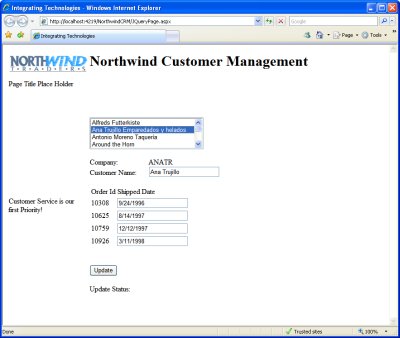
Figure 1.Merging jTemplate and ASP.NET -- The table of sales orders has been generated by merging data from a WCF service with a jTemplate template.
The result is the table you see in Figure 1. It's a pretty basic display -- and it doesn't let the user make changes. But tune in next week, where I'll use these same tools to let the user change ship dates.
About the Author
Peter Vogel is a system architect and principal in PH&V Information Services. PH&V provides full-stack consulting from UX design through object modeling to database design. Peter tweets about his VSM columns with the hashtag #vogelarticles. His blog posts on user experience design can be found at http://blog.learningtree.com/tag/ui/.